9500 MXC User Manual
3DB 23063 ADAA - Rev 004 July 2007 Vol. IV-7-15
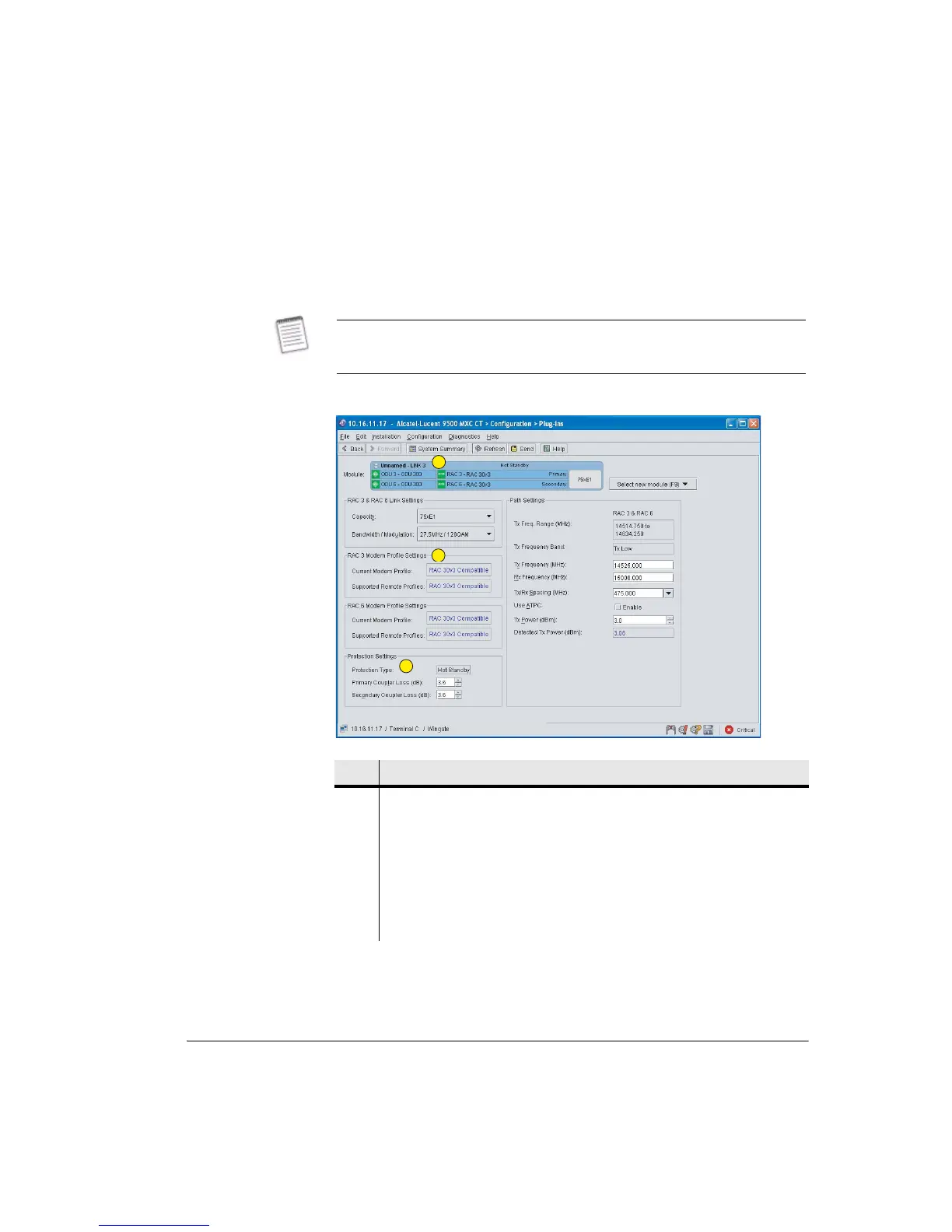
Example Plug-ins Screens for Protected Options
The displayed data and setting options depends on the type of protection selected
in the Protection screen.
Figure 7-4. Example Plug-ins Screen for a Protected Hot Standby Link
The larger size of the ring protection and frequency diversity screens means they
open with scroll bars. To achieve a full screen view, use the maximize button in
the top right corner of the screen, or click and drag one corner of the screen.
Item Description
1 Module shows a protected STM1 Link: RACs in slots 1 & 4 with RAC 1 the
primary RAC and RAC 4 the secondary.
For hot-standby the link/path settings are commoned so only one Path Settings
panel is shown.
2 The Protection Settings panel confirms protection type and, for a hot-standby
or frequency diversity link, a coupler-loss entry is prompted.
3 Modem Profile Settings are confirmed for both RACs.
1
2
3



 To Next Page