The job total values include the following data:
Distance in working position
Time in working position
Worked area
Applied quantity
REQUIREMENTS
When boundary lines or tracks lines should be
created, a field must be created; see page
1. In the job menu, tap on
.
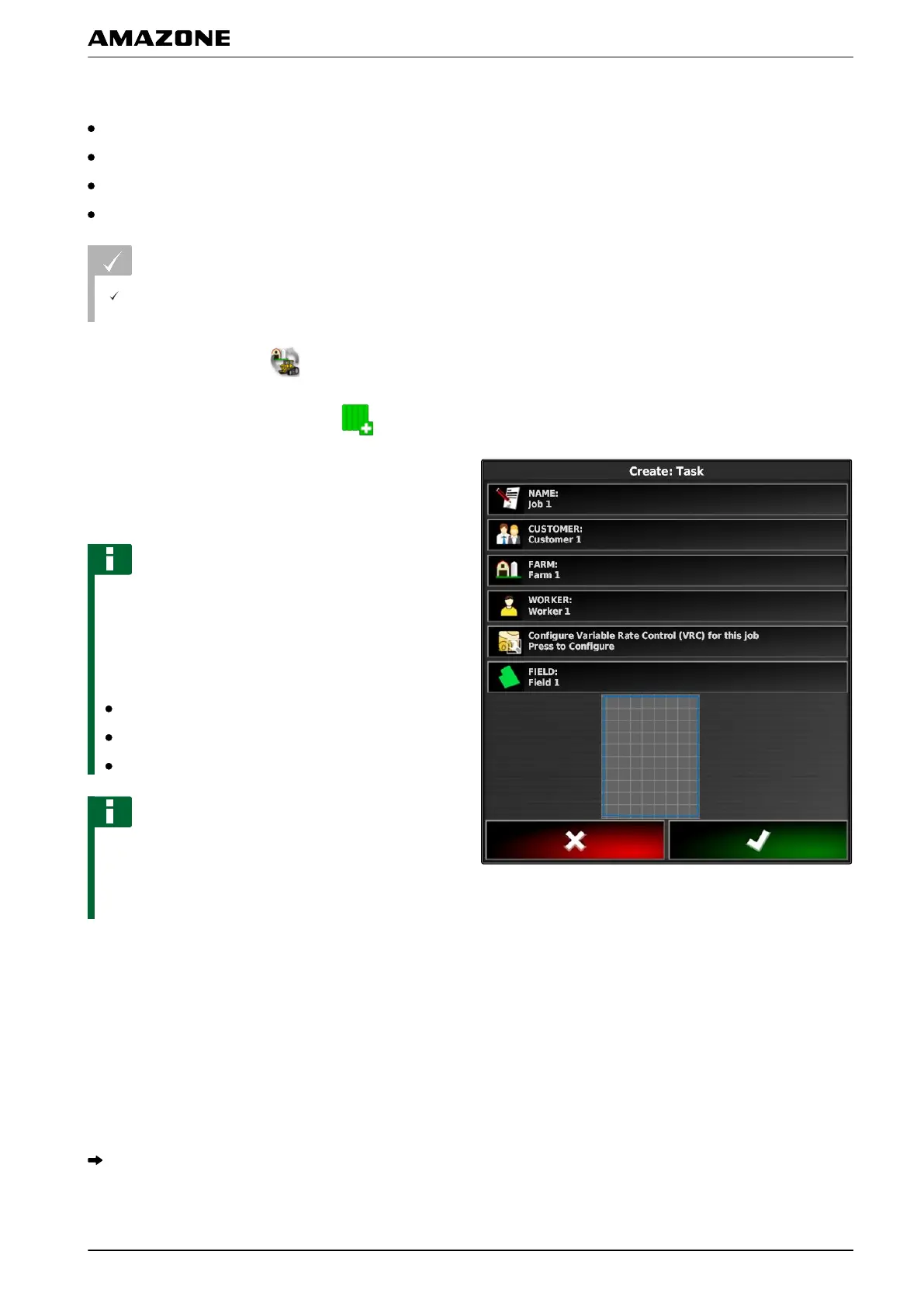
2. Call up the "Create job" menu with .
3. Enter the size of the field under "Area" (optional).
4.
Enter a name for the field under "Name".
NOTE
Sensible names should be assigned to make it easier
to manage
the jobs.
The automatically generated name consists of the
following elements:
The word "Job"
Date of creation
Time of creation
NOTE
The following data belongs to the master data and is
optional.
To add the master data to the job, the master
data can be selected from a list. If master data has
not been created yet, see page 114.
5. Under "Customer", indicate for whom the job is
being processed.
6.
Under "Farm", indicate the farm for which the job is
being processed.
7. Under "Worker", indicate who is processing the job.
8. Under "Field", select the field that will be worked.
When a field has been selected, a preview of the
field will be shown.
I | Managing jobs | Creating a new job
MG5574-EN-II | B.1 | 25.10.2016
117



 To Next Page