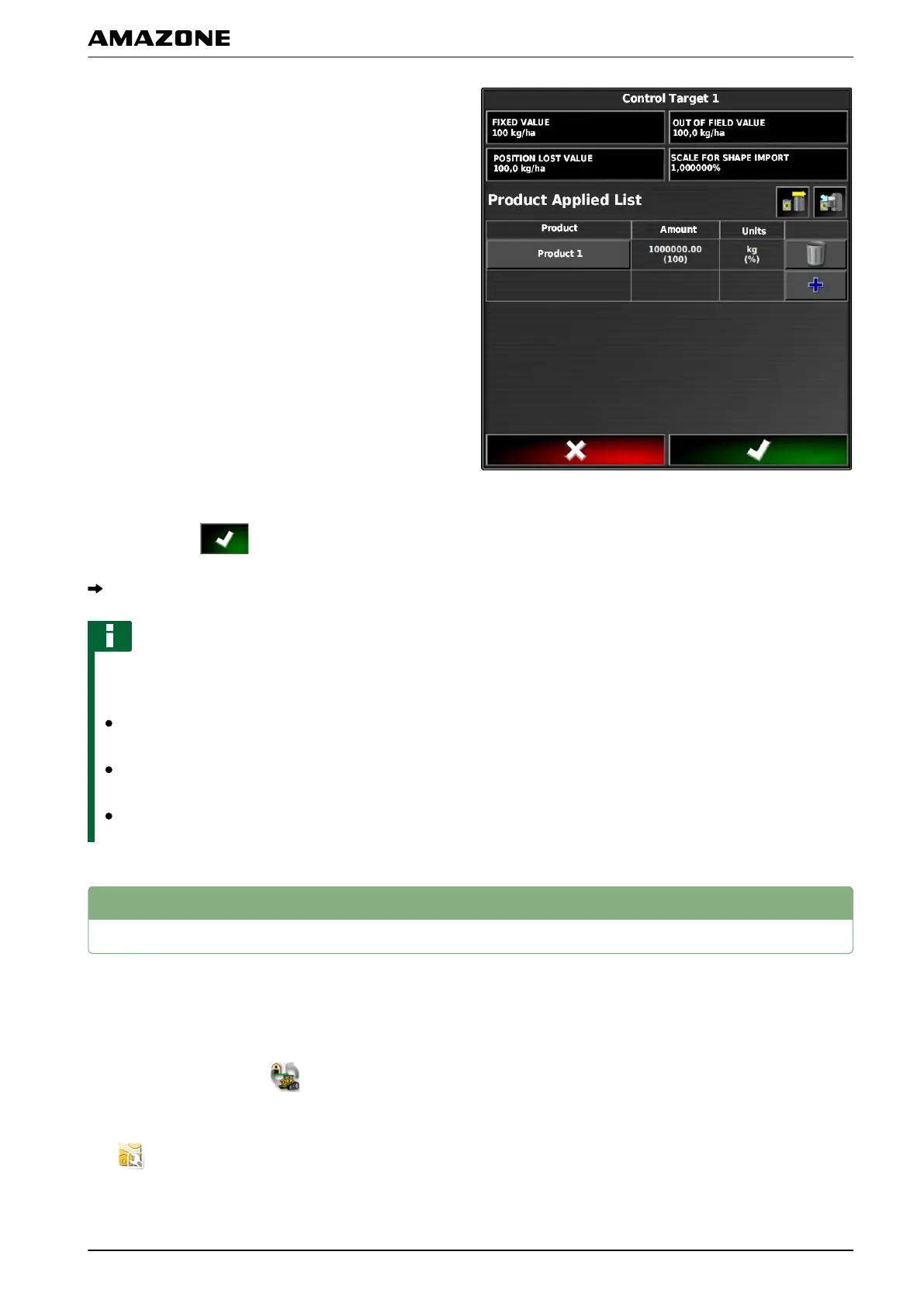
10. When t
he application map contains areas for
which no application rate is defined,
enter the value for a fixed application rate under
"Setpoint".
1
1. Under "Out of field value", enter the value for the
rate that should be applied when the implement
crosses the boundary line.
12. Under "Position lost value", enter the value for the
rate that should be applied when the GPS signal is
interrupted.
13. When all of the application rates should be
reduced or increased,
enter the factor with which the application rate
should be multiplied under "Scale for shape import".
14. To document product information,
see page 204.
15. Confirm with
.
The application map will be loaded.
NOTE
For the application map to be properly displayed,
the following
conditions must be fulfilled:
The "Application map" must be selected as the
"Coverage map"; see page
209.
The controllable implement element must be
selected as the VRC map; see page
211
The coverage scale must be configured; see
page
212
3
Defining a fixed setpoint for rate control
A fixed setpoint can be defined for the application rate.
This setpoint is transmitted
to the implement and the
implement is controlled accordingly.
1. In the job menu, tap on
.
2. Call up the "Rate control assignment" menu with
.
048458
Q | Using rate control| Defining a fixed setpoint for rate control
MG5574-EN-II | B.1 | 25.10.2016
199



 To Next Page