Managing fields
J
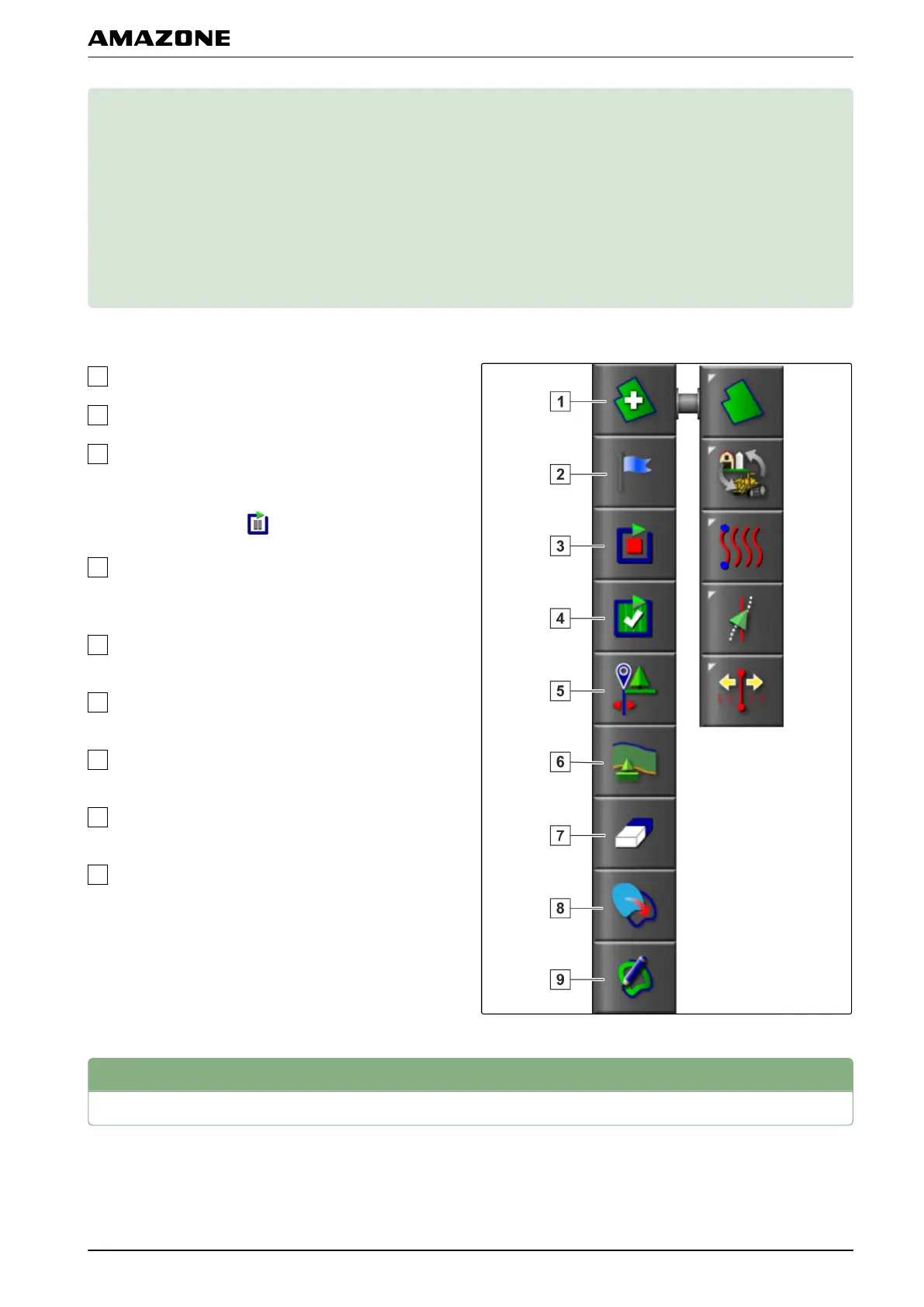
Overview of the field menu
New field: Opens the "Create
new field" menu.
Flag point: Opens the "Add
marker" menu.
Boundary line recording: Starts or interrupts the
recording
of the boundary line. When the boundary
line recording has been started, the symbol on the
button changes to
.
Complete boundary line recording: Terminates the
boundary
line recording and completes the gaps in
the boundary line.
Offset for boundary line recording: Opens the
"Boundary line offset" menu.
Configure headlands: Opens the "Headland
options" menu
Delete boundary lines: Deletes all of the created
boundary
lines for the selected field.
Create boundary from shape file: Opens the menu
for loading
a shape file to create a boundary line.
Create boundary line from coverage: Opens a
menu for creating
a boundary line from the
coverage
1
Creating a new field
A field is defined as an area that should be worked. A
field must be created
so that boundary lines and flag
points can be created and saved.
005518
001688
J | Managing fields |
MG5574-EN-II | B.1 | 25.10.2016
127



 To Next Page