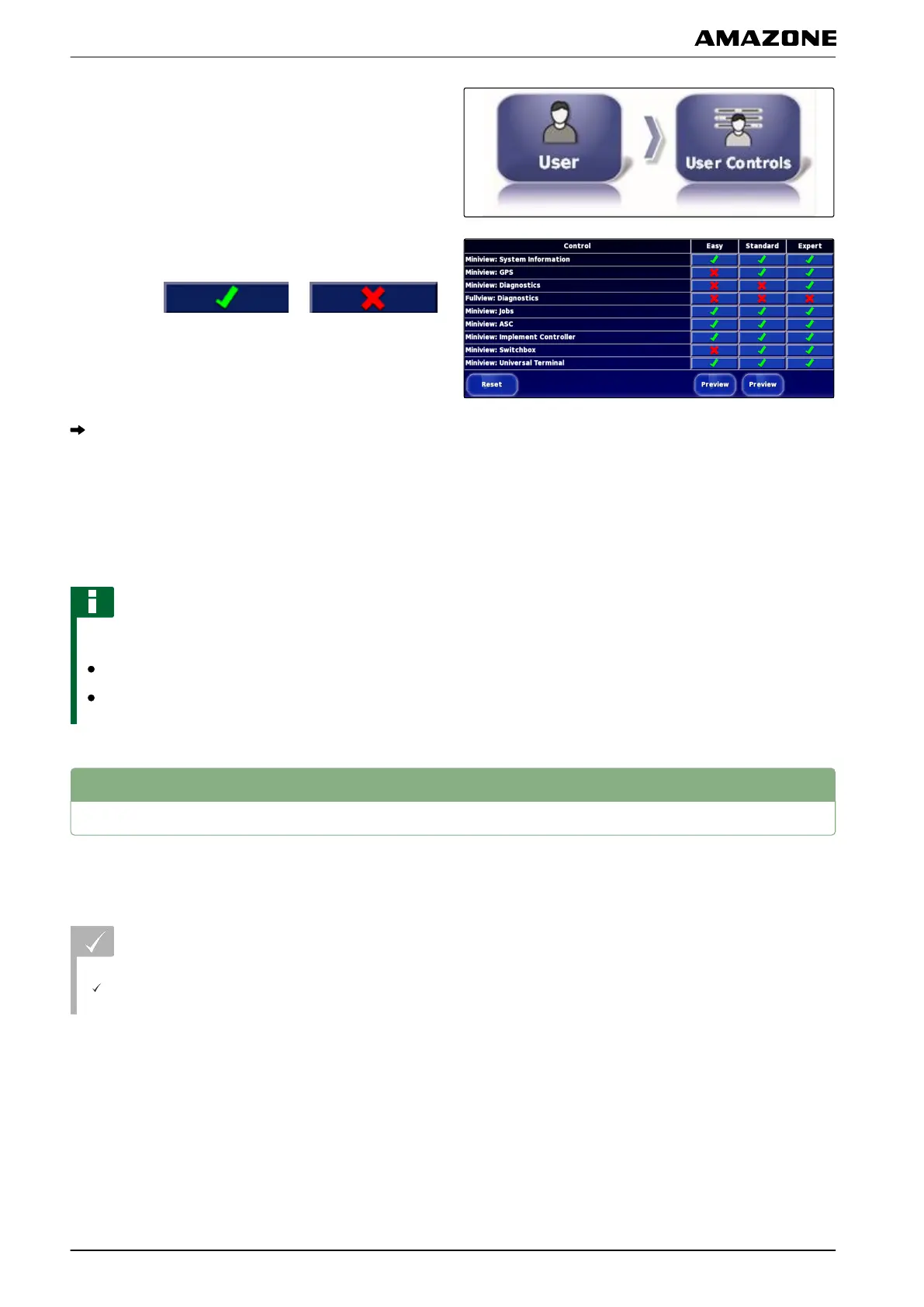
1. Select "Setup menu" > "User" > "User controls".
2. T
o enable or disable the menus for the individual
user access levels,
select the
or
buttons in the corresponding column.
3. T
o see a preview of the configured user interface,
select "Preview" in the corresponding column.
The button is then labelled with " Exit preview ".
4. To exit the preview of the configured user interface,
select "Exit preview".
5. T
o reset all of the settings,
select "Reset".
NOTE
The settings can be reset as follows:
To the factory settings
To the version before the AMAPAD was switched
on last
3
Entering the system settings
3.1 Configuring the functions
REQUIREMENTS
User access level has been set to "Standard" or
"Expert"; see page
41
3.1.1 Configuring the functions of the console
Enabling the cameras
With the camera function, images from a connected
digital camera
can be transmitted to the AMAPAD.
005556
005367
005366
005365
F | Configuring the AMAPAD | Entering the system settings
MG5574-EN-II | B.1 | 25.10.2016
42



 To Next Page