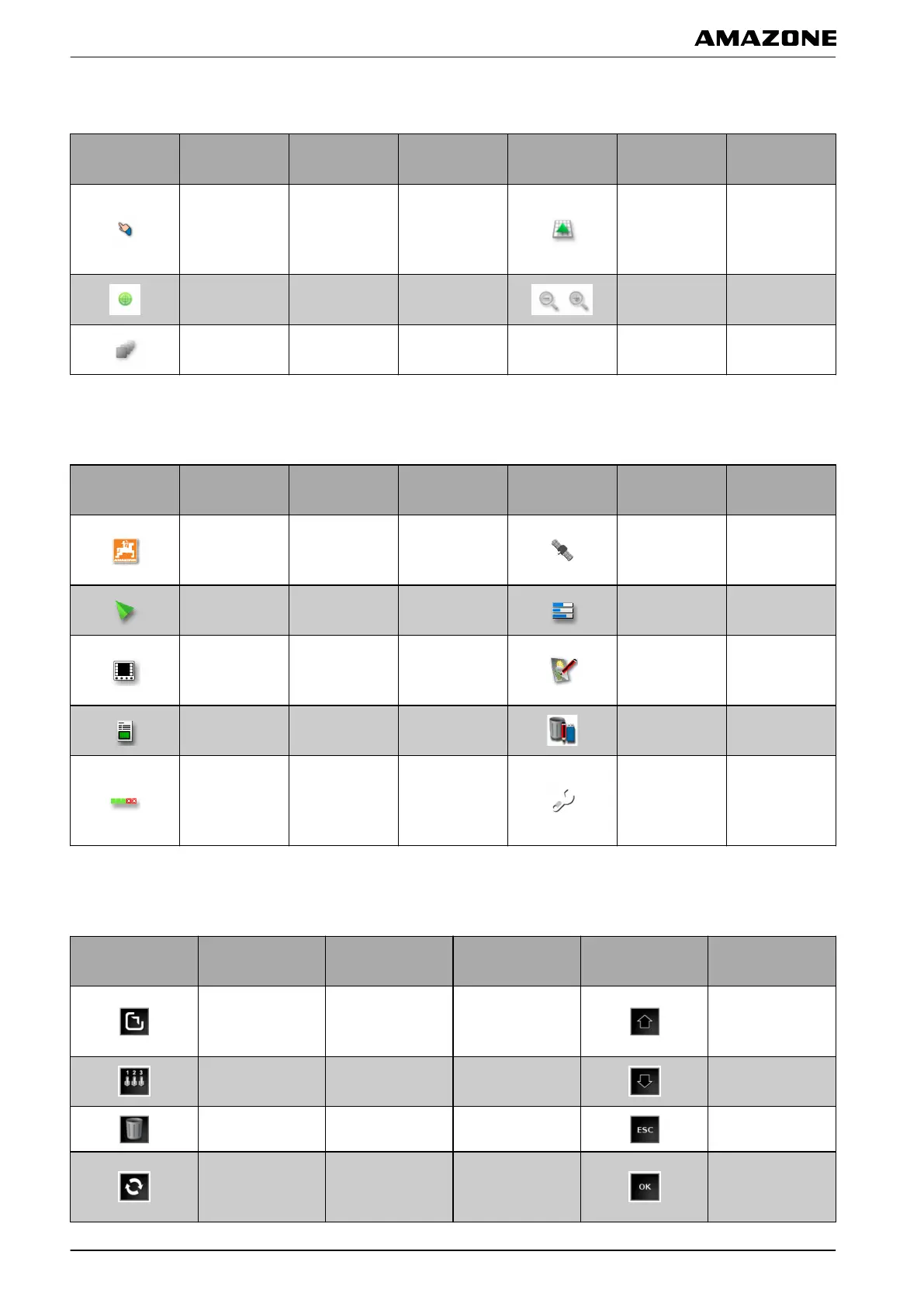
4.7 Buttons in the map view
Button Function
More
information
Button Function
More
information
Indicates
whether
the
selection mode
is enabled
see page
Change
perspective
see page 104
Focus on
vehicle
symbol
see page 104
Enlarge or
reduce map
see page 103
Select map
layers
see page 105
4.8 Buttons in the function menu
Button Function
More
information
Button Function
More
information
Call up
software
version
see page 225
Call up GPS
information
see page 164
Call up map
view
see page 103
Call up system
diagnosis
see page 224
Open
Universal
T
erminal
see page 174
Edit job data see page 124
Call up job
information
see page 124
Manage
inventory
data
see page 216
Configure
automatic part-
width section
control
see page 186
Call up setup
menu
see page 24
4.9 Buttons on the Universal Terminal
Button Function
More
information
Button Function
Maximise
Universal
T
erminal
Shift the selection
upwards
Call up AUX-N
setup
see page 178
Shift the selection
downwards
Delete pool Cancel
Switch between
the connected
devices.
Confirm
047207
060588
060589
E | User interface at a glance | Buttons in the operating menu
MG5574-EN-II | B.1 | 25.10.2016
22



 To Next Page