FI002K0018v1100UK – THS/21 Instruction manual for installation, use and maintenance
5
MAINTENANCE
ORIGINAL INSTRUCTIONS 149
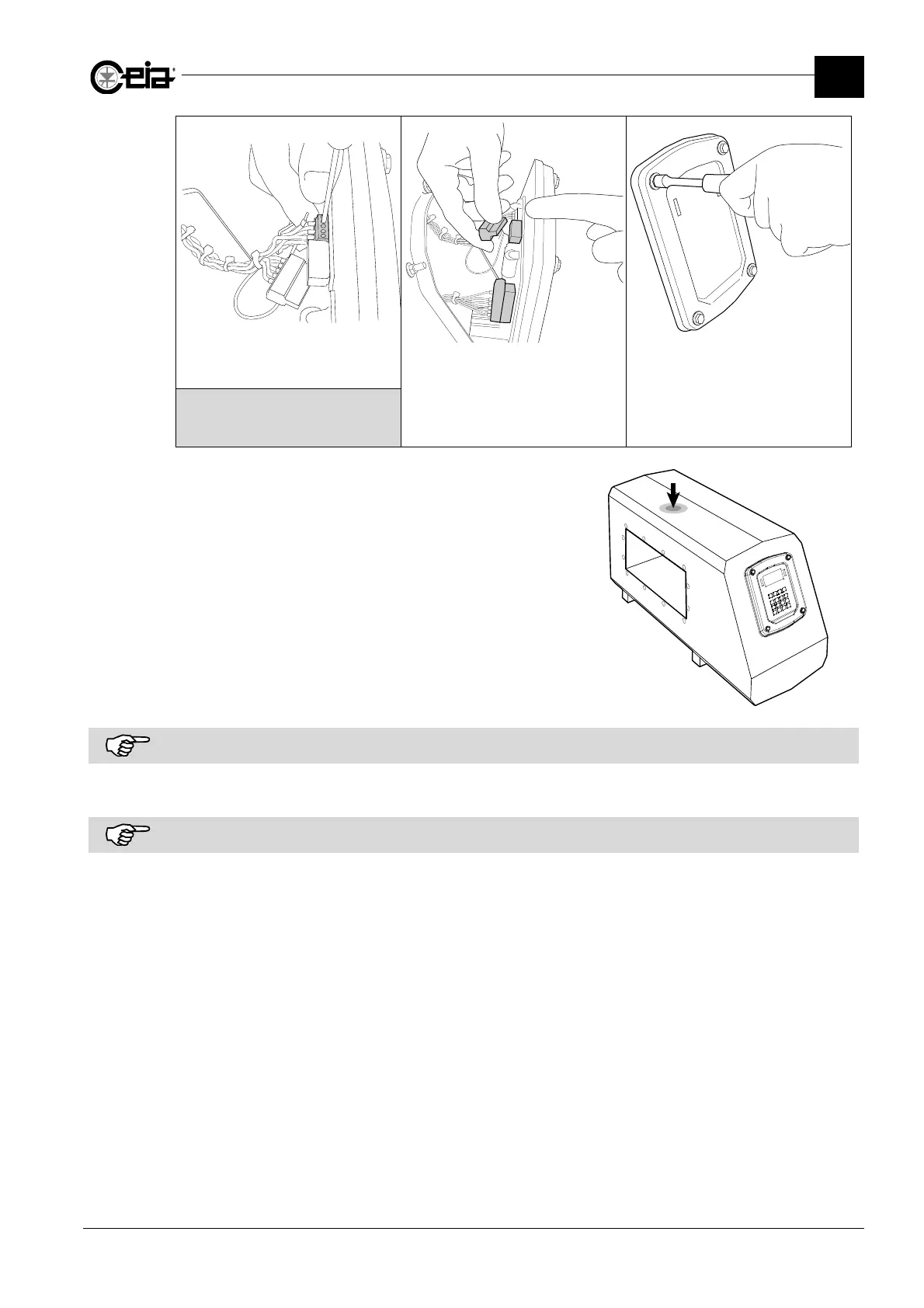
Reconnect the terminals shown next
to connector J13
Reinsert the connectors J13 and J15
shown in the figure
Reinsert the control panel on the
antenna, tightening the 4 fastening
bolts again with a 10 mm spanner
Refer to the electrical diagram for the
relevant THS model for the correct
positioning of the terminals
Perform the TA Autolearn (TL) procedure:
- The procedure must be carried out in an
interference-free environment: deactivate any
other power devices in the area.
- Set the parameter
TA Autolearn
(TL)
= ON
and
exit Programming.
The message “TA Autolearn” will appear on the
display: press down firmly for at least a second on
the probe (as shown alongside, do not press the
centre line).
Repeat TA Autolearn for each detection mode or
band available on the metal detector.
If there are environmental noises during the execution of TA Autolearn, it may be aborted (message “AUTOLEARN
ABORTED”).
Check that the system operates properly with all the products stored in memory.
The SPM card stores the values of all the operating parameters including those of the ALM and RCU cards. If the ALM or
the RCU card is replaced, therefore, it is not necessary to reprogram the system.







 To Next Page