5
FI002K0018v1100UK – THS/21 Instruction manual for installation, use and maintenance
MAINTENANCE
148 ORIGINAL INSTRUCTIONS
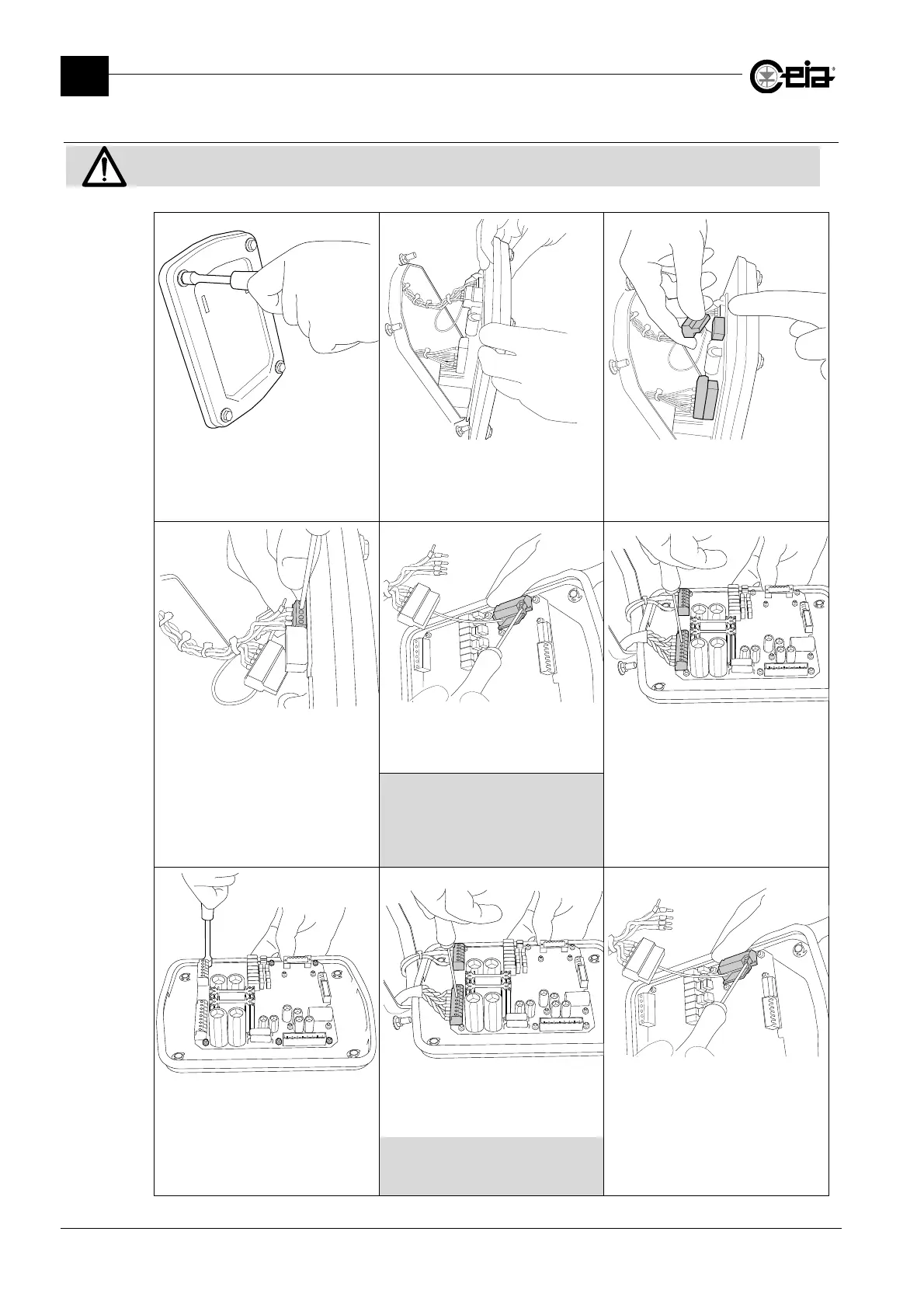
5.4.2 Replacing the SCD card
Switch off the device and disconnect the system from all power sources.
Release the control panel from the
antenna b
unscrewin
the 4 fastenin
bolts with a 10 mm spanner
The card is fastened to the back of the
control panel. Remove the panel
taking care not to pull the internal
cables too much
Remove the internal connectors J13
and J15 shown in the figure
Unscrew and disconnect the
terminals shown
Unscrew and remove the SPM
memory card from the card to be
replaced
Disconnect the terminals from the
connectors J19 and J20 at the base
of the SCD card
The SPM card contains all the data on
the configuration and the products of
the equipment for which it was
programmed. Do not install the SPM
card in other equipment.
Remove the card to be replaced from
the steel panel, unscrewing the 6 nuts
with a 5.5 mm spanner.
Fasten the new card in place
Reconnect the terminals to the
connectors J19 and J20 at the base
of the SCD card.
Reposition the SPM memory card
on the new card.
Refer to the electrical diagram for the
relevant THS model for the correct
positioning of the terminals







 To Next Page