CDM-570A/570AL Satellite Modem with Optional Packet Processor
Revision 5
Ethernet-based Remote Product Management 7–47 MN-CDM570A
QoS Max/Priority Delete Rule
Enter Rule Index to Delete, and then click [Delete Rule] to execute removal of the specified rule
from the QoS Max/Priority Rules Table.
The information that follows is applicable only when QoS Mode = Rule –
Min/Max Mode
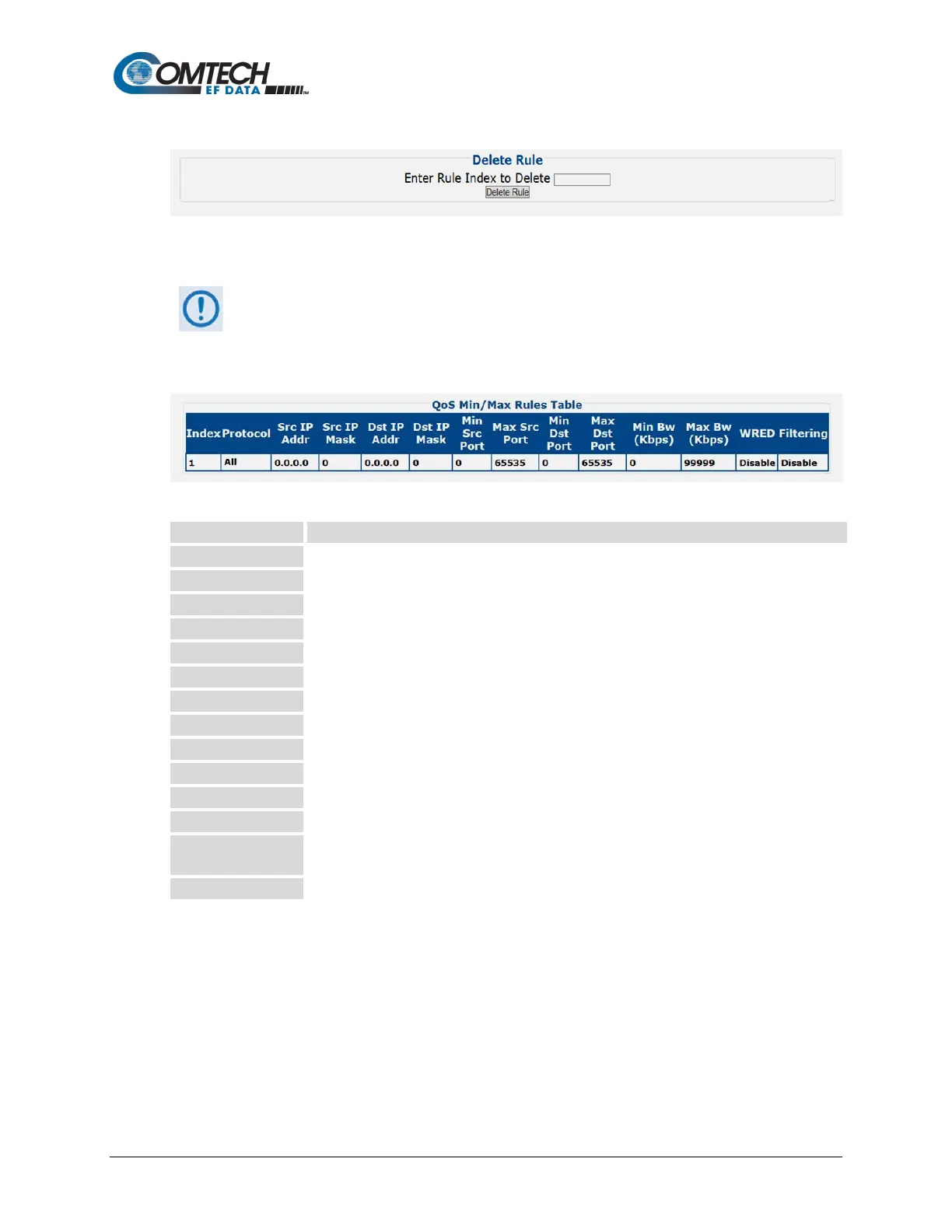
QoS Min/Max Rules Table
This section displays all existing QoS Min/Max Rules Table entries. From left to right:
This is the internal table index that is automatically assigned and cannot be edited.
Specifies the protocol for the specific rule.
Identifies the Source IP Address in the form XXX.XXX.XXX.XXX.
Identifies the Source IP Mask in the form YY.
Identifies the Destination IP Address in the form XXX.XXX.XXX.XXX.
Identifies the Destination IP Mask in the form YY.
Specifies the Minimum Source Port.
Specifies the Maximum Source Port.
Specifies the Minimum Destination Port.
Specifies the Maximum Destination Port.
Specifies the Minimum Bandwidth value in kilobits per second.
Specifies the Maximum Bandwidth value in kilobits per second.
Specifies the WRED (Weighted Random Early Detection) setting for the specific rule as
Disable or Enable.
Specifies the flow filter setting for the specific rule as Disable or Enable.



 To Next Page