SLM-5650B Satellite Modem
Revision 2
Ethernet-Based Management 6–9 MN-SLM-5650B
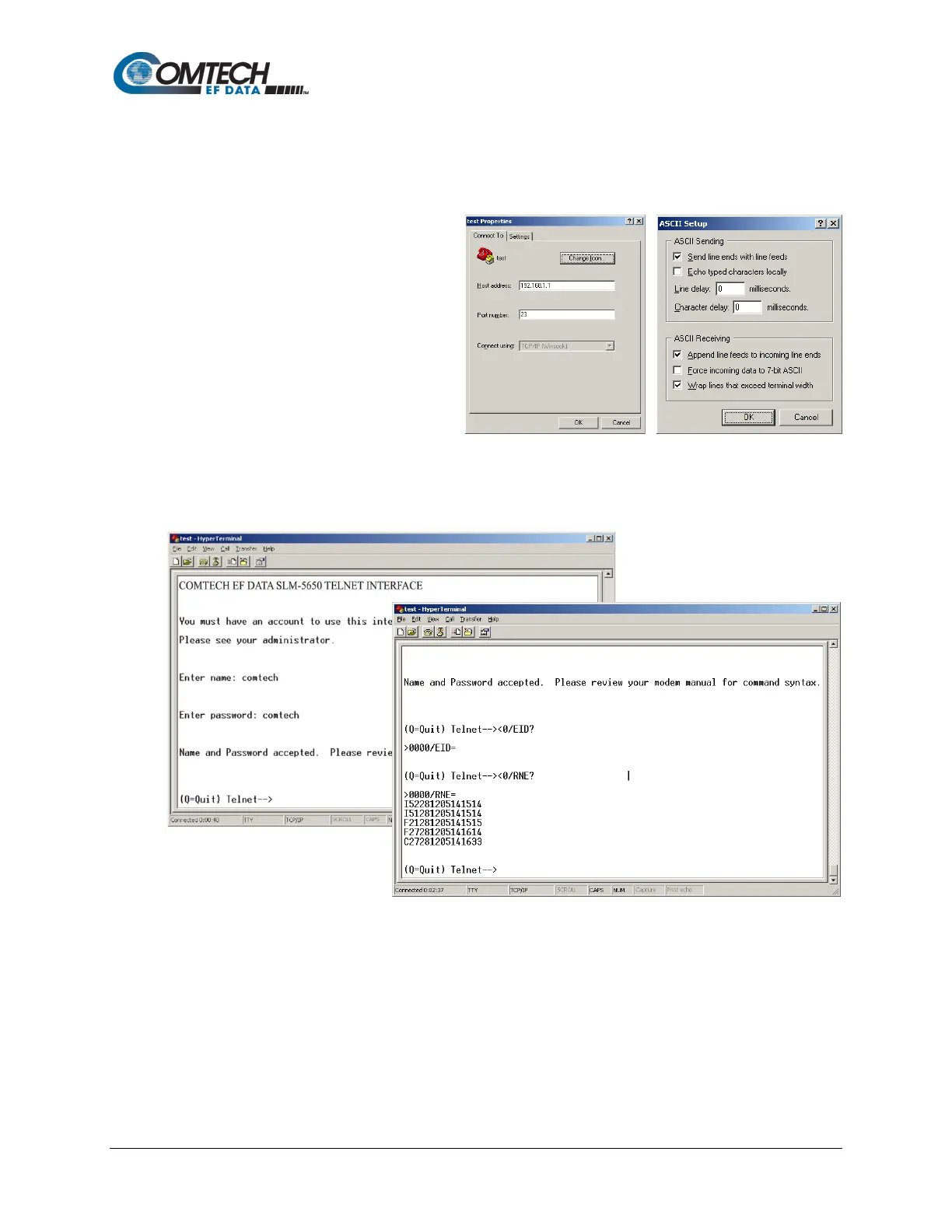
In order to view the full response messages, CEFD recommends using HyperTerminal configured
as Telnet Client. To do so, configure HyperTerminal as follows:
1. Ensure that connection is made
using TCP/IP (Winsock) instead
of COM1 or COM2, as shown in
the example to the near right.
2. ASCII Setup (File Properties
Settings ASCII Setup):
Check the "Send line ends with
line feeds" option in the ASCII
Sending section and the
“Append line feeds to
incoming line ends" option in
the ASCII Receiving section, as shown in the example to the far right.
Examples of login and remote command/query execution, when using HyperTerminal as the
interface, appear as follows:
The Telnet interface is also available for use with the menu-driven Command Line Interface (CLI)
provided with the optional Network Processor (NP) Interface – but only when the security level
setting for the NP Interface has been set as “Low”.



 To Next Page