SLM-5650B Satellite Modem
Revision 2
Network Processor (NP) Interface 8–22 MN-SLM-5650B
Current Date & Time
Item Description
Current Date / Current Time
These fields display the date and time
as of the moment this page was accessed
The current date and time of the modem is set from the modem’s front panel and
kept current using a battery back-up clock. This means that the date and time will
be correct even if the modem loses power.
This displays the status of network time server (if NTP is enabled).
Update Date & Time Click
to refresh the
and
displays.
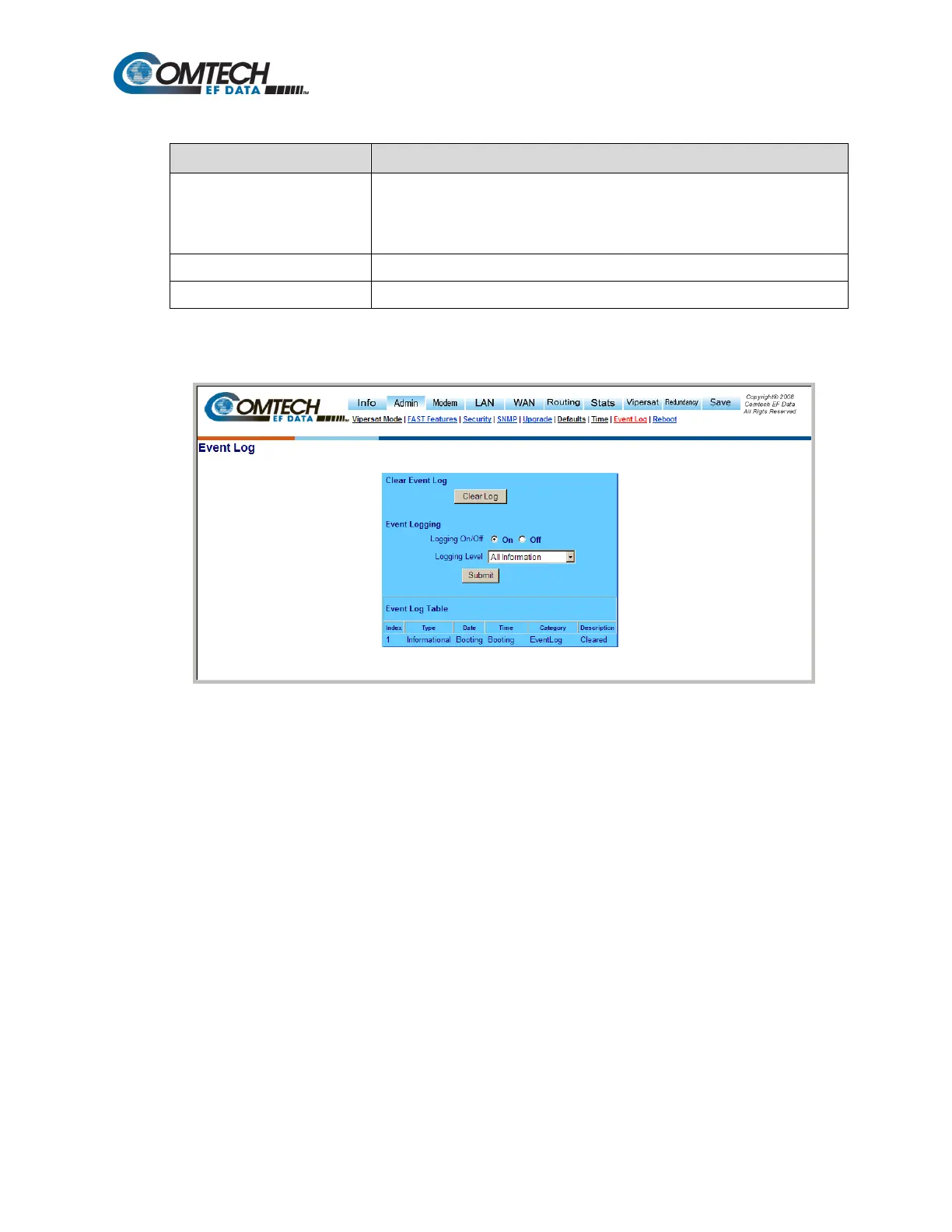
8.6.5.2.8 Admin | Event Log
Figure 8-17. Admin | Event Log Page
Use the ‘Admin | Event Log’ page (Figure 8-17) to view logged events specific to the NP Interface.
This page serves as a monitoring/troubleshooting aid to help determine the health of the interface,
as well as troubleshoot any issues found in the field.
Clear Event Log
Click [Clear Log] to delete all existing log entries. The event log is reset to one (1) entry: “Eventlog
Cleared”.
Event Logging
Logging On/Off – Enables/disables logging of event messages.
Logging Level – Allows the filtering of the highest displayed message level. Choices are Errors
Only, Errors and Warnings, and All Information.
Click [Submit] to execute these settings.



 To Next Page