SLM-5650B Satellite Modem
Revision 2
NP Interface Telnet/SSH CLI Operation 9–6 MN-SLM-5650B
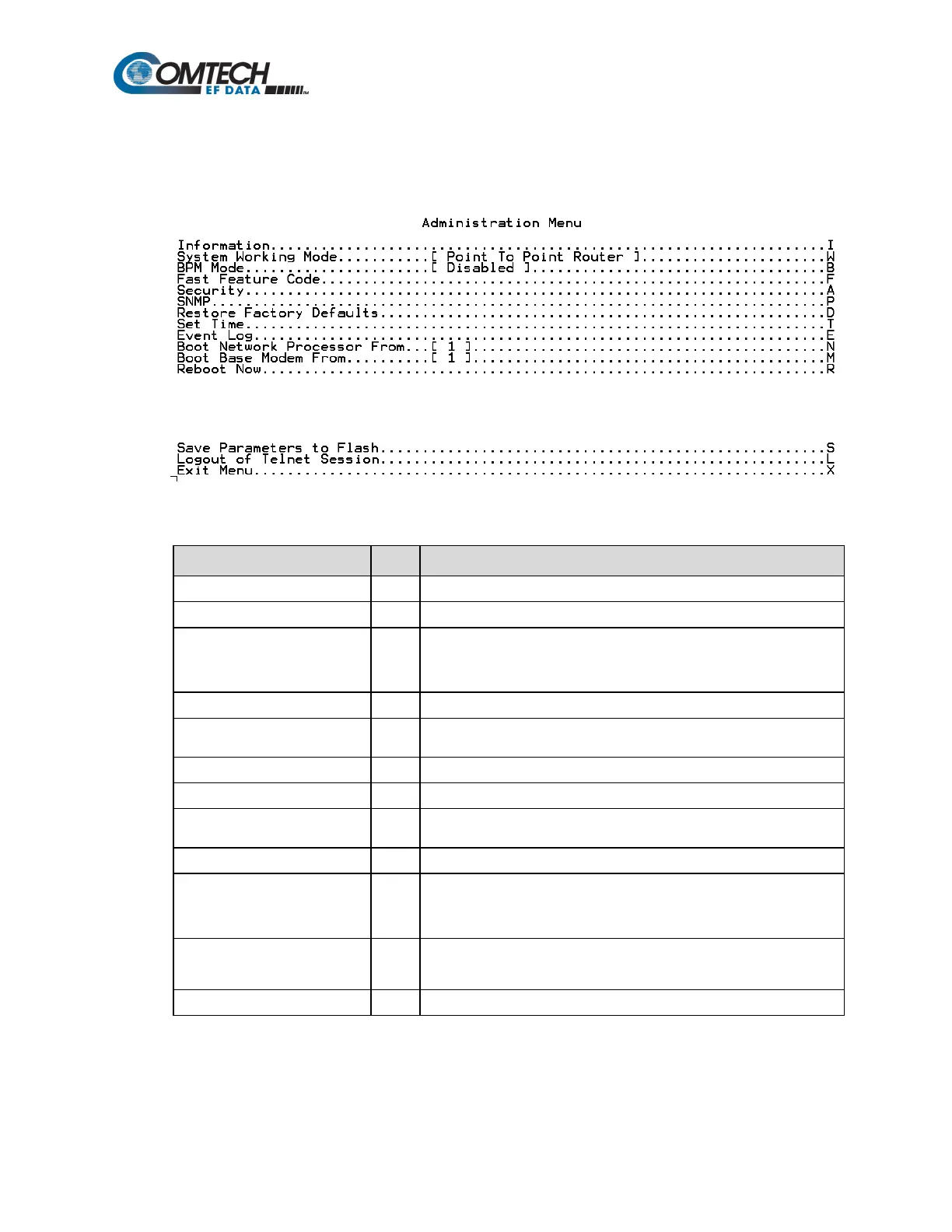
9.2.4 Administration Menu Page (A)
When the Administration Menu page is opened from the Main Menu, the following page appears:
The page contains the following options or fields:
Menu Options/Fields Entry Description
BPM Mode B
Prompts user to select BPM (Bridge Point-to-Multipoint) mode of
operation:
Displays currently installed FAST options.
Security A
Allows user to set admin user name and password, and set IP Interface
Security Mode.
Displays SNMP configuration parameters.
Allows user to restore factory default configuration settings.
Set Time T
Allows user to configure automatic time synchronization through Network
Time Protocol (NTP).
Displays summary of faults and events.
Boot Network Processor From
[#]
N
Prompts user to enter NP boot image:
Boot Base Modem From [#] M
Prompts user to enter modem boot image:
Prompts user to enter Y to reboot, N to exit command without rebooting.



 To Next Page