SLM-5650B Satellite Modem
Revision 2
NP Interface Telnet/SSH CLI Operation 9–33 MN-SLM-5650B
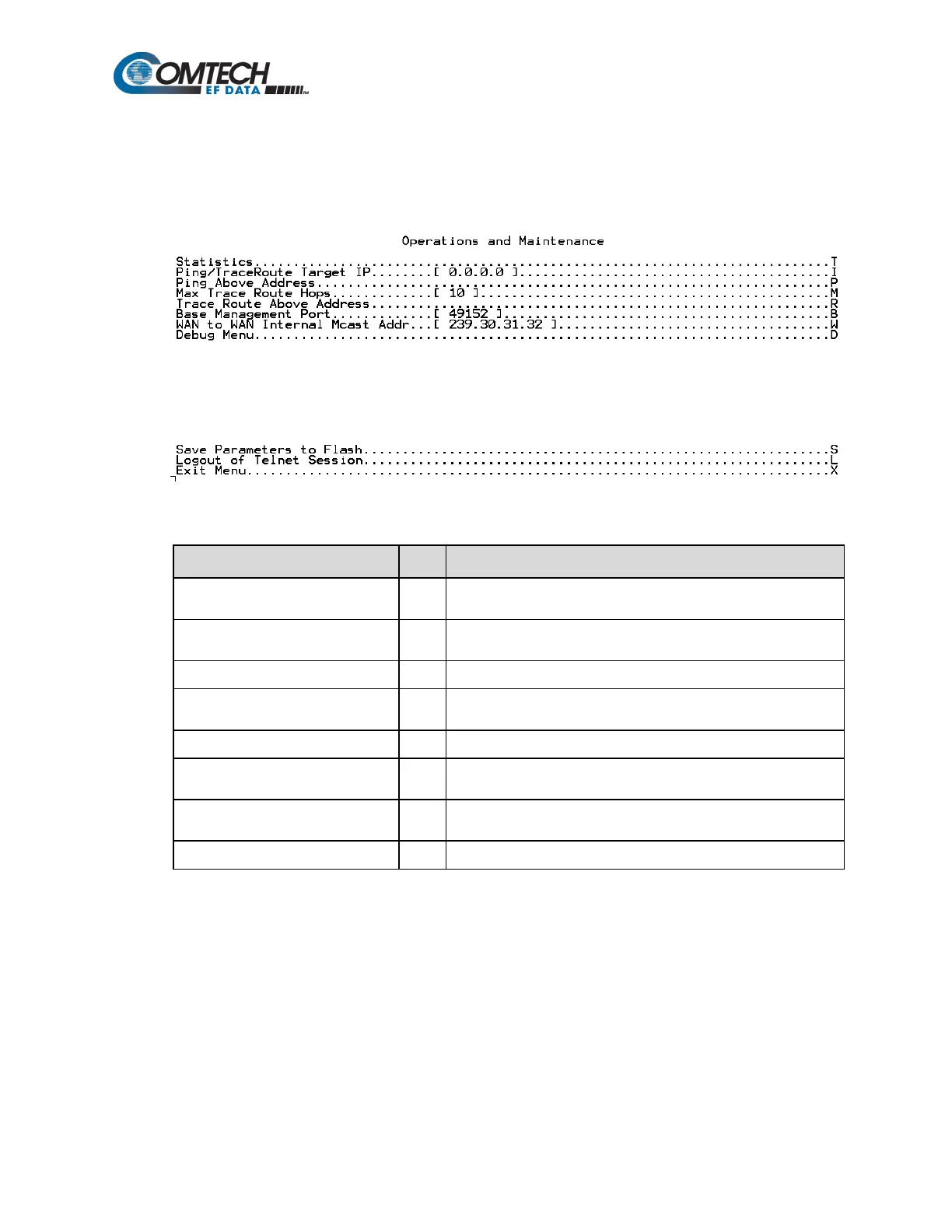
9.2.12 Operations & Maintenance (O)
When the Operations & Maintenance page is opened from the Main Menu, the following page
appears:
The page contains the following options or fields:
Menu Options/Fields Entry Description
Statistics T
Provides user with read-only access to Ethernet Tx/Rx, LAN, WAN
operating statistics; allows user to clear existing statistics.
Ping/TraceRoute Target IP I
Allows user to edit target IP address for ping and trace route using
the arrow keys.
Allows user to ping on IP Address.
Max Trace Route Hops M
Allows user to set the maximum number of trace route hops using
the arrow keys.
Trace Route Above Address
Allows user to trace route on IP address.
Base Management Port B
Allows user to edit the Vipersat base management UDP/TCP port
using the arrow keys.
WAN to WAN Internal Mcast Addr W
Allows user to edit the WAN-WAN Internal Multicast Address using
the arrow keys.
Password-restricted for factory use only.
Note: Ping and Trace Route are only available through the CLI Operations & Maintenance page.
For ping and trace route to work, the user must enter a target IP address. The user can then choose
to issue a Ping or Trace Route to the Target IP Address. When doing a Trace Route, the maximum
trace route hops can also be specified.



 To Next Page