SLM-5650B Satellite Modem
Revision 2
Front Panel Operation 5–1 MN-SLM-5650B
Chapter 5. FRONT PANEL
OPERATION
5.1 Overview
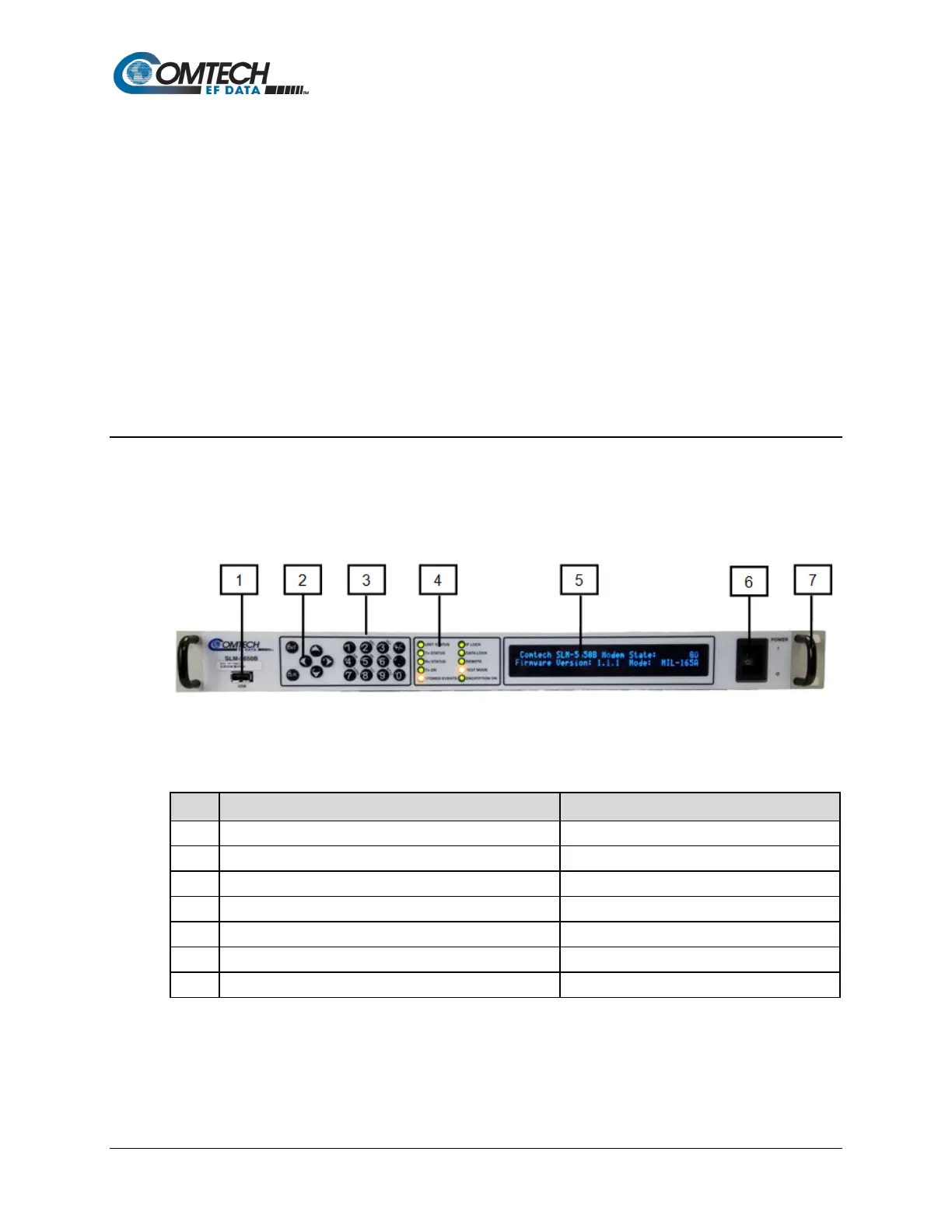
The SLM-5650B Satellite Modem front panel (Figure 5-1) allows the user to monitor the modem
operating status (including clocking information) and to control modem configuration parameters.
Figure 5-1. Front Panel Functions
Table 5-1. Front Panel Functions
Item Description Function
Reserved for future software support
Local control via menu navigation
3 12-button array Manual data entry
4 10 Light-Emitting Diodes (LEDs) Overall status monitoring at a glance
5 40-character, 2-line Vacuum Fluorescent Display (VFD) Display of messages, menus and prompts
Eases installation into / removal from rack
The front panel operating features (keypad/data entry array, LED Indicators, and VFD) and
menus are described in detail in this chapter. For information about Web Server or Remote
Control operation, refer to Chapter Sect. 6.3 HTTP/HTTPS (Web Server) Interfaces or
Appendix C. REMOTE CONTROL, respectively.



 To Next Page