SLM-5650B Satellite Modem
Revision 2
Network Processor (NP) Interface 8–15 MN-SLM-5650B
8.6.5.2.2 Admin | FAST Features
This section depicts the NP HTTP/HTTPS Interface with Quality of Service
(QoS), Management Security, and NP BPM installed on the modem.
Note the following:
If the modem does not have the FAST options installed, any hyperlinks to that
option will not be visible/available to the user.
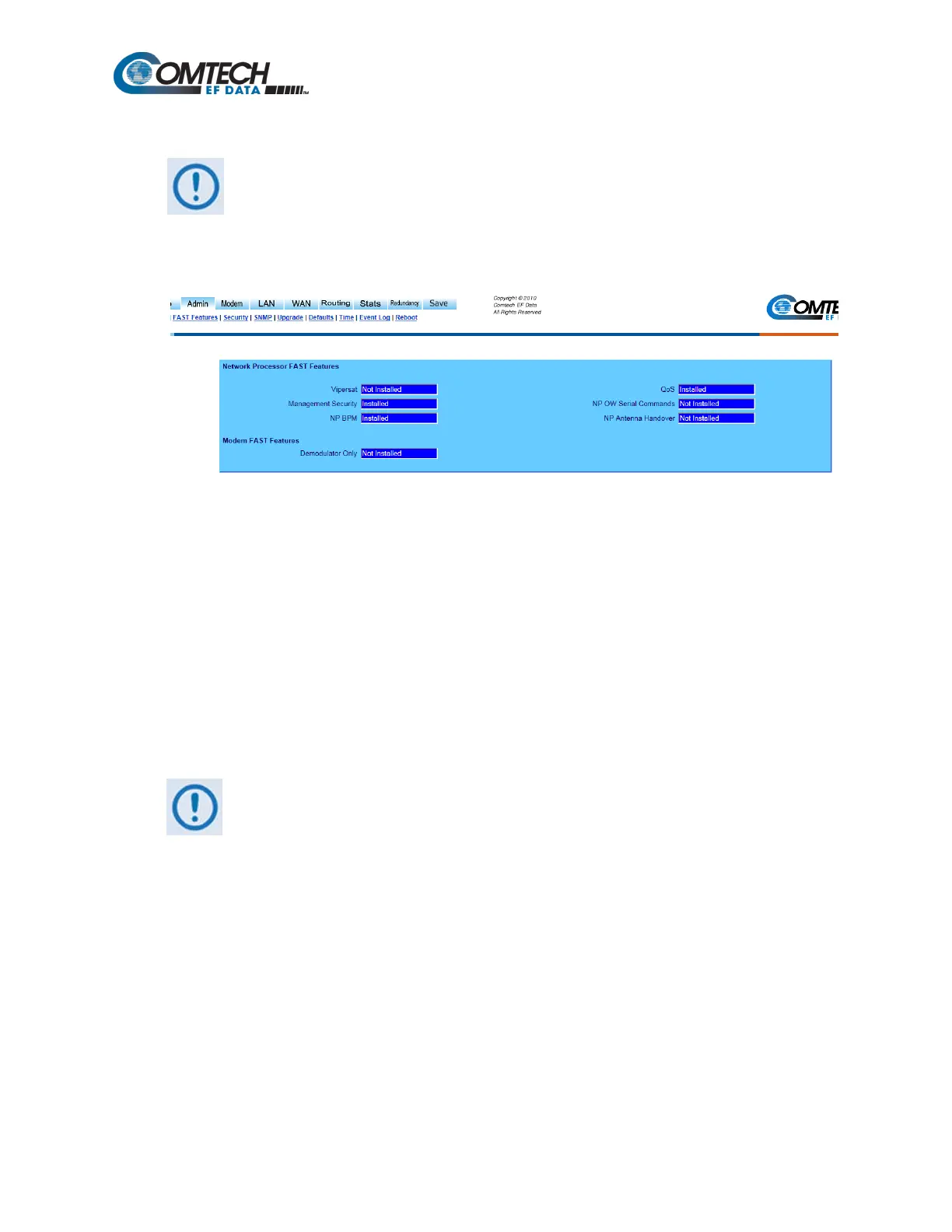
Figure 8-11. Admin | FAST Features Page
The read-only ‘Admin | FAST Features’ page (Figure 8-11) displays available FAST Features as
Installed or Not Installed.
Network Processor and Modem FAST Features
Comtech EF Data offers Vipersat, Management Security, NP BPM, Quality of Service (QoS), NP
OW Serial Commands, and NP Antenna Handover functionality as optional FAST Features for the
NP Interface. The modem’s Demodulator Only FAST feature status is also provided. To install
these options, a modem FAST code must be purchased by contacting Comtech EF Data Customer
Support.
Once the 20-digit modem FAST code is obtained, the purchased FAST Feature(s) is installed via
the modem front panel (Utility: FAST Configuration Enter modem code).
See Chapter 5. FRONT PANEL OPERATION for detailed information on installing FAST Features.
Upgrading the FAST features requires a modem reboot in order for FAST
features to be activated, and may require reconfiguration of all modem
parameters.



 To Next Page