SLM-5650B Satellite Modem
Revision 2
NP Interface Telnet/SSH CLI Operation 9–10 MN-SLM-5650B
9.2.4.5 Administration Menu | Security (A)
The HighLevel Security setting will disable the Telnet menu interface – do not
enable High Level Security if using Telnet or connectivity will be lost! When the
High Level Security setting is selected, SSH can be used to interface with the
CLI menu system.
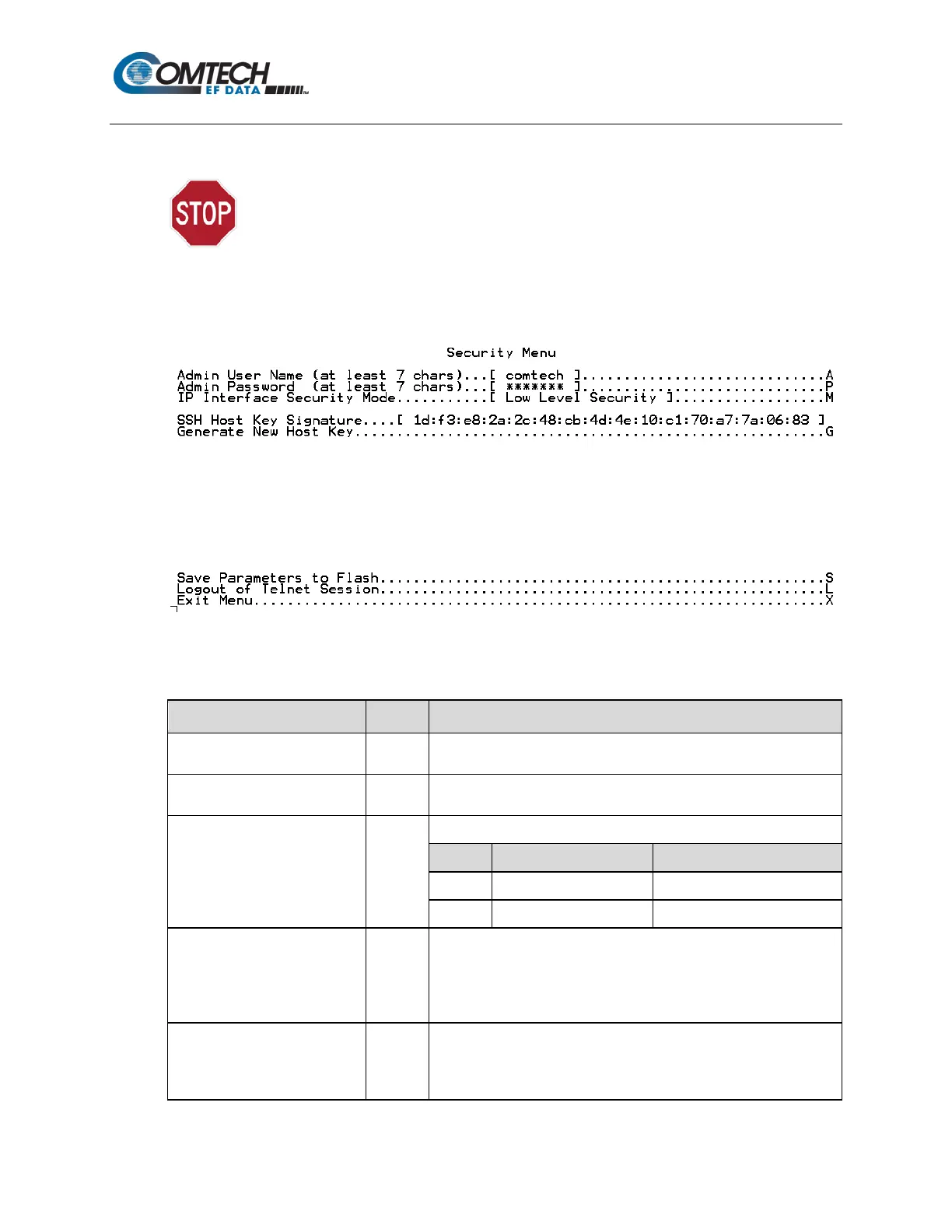
When the Security Menu page is opened from the Administration Menu, the following page
appears:
The page contains the following options or fields:
Menu Options/Fields Entry Description
Admin User Name A
Allows user to set the Admin User Name (excluding < > ” ~, a
minimum of 7 / maximum of 25 characters is permitted).
Admin Password P
Allows user to set the Admin Password (excluding < > ” ~, a minimum
of 7 / maximum of 25 characters is permitted).
IP Interface Security Mode M
Prompts user to select the IP Interface Security Level:
SSH Host Key Signature [RO]
This key signature, or fingerprint, helps to identify the NP when
connecting through SSH. SSH clients typically show the host key
signature when they connect to a system for the first time. The user
can then compare the host key the SSH client shows with the host
key the NP displays to verify that they are the same
Generate New Host Key G
Generates a new host key that uniquely identifies the NP.
NOTE: After doing this, SSH clients that have connected to the NP
before will usually note or warn that the host key has changed when



 To Next Page