11. Soft Switch List Field Service Ver. 1.0 Aug. 2005
122
FK-503
Adjustment / Setting
NOTE
• The features with (*) are settable by users. *: Screen setting
NOTE
• The features with (*) are settable by users. *: Screen setting
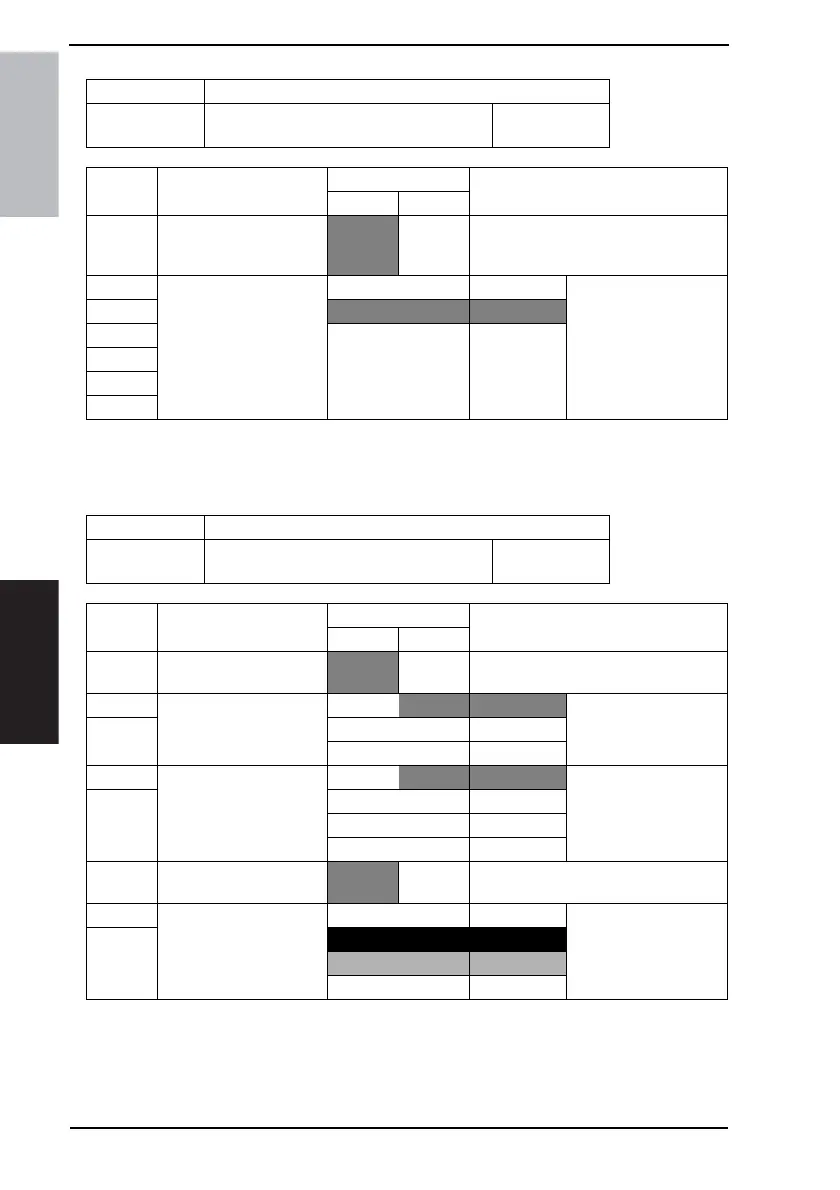
MODE Factory setting bit
400
Bit: 7654 3210
0000 0000
HEX:00
Bit Feature
Logic
Description
01
6 Set priority doc mixed
mode. (Copy) *
No Yes Selects priority doc mixed mode when
Power source is ON and panel reset key
is ON.
5 Bit 5-0: 000000 apanese
4
000001 English
3 Others Not available
2
1
0
MODE Factory setting bit
402
Bit: 7654 3210
0000 0001
HEX:01
Bit Feature
Logic
Description
01
7 Select priority doc mode.
(Copy) *
1 sided 2 sided
6 Select priority print mode.
(Copy) *
Bit 6-5:
00 1 sided
5 01 2 sided
Others Not available
4 Select automatic function
priority mode (Copy) *
Bit 4-3:
00 APS APS: Auto Paper Selec-
tion.
AMS: Auto Magnifica-
tion Selection.
301AMS
10 Not available
11 Manual
2 Select priority order of
device *
Copy Printer
1 Select priority applica-
tion. (after auto clear and
panel reset) *
Bit 1-0: 00 FAX Sets the initial status
screen (Copy, FAX, Auto
or scanner)
0
01 Copy
10 Auto
11 Scanner









 To Next Page