Field Service Ver. 1.0 Aug. 2005 11. Soft Switch List
123
FK-503Adjustment / Setting
NOTE
• The features with (*) are settable by users. *: Screen setting
NOTE
• The features with (*) are settable by users. *: Screen setting
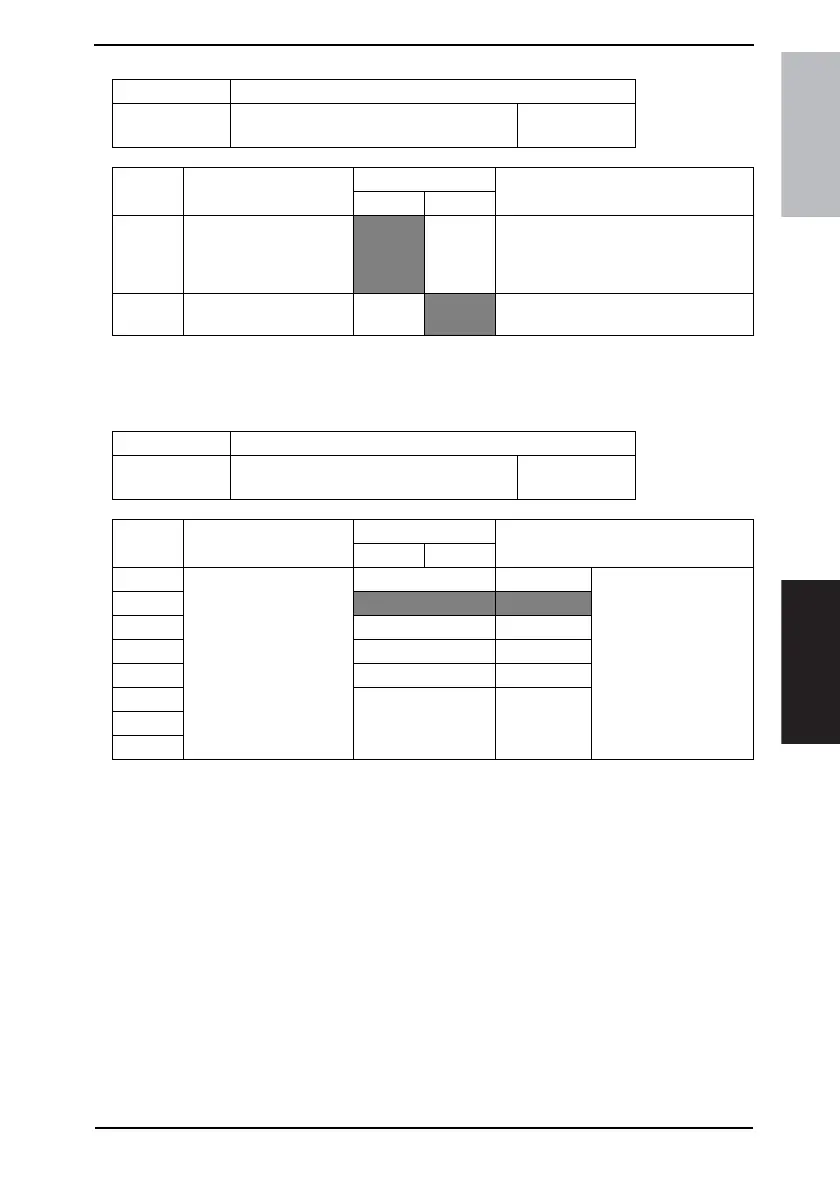
MODE Factory setting bit
403
Bit: 7654 3210
0000 0001
HEX:01
Bit Feature
Logic
Description
01
7 Select draft print zoom
ratio. (Copy) *
Recom-
mended
magnifi-
cation
Same
magnifi-
cation
Set ratios for 2-in-1 page, 4-in-1 page,
Booklet creation, or image repeat.
0 Auto-clear by user. (Copy)
*
No
Yes Selects whether to reset the touch panel
when pressing ID key.
MODE Factory setting bit
404
Bit: 7654 3210
0000 0001
HEX:01
Bit Feature
Logic
Description
01
7 Select auto-clear time. * Bit 7-0: 00000000 No reset
6
00000001 1 min For every 1 min
5|
4 11110000 240 min Select whether to carry
out auto-clear if there is
no operation for a cer-
tain time, after copy or
operation.
3 11111111 30 sec
2 Others Not available
1
0









 To Next Page