Field Service Ver. 1.0 Aug. 2005 4. Other
13
SD-502Maintenance
6. Tighten six screws [10].
NOTE
• Turn the gear again and check to
see that the protrusion of the
Clincher smoothly fits into the
recess in the jig.
7. Turn the gear and remove the jig.
4.3.7 In & Out Guide Drive Motor
1. Remove the Saddle Unit.
☞ 7
2. Remove the Paper Output Tray.
☞ 5
3. Remove the Front Cover.
☞ 5
4. Remove the Rear Cover.
☞ 6
5. Remove the Upper Cover.
☞ 6
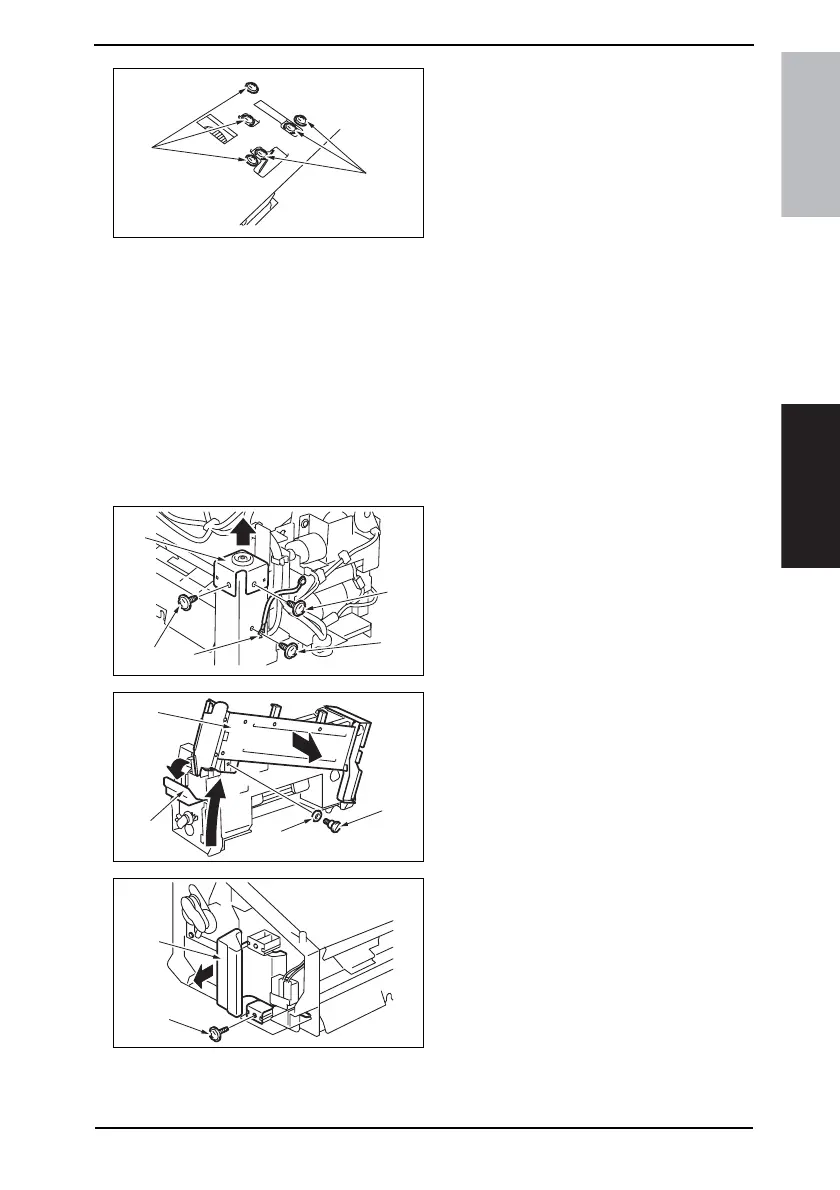
6. Remove the screw [1], and remove
the ground wire [2].
7. Remove two screws [3], and remove
the holder [4].
8. Release the lock release lever [5],
and slide the Saddle Unit Mounting
Plate [6].
9. Remove the shoulder screw [7] and
the washer [8], and remove the Sad-
dle Unit Mounting Plate [6].
10. Remove the screw [9], and remove
the lock release lever [10].
4511F2C554DA
[10]
[10]
4511F2C513DA
[1]
[2]
[3]
[3]
[4]
4511F2C515DA
[7]
[8]
[5]
[6]
4511F2C527DA
[9]
[10]









 To Next Page