2 - 192 Conversational Part Programming v546CO WinMax Lathe Conversational Part Programming
Change Parameters
Program Parameters are available for entering the rapid traverse feedrate, setting
maximum spindle RPM and disabling or enabling axis feedrate, rapid, spindle speed
override, and setting an optional stop before or after each tool change.
Program Parameters programmed from the Input screen are in effect when running a
part program until the end of a program or until a Change Parameter data Block is
programmed.
Program Parameters are stored with the conversational part program. These parameters
apply to all data blocks in the conversational part program and are available for
• Entering the rapid traverse feedrate.
• Setting maximum spindle RPM.
• Disabling or enabling axis feedrate override.
• Setting an optional stop before or after each tool change.
• Defining a tool change position for each tool change.
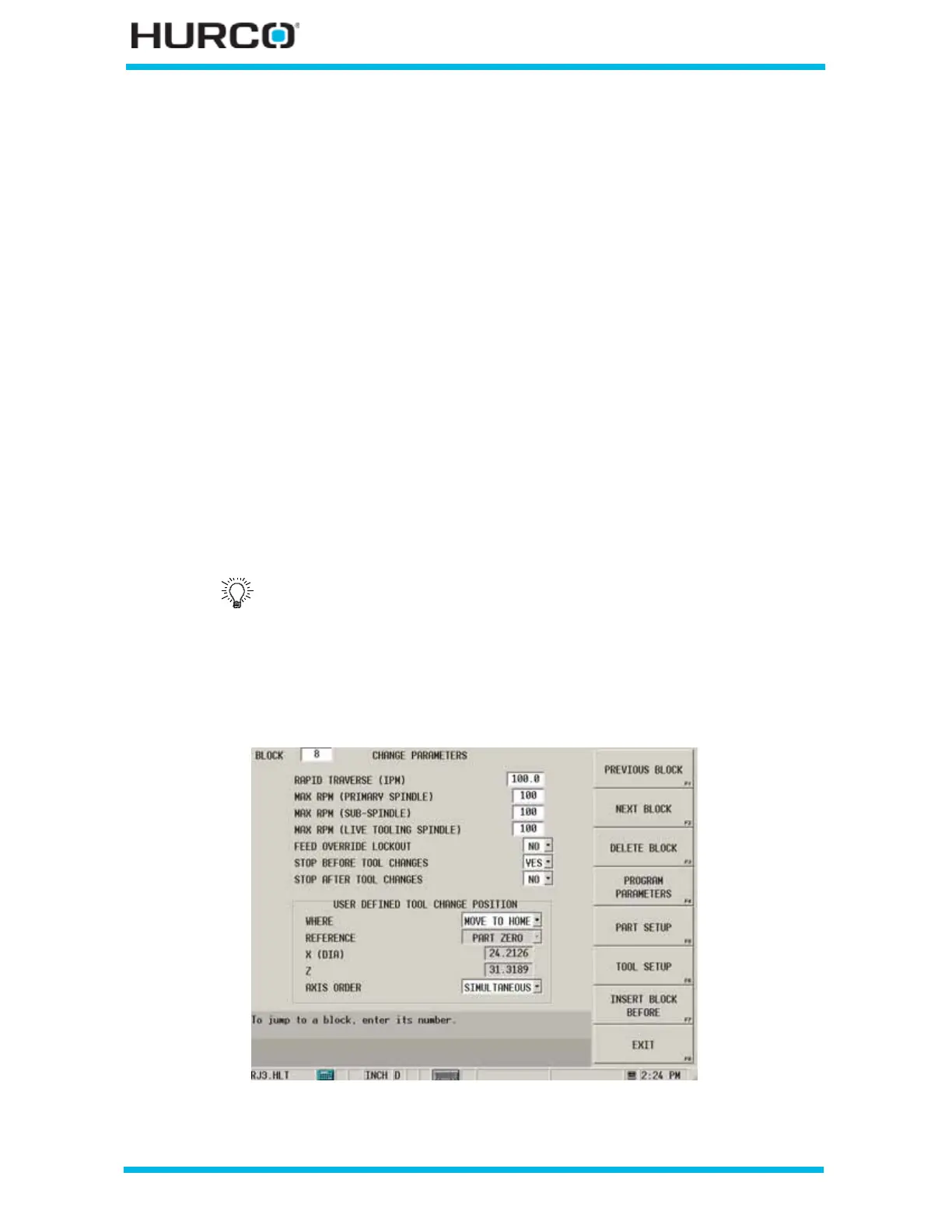
The Change Parameters screen displays with the values entered in Program Parameters.
Edit these values for a Change Parameters data block.
To access the Change Parameters screen from the Program Review screen or from the
New Block screen, select the MISCELLANEOUS F4 softkey followed by the CHANGE
PARAMETERS F1 softkey.
Figure 2–158. Change Parameters screen
Refer to Getting Started with WinMax Lathe, Program Parameters, on
page 4 - 82 for more information about Program Parameters and the
Input screen.



 To Next Page