WinMax Lathe Conversational Part Programming v546CO Conversational Part Programming 2-11
Profile Data Block
Profile data blocks use elements to create different profiles in a part program. An element
is any single or combined X-Z axis movement at a programmed feedrate. A series of
profiles can be programmed in a single data block, using different elements, to form a
complete profile.
To create a Profile from the New Block screen, select the TURNING F2 softkey followed
by the PROFILE F1 softkey.
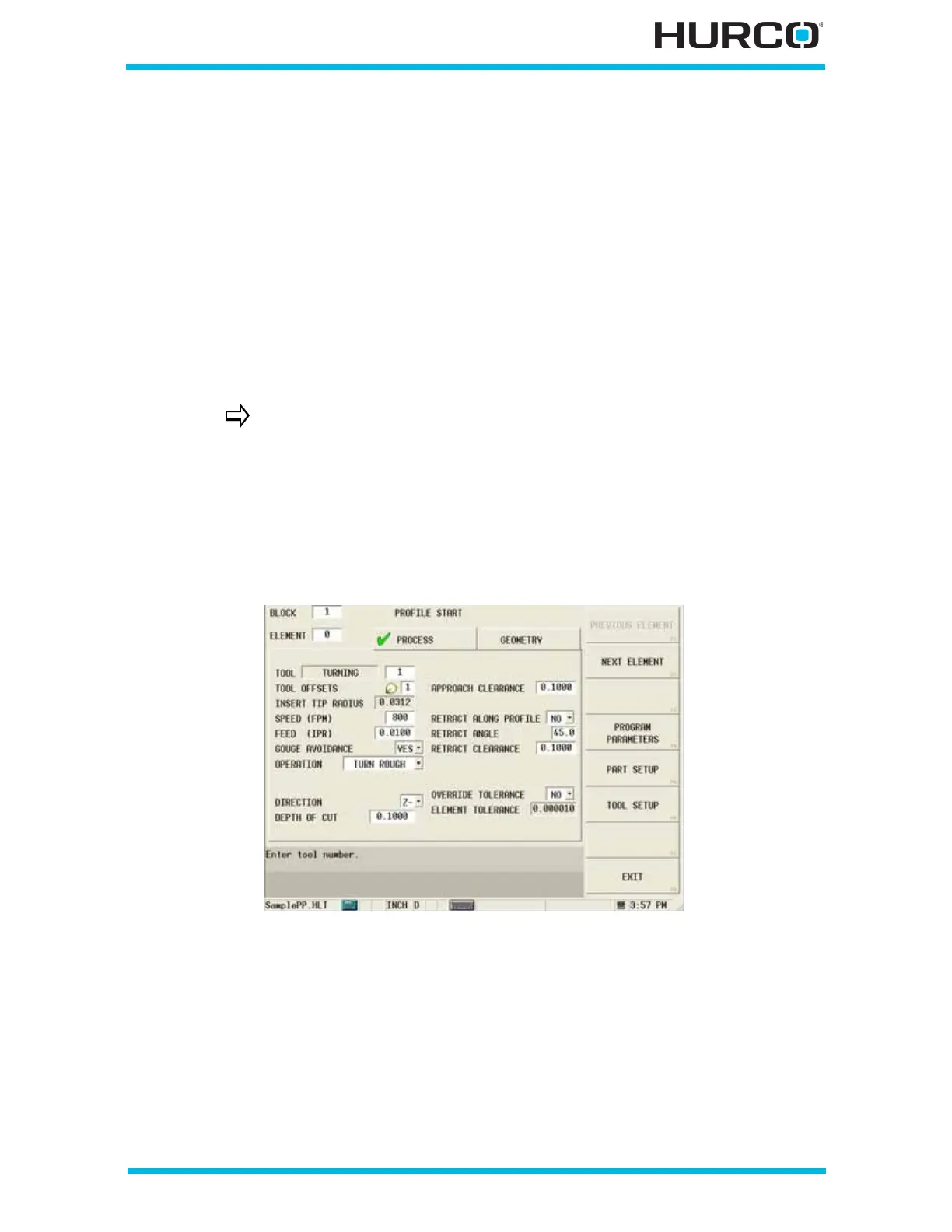
The Profile Start screen appears with tabs for Process and Geometry. The Process tab
contains fields for programming the tool and cutting information; the Geometry tab
contains fields for programming the shape of the profile.
Process Tab
Program the tool and cutting information using the fields on the Process tab.
Figure 2–3. Profile Start Process Tab screen
The Profile Start screen opens with the fields ready to accept values. When you enter the
tool number for a tool programmed in Tool Setup, a pop-up message appears asking if
you want to use the defined feeds and speeds for the tool.
• Select Yes and the feed and speed values entered for the tool in Tool Setup
are entered for this data block.
• Select No and enter the feeds and speeds for the tool.
If you open a program created using a software version prior to v1.1,
the Profile Start screen will retain the Roughing and Finishing fields
and values entered in the original program for backwards
compatibility.



 To Next Page