2 - 32 Conversational Part Programming v546CO WinMax Lathe Conversational Part Programming
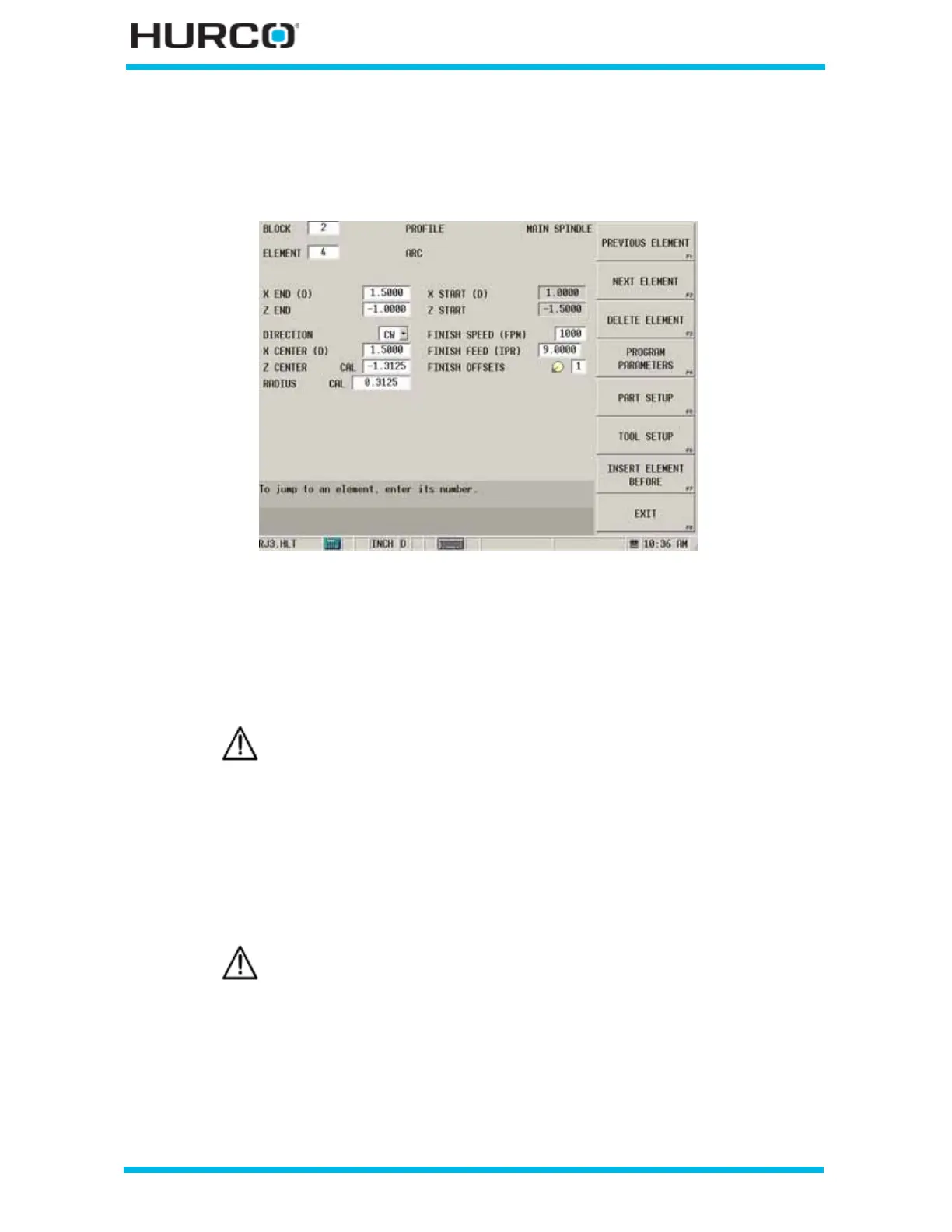
Arc Element
An Arc operation cuts the stock in an arc pattern from one point back to another point to
form a rounded corner.
Figure 2–21. Arc Element screen
These fields appear on the Arc Element screen:
• X END (D) or (R)—identifies the X (DIAMETER) or (RADIUS) coordinate for
the ending point of the Arc.
• Z END—identifies the Z coordinate for the ending point of the Arc.
• DIRECTION—identifies the direction of the arc from the start point. Select
CW (clockwise) or CCW (counterclockwise).
• X CENTER (D) or (R)—contains the X coordinate of the arc’s center point.
• Z CENTER—contains the Z coordinate of the arc’s center point.
When the cursor is located in either the X END (D) or (R) field or
the Z END field, the FIND ANOTHER END POINT F7 softkey
appears. Select this softkey and the control calculates a second end
point to provide you with an alternative. You can choose the
geometry that best suits your needs.
When the cursor is located in either the X CENTER (D) or (R) field
or the Z CENTER field, the FIND ANOTHER CENTER POINT F7
softkey appears. Select this softkey and the control calculates a
second center point to provide you with an alternative. You can
choose the geometry that best suits your needs.



 To Next Page