WinMax Lathe Conversational Part Programming v546CO Conversational Part Programming 2-3
Position Data Block
Position data blocks allow you to position the axes. Positions can be relative to Machine
Zero or Part Zero. The default is Part Zero. If you select Machine Zero, the control checks
the position values to be sure they are not out of travel before the machine will run.
Insert Position blocks into a part program to:
• Move the currently active tool to a safe location.
• Automatically stop motion during part cutting to refixture or perform some
other manual operation.
• Turn off the coolant and stop the spindle.
• Drive a long tool around obstructions.
• Move the tool around a tailstock.
• Move the turret back at the end of a program to provide easy access to the
finished part.
• Move a new tool to a safe starting position after a tool change, but before the
tool is used by the subsequent data block.
• Send the last tool used to the home position.
• Change tools at the end of a cycle.
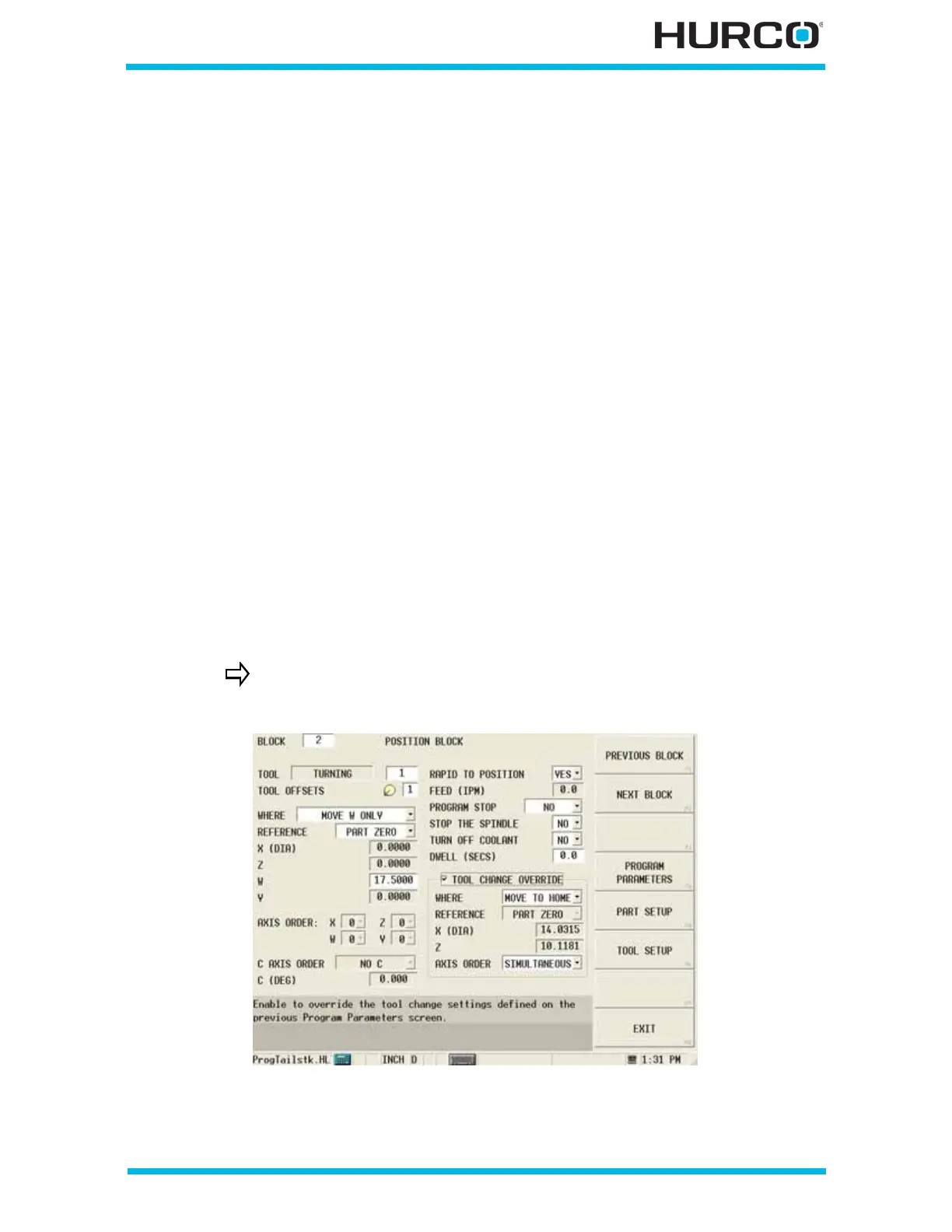
To create a Position Block from the New Block screen, select the POSITION F1 softkey.
The cursor is located at the Block field on the Position Block screen. The softkeys change
depending on where the cursor is located.
Figure 2–2. Position Data Block screen, TMX MY Series shown
The fields are displayed based on your machine configuration.



 To Next Page