WinMax Lathe Conversational Part Programming v546CO Conversational Part Programming 2-65
Advanced Pecking
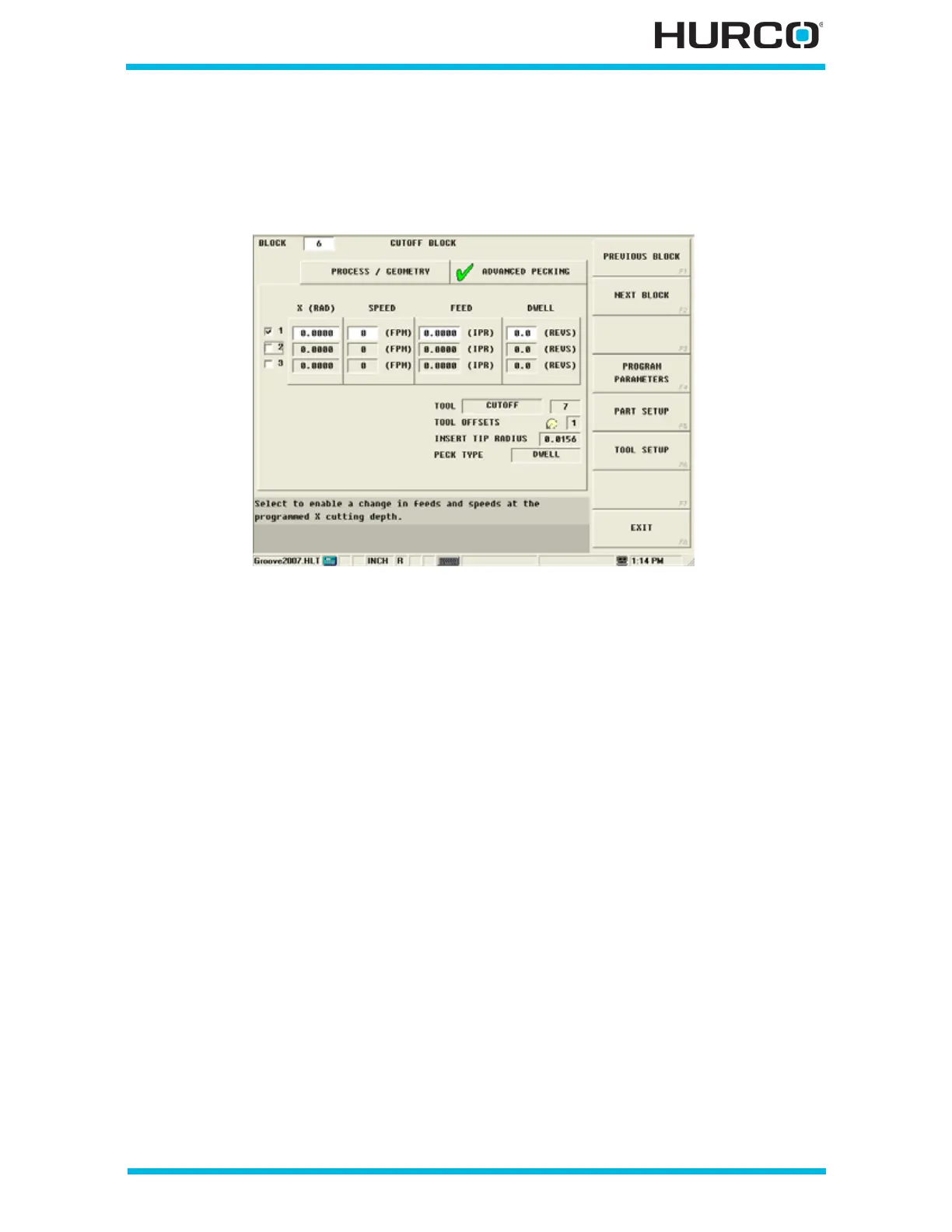
The Advanced Pecking tab is available for making adjustments for speeds, feeds, and
dwell for up to 3 cutting depths at specified X radius or diameter locations.
Figure 2–53. Cutoff Block Advanced Pecking Tab screen
Use these fields for making adjustments within a Cutoff data block:
• X (RAD) or (DIA)—defines the X cutting depth where the change in speed,
feed, and/or dwell should occur. Select from 1 to 3 X locations by selecting
the 1, 2, or 3 listed to the left of this field.
• SPEED—defines the adjusted RPM value or Constant Surface Speed value for
this tool.
• FEED—identifies the adjusted feed per revolution for this tool.
• DWELL—defines the adjusted number of revolutions before the drill should
retract at Rapid. This field appears when Dwell is selected for the Peck Type
on the Process/Geometry tab.
Programmed tool information is carried over from the Process/Geometry tab to the lower
right corner of the Advanced Pecking tab to use as a reference.



 To Next Page