2 - 52 Conversational Part Programming v546CO WinMax Lathe Conversational Part Programming
To create a Grooving Cycle from the New Block screen, select the TURNING F2 softkey
followed by the GROOVE F3 softkey.
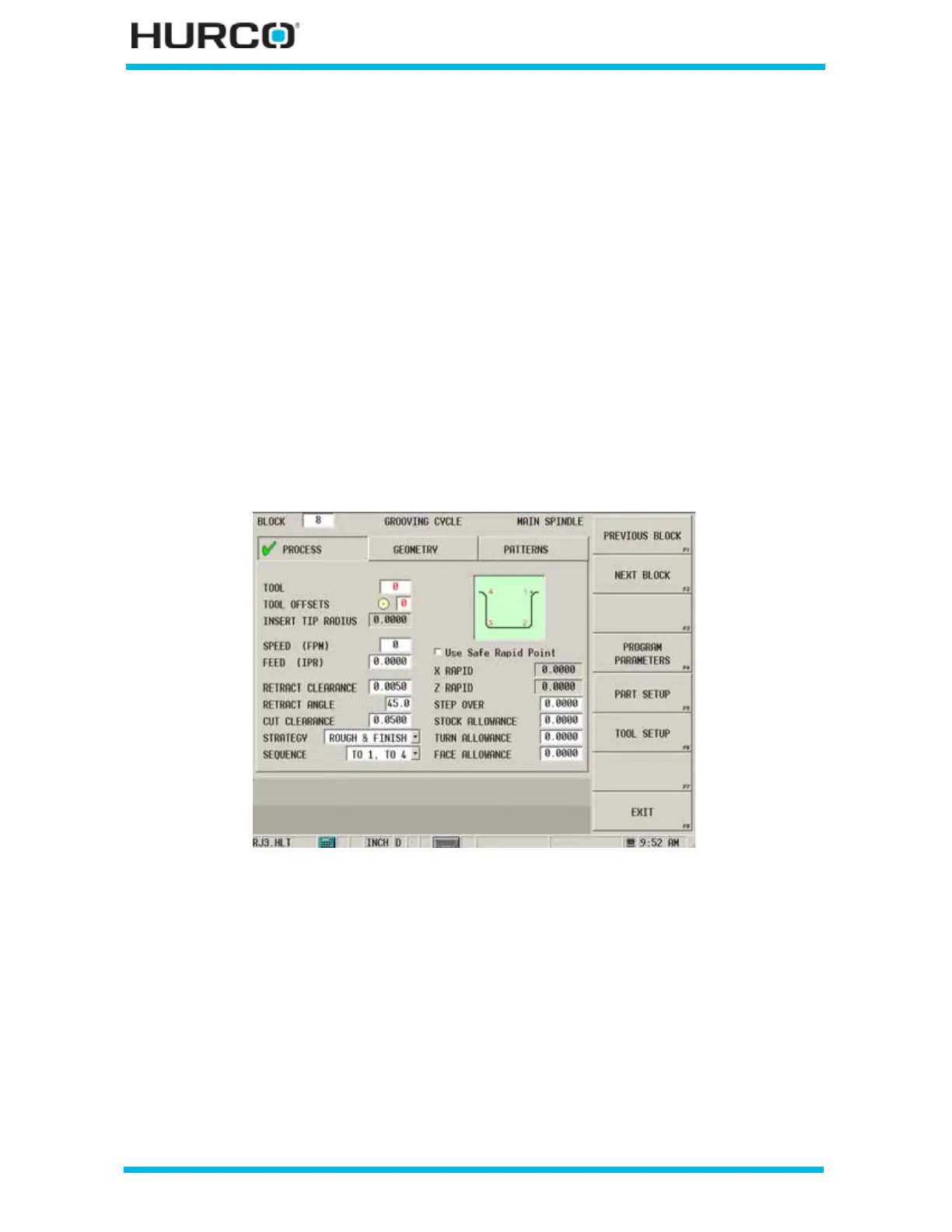
The GROOVING CYCLE screen appears with tabs for Process, Geometry, and Patterns.
• The fields on the Process tab are for programming the tool and cutting
information
• The fields on the Geometry tab are for programming the shape of the groove.
• The fields on the Patterns tab are for programming patterns of identical,
incremental grooves along a part.
The start point is the point at which the diameter and wall theoretically intersect. The
start point is indicated by a cross hair next to Corner 1 in the on-screen graphic on the
Geometry tab.
Process
Program the tool and cutting information using the Process tab.
Figure 2–43. Grooving Cycle Process Tab screen
Use these fields to program the tool and cutting information for the groove:
• TOOL—identifies the tool number that will be used in the part program.
• TOOL OFFSETS—identifies the programmed tool offset and orientation
programmed in Tool Setup that will be used. The tool offset defaults to the
same number as the tool.
• INSERT TIP RADIUS—displays the insert tip radius programmed in Tool
Setup. This field is read-only.
• SPEED—identifies the RPM value or Constant Surface Speed value (FPM) for
this tool.
• FEED—identifies the programmed feed rate (IPM or IPR) for this tool.



 To Next Page