2 - 58 Conversational Part Programming v546CO WinMax Lathe Conversational Part Programming
Hole Cycle
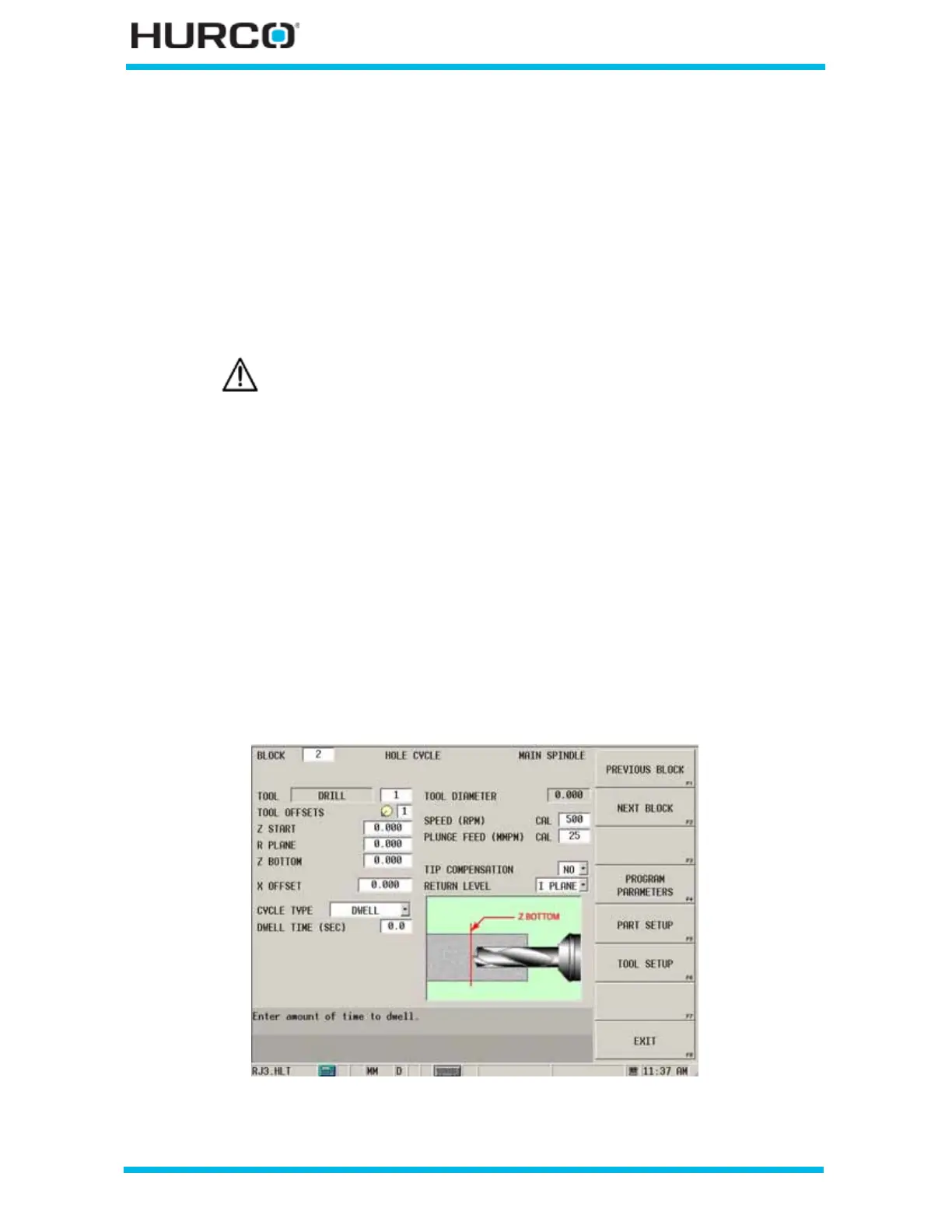
Hole cycle operations include Drill, Center Drill, and Tap. The tool type defined by the tool
number selected in the block determines the type of hole operation. The on-screen
graphic shows the tool and the screen contains fields appropriate for programming the
tool type.
• Drill—creates a hole in the stock centerline. Drills can also be used as
starting points for additional operations such as boring.
The drill can be shifted off center with the X Offset field.
• Center Drill—drills to the programmed depth, dwells for the programmed
amount of seconds, then retracts.
• Tap—feeds with spindle at speed to depth, reverses the spindle and feeds
out. Standard tapping and rigid tapping are available.
A tension/compression tap holder is recommended.
The control will automatically calculate the feedrate for tapping using the
speed (rpm) and the threads per inch or pitch programmed for the tool in
Tool Setup.
To create a Hole Cycle from the New Block screen, select the TURNING F2 softkey
followed by the HOLE F4 softkey.
The HOLE CYCLE screen appears.
Figure 2–50. Hole Cycle screen
Do not exceed the drill manufacturer’s maximum allowable offset.



 To Next Page