2 - 38 Conversational Part Programming v546CO WinMax Lathe Conversational Part Programming
Threading Cycle
The Threading cycle performs multi-pass threading for OD (outside diameter) and ID
(inside diameter) threads. This cycle supports taper and face threads, lead in and lead
out angles, multiple spring passes, and various methods of specifying depth of cut.
To create a Profile from the New Block screen, select the TURNING F2 softkey followed
by the THREAD F2 softkey.
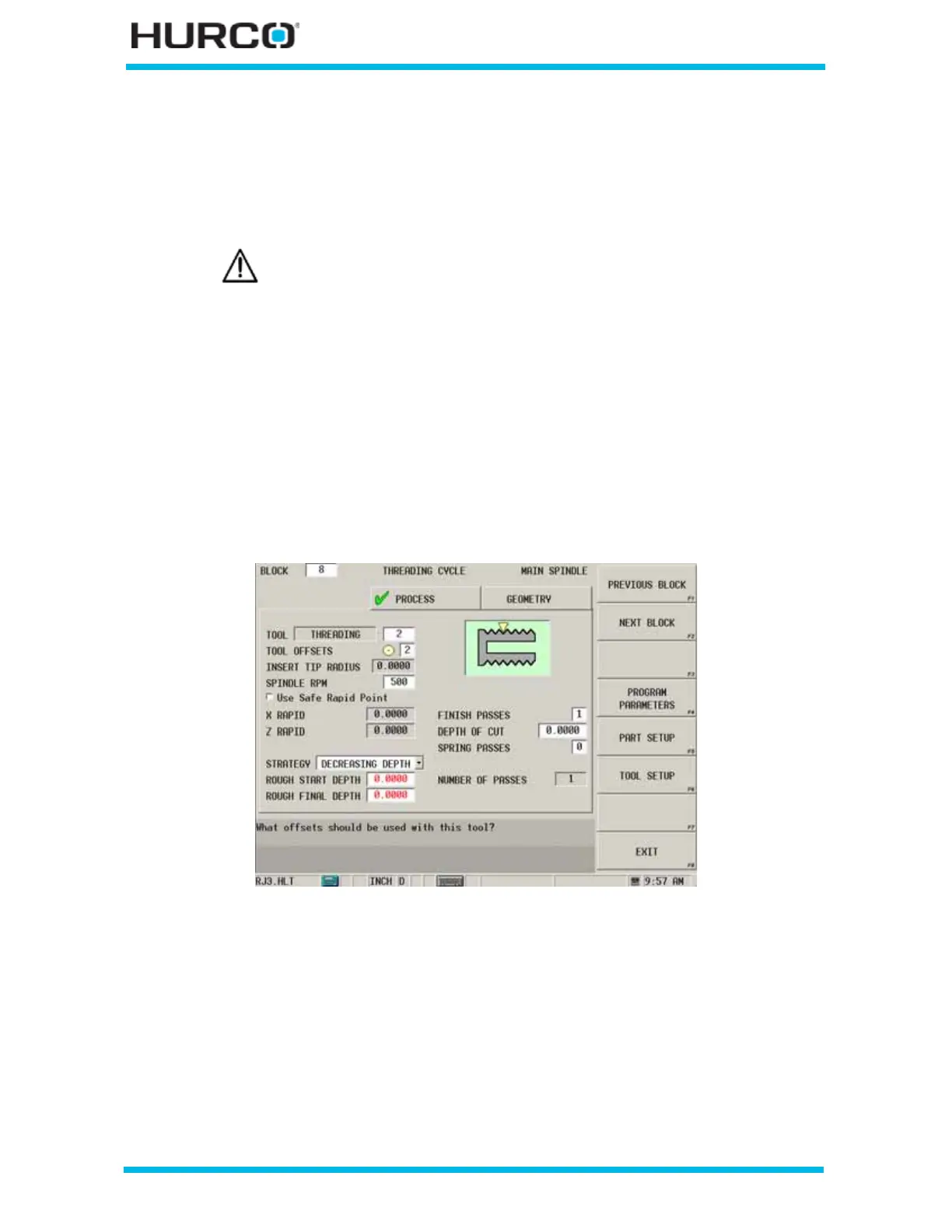
The THREADING CYCLE screen appears with tabs for Process and Geometry. The fields on
the Process tab are for programming the tool and cutting information; the fields on the
Geometry tab are for programming the shape of the thread.
Process
Program the tool and cutting information using the Process tab:
Figure 2–24. Threading Cycle screen Process tab
• TOOL—contains the programmed tool number from Tool Setup.
• TOOL OFFSETS—identifies the programmed tool offset and orientation
programmed in Tool Setup that will be used. You can accept or change this
offset.
• INSERT TIP RADIUS—displays the insert tip radius programmed in Tool
Setup. This field is read-only.
A Position block is required before a Threading Cycle if there is not
sufficient clearance for the tool to move around the part from a
previous data block.



 To Next Page