WinMax Lathe Conversational Part Programming v546CO Conversational Part Programming 2-15
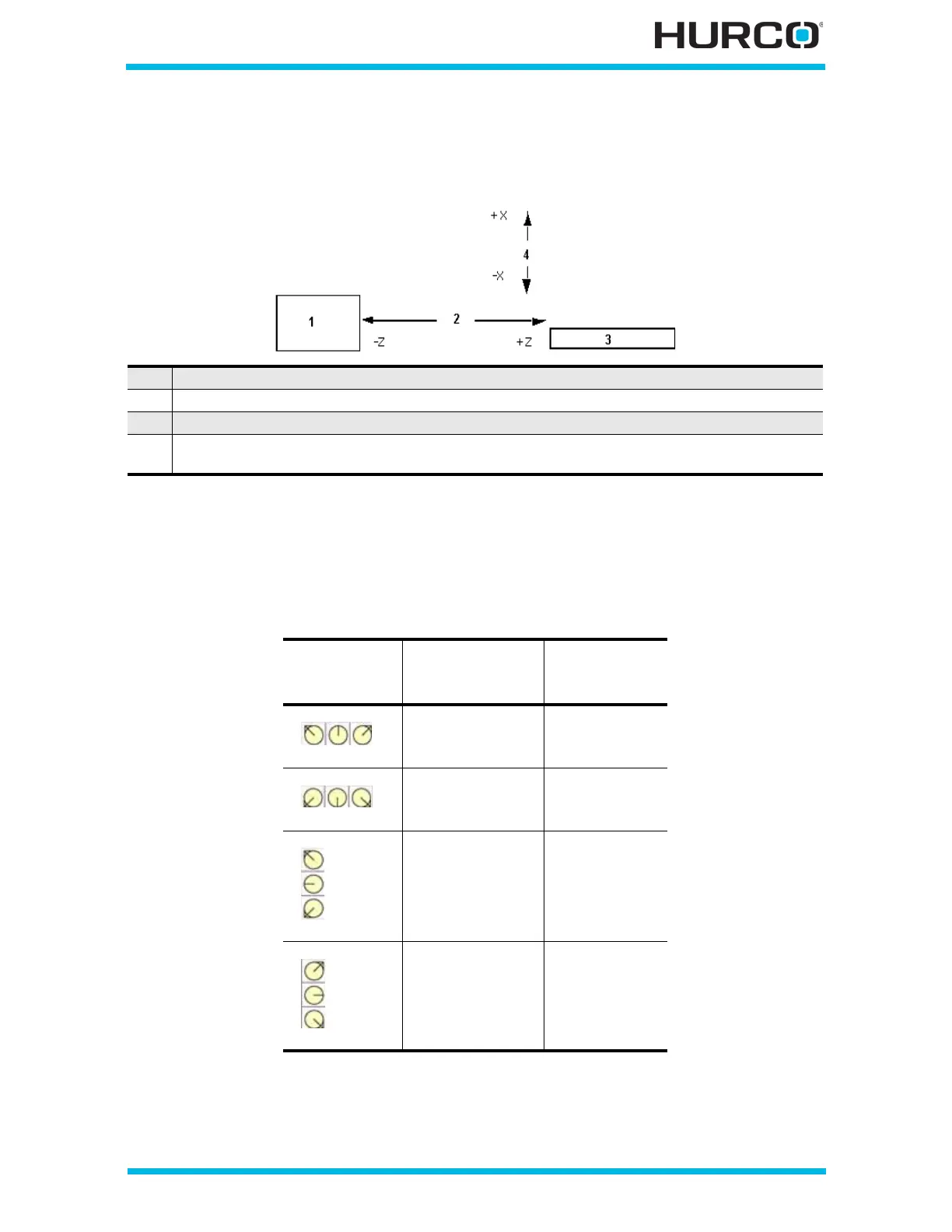
• DIRECTION—identifies the cut direction for the rough pass as X+, X-, Z+, or
Z-. This field appears when Turn Rough is selected for the Operation. Axis
motion is shown in the figure below:
Figure 2–5. Axes Motion
The control assigns a default Cutting Side for a Finish Profile following a
Roughing Profile based on the selected Direction. When the orientation and
roughing direction are identified as shown in the following table, the
corresponding cutting side value is automatically entered in the Cutting Side
field of the Finish Operation block:
Figure 2–6. Finish Tool Cutting Side default values based on Roughing Direction
• DEPTH OF CUT—identifies the total depth of cut of the tool into the part.
This field appears when Turn Rough is selected for the Operation.
1 Chuck, Jaws, and Spindle
2 Tool in turret moves toward part (-Z) or away from part (+Z) in spindle.
3 Tailstock
4 Tool in turret moves toward tailstock and chuck (-X) or away from tailstock and
chuck (+X).
Roughing
Tool
Orientation
Roughing
Direction
Finish Tool
Cutting Side
Z-
Z+
Left
Right
Z-
Z+
Right
Left
X-
X+
Left
Right
X-
X+
Right
Left



 To Next Page