8.3 Acoustic Stando
267
Chapter 8
z
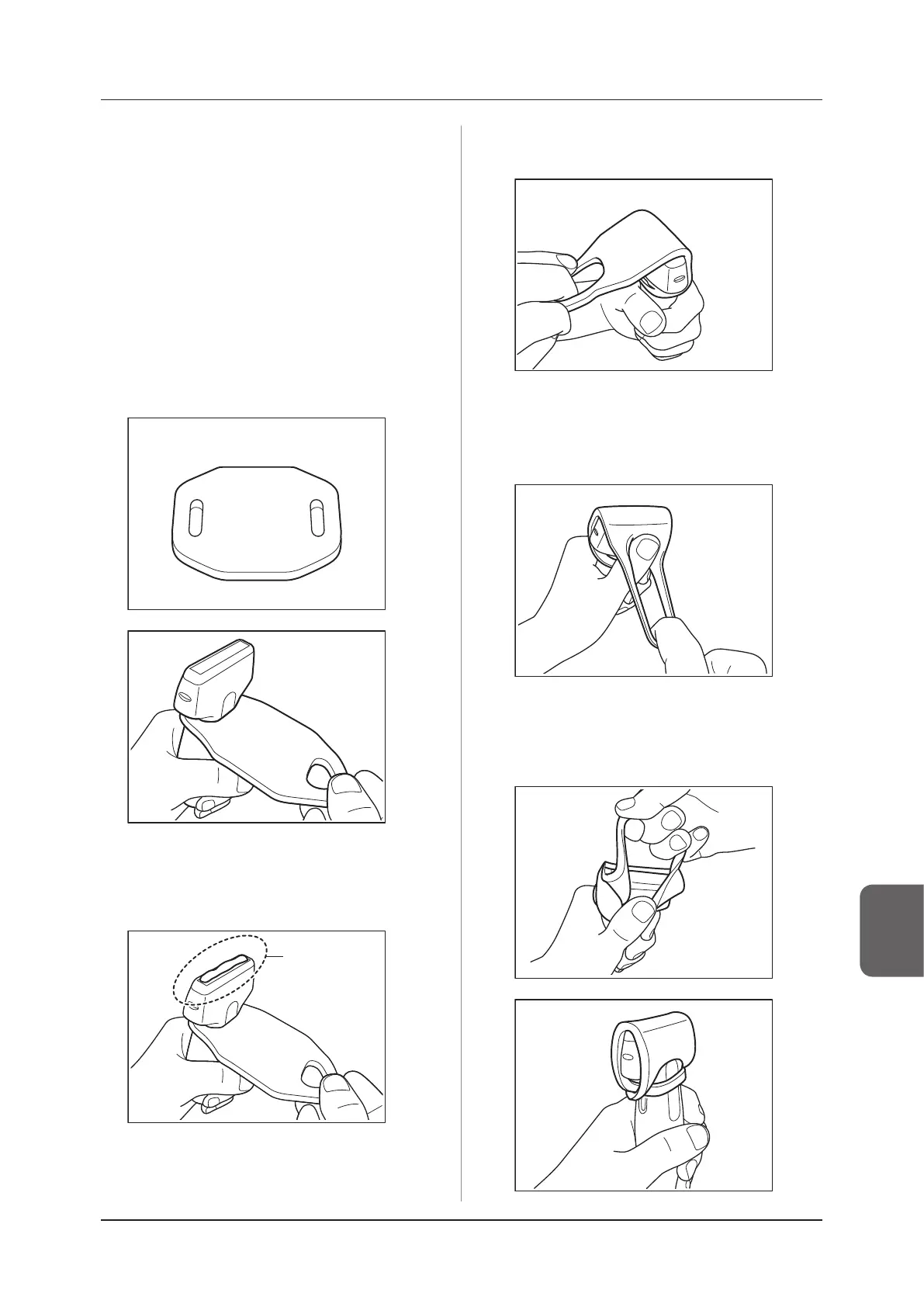
How to attach Acoustic Stando
1
Open the storage bag of Acoustic Stand-
off, and take out Acoustic Standoff from
the storage bag.
2
Remove a pair of protective films from
Acoustic Stando.
• Do not discard a pair of protective lms as you
will use them in storing Acoustic Stando.
3
As shown in the figures below, pass the
transducer into one of the two openings
of Acoustic Stando.
4
Apply an appropriate amount of ultra-
sound gel to the lens surface of the trans-
ducer.
Ultrasound
gel
5
Fold Acoustic Stando over the acoustic
lens surface of the transducer.
6
Insert your thumb into the other opening
to secure Acoustic Stando to the side of
the transducer.
7
Fold Acoustic Standoff over the lens
again, and pass the transducer into the
other opening.



 To Next Page