290
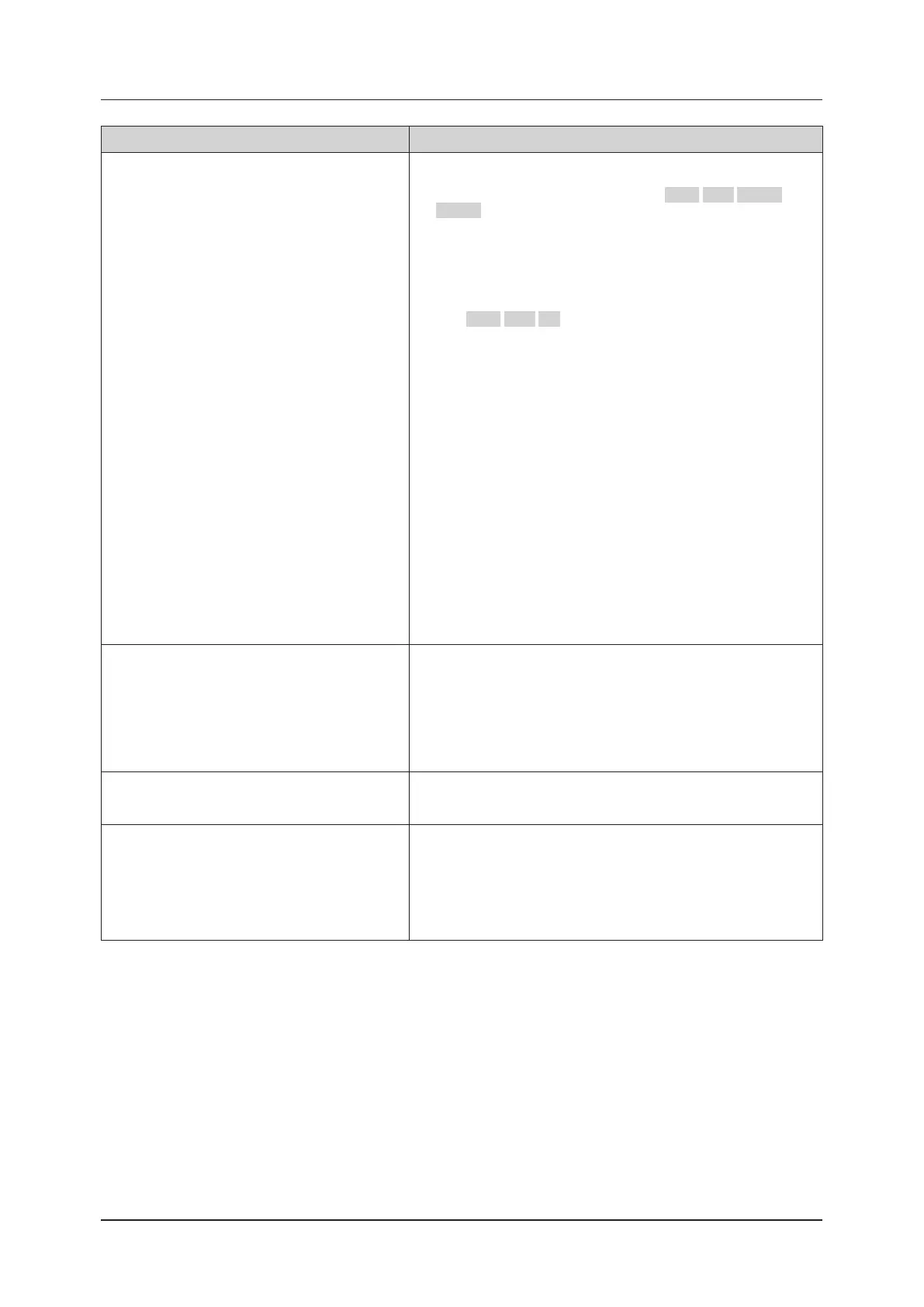
11.1 Troubleshooting
Problems What to check
Reaction in an area dierent from where you touch.
* After checking the following, shut down the system. Do the following
before shutting down the system.
On the mini console, press the 4 buttons, EXIT / SET / User 1 /
User 2 at the same time.
A log is saved for analysis. Also, the trackball pointer appears.
Next, if a clip or still image must be stored, freeze the image if you
are in a live state. Use the trackball pointer that appears to perform
[Print], [Still Store], [Clip Store], or [Cine Clip Store] via trackball and
SET button operations to store the image.
If the trackball pointer does not appear, pressing the 3 but-
tons, EXIT / SET / F2 (Push) at the same time makes it appear.
1. Check that there is no protective sheet, debris, or dirt stuck to the
surface of the LCD monitor. If something is stuck to the surface of the
LCD monitor, shut down the system before removing the protective
sheet, debris, or dirt, and then restart it.
2. If the reaction continues to occur in an area dierent from where you
touch after doing step 1 above, check whether the power plug of the
power cable that was included with the system is directly connected
to the mains plug (hospital grade ). For instance, if you are using a
connector for 3-pin to 2-pin conversion, an area dierent from where
you touch may react. In this case, stop using the connector for 3-pin
to 2-pin conversion.
If touching still does not work after doing the steps above, contact your
service representative.
[Shutdown procedures for when an area dierent from where you touch
reacts]
Do the [Shutdown procedures for when touching does not work] written
in the cell for what to check in "Touch operation cannot be enabled".
Connection is cut due to low signal strength of wire-
less LAN.
• Reconnect with the following procedure.
1. Move to a place where the wireless LAN signal strength is high.
2. If the wireless LAN connection is not recovered in step 1 above,
switch to the wired network (if available) by touching the wired LAN
network in the network status dialog.
Refer to "Network Screen" of the "Operation Manual: Applications".
"Error: DICOM Status" is displayed.
This is an error issued by the connected device.
For details on the error, check the instruction manual of the connected
device.
Error code "CA00017" is displayed on the monitor.
Turn o the system and detach the transducer from the transducer con-
nector.
If you have spray type air duster, remove foreign objects adhered to
the pin of the transducer connector by using it. Do not use cloth, tissue
paper, or brush, which will result in adhesion of foreign objects.
Attach the transducer to the system and start up. If an error has oc-
curred again, please contact your service representative.



 To Next Page