294
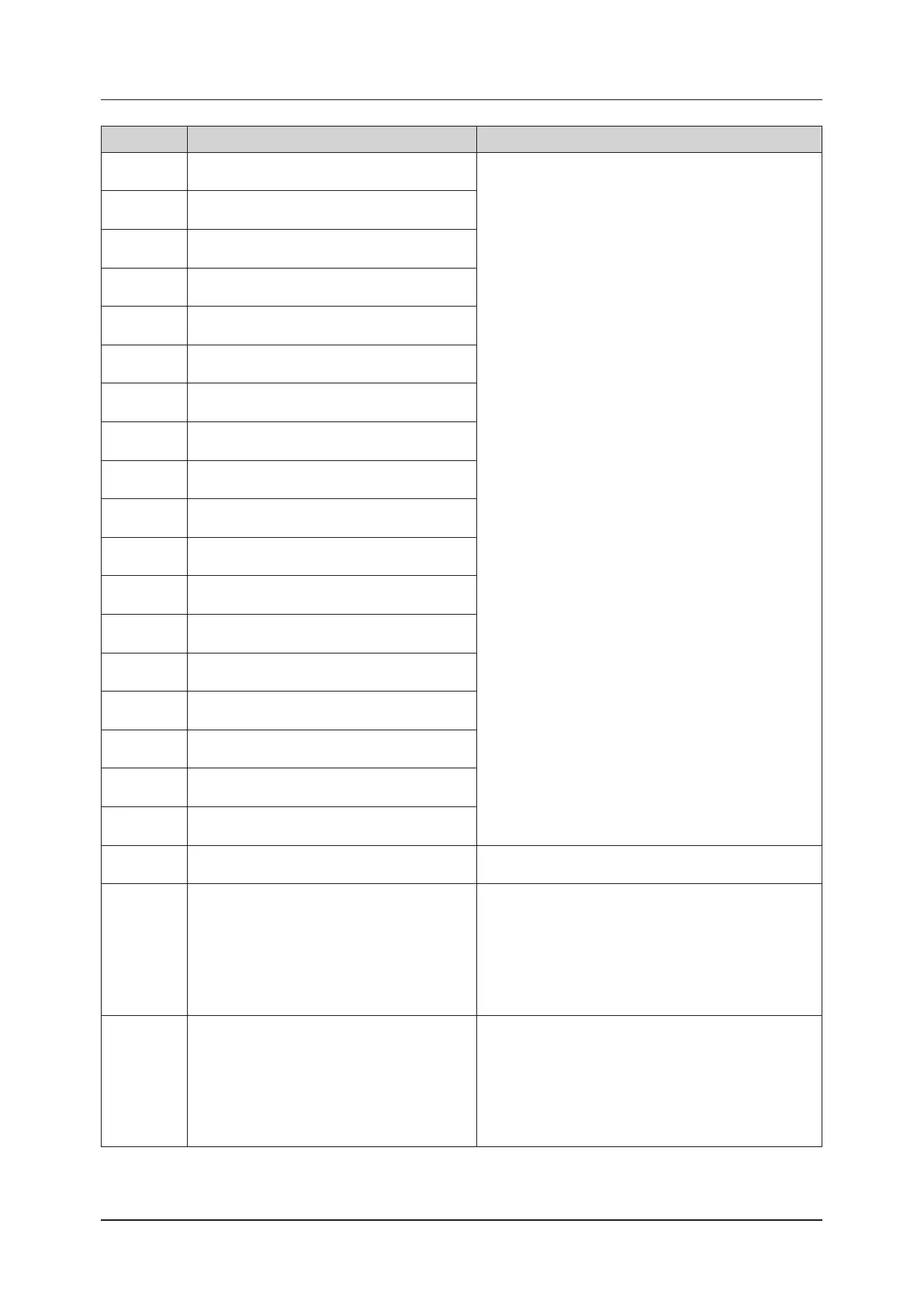
11.2 Error Code List
Error code Display message Phenomenon / Solution
CA07031
Boot system error.
Error code = 0x201C
Please stop use of the system, and contact your service
representative.
CA07032
Boot system error.
Error code = 0x201D
CA07033
Boot system error.
Error code = 0x201E
CA07034
Boot system error.
Error code = 0x0001
CA07035
Boot system error.
Error code = 0x0002
CA07036
Boot system error.
Error code = 0x0003
CA07037
Boot system error.
Error code = 0x0004
CA07038
Boot system error.
Error code = 0x0005
CA07039
Boot system error.
Error code = 0x0006
CA07040
Boot system error.
Error code = 0x0007
CA07041
Boot system error.
Error code = 0x0008
CA07042
Boot system error.
Error code = 0x0009
CA07043
Boot system error.
Error code = 0x000A
CA07044
Boot system error.
Error code = 0x000F
CA07045
Boot system error.
Error code = 0x0010
CA07046
Boot system error.
Error code = 0x0011
CA07047
Boot system error.
Error code = 0x0012
CA07048
Boot system error.
Error code = 0xAAAA
CA07049
Application is busy.
System shut down to force.
Please reboot the system.
CA07050
Application is busy.
Shutdown process has been canceled.
Wait for a while, please try to shut down again.
• During examination
End the examination and then select Shutdown again.
• At other times
Check that no other dialog box is displayed. If another
dialog box is displayed, close it and then select Shutdown
again.
If the examination screen is not displayed, display the
examination screen and then select Shutdown again.
CA07051
Application is busy.
Standby process has been canceled.
Wait for a while, please try to standby again.
• During examination
End the examination and then select Standby again.
• At other times
Check that no other dialog box is displayed. If another
dialog box is displayed, close it and then select Standby
again.
If the examination screen is not displayed, display the
examination screen and then select Standby again.



 To Next Page