116 SyncServer 600 Series User’s Guide 098-00720-000 Revision D1 – February, 2018
Chapter 4
Navigation Windows
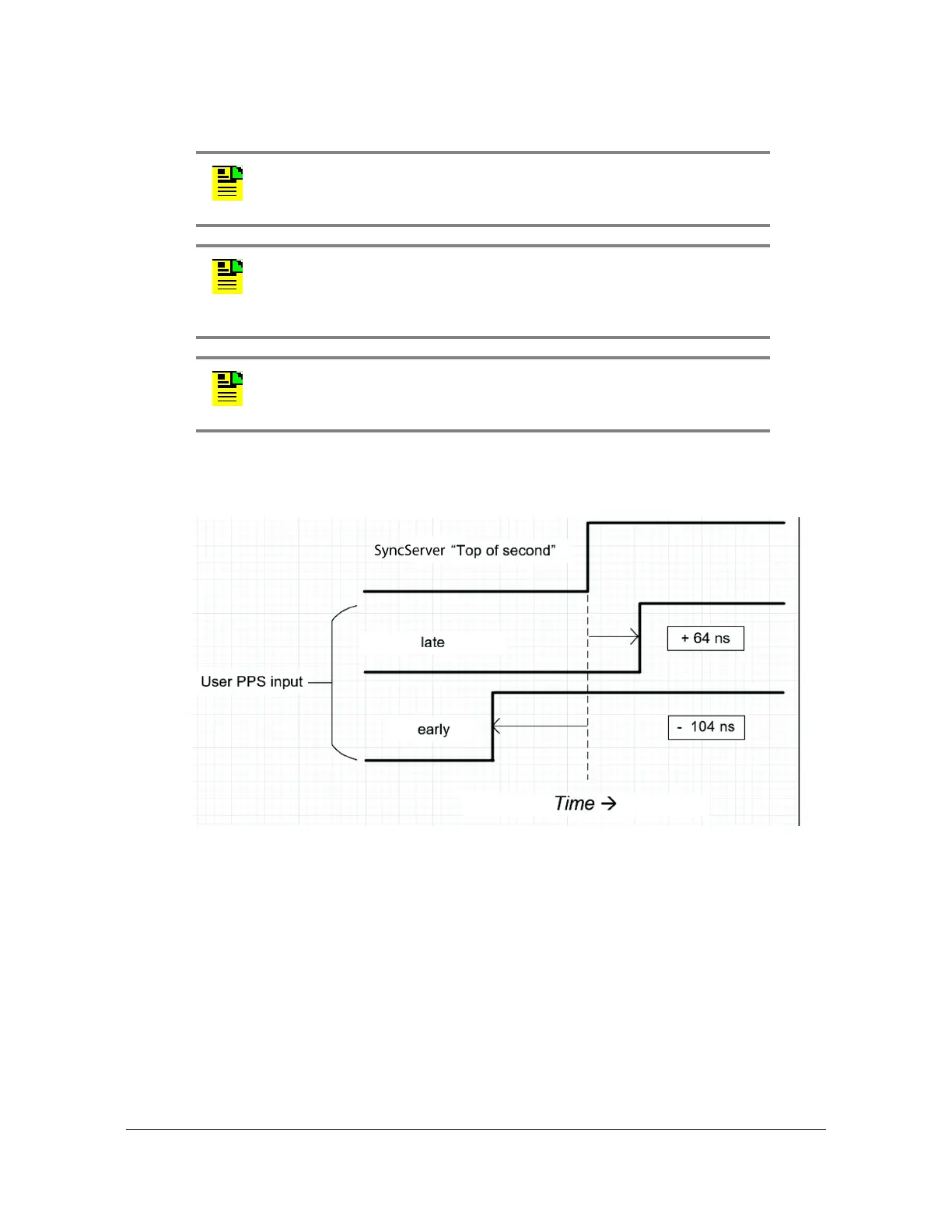
Figure 4-33. Time-Interval Measurement (conceptual)
References Configuration Window
The References tab on the dashboard provides access to configure GNSS position
and operating mode, as well as view Reference Status.
References - Reference Status Window
Use this window to view status information for system References. See Figure 4-34.
Note: The 1PPS input should be disabled on the Timing->Input
control page. The measurement is not useful if the SyncServer is
using the 1PPS as the reference.
Note: Measurements are not useful if the SyncServer system clock
has not been set or is changing. Therefore, it is not recommended to
use the measurement feature when the SyncServer is in warmup,
free-run, or locking clock states.
Note: If the user 1PPS input is later than the internal 1PPS, then the
measurement will be positive. If the user 1PPS is early, then the
measurement result will be negative. See
Figure 4-33.



 To Next Page