3-51
3.5 Unique switch adjustment
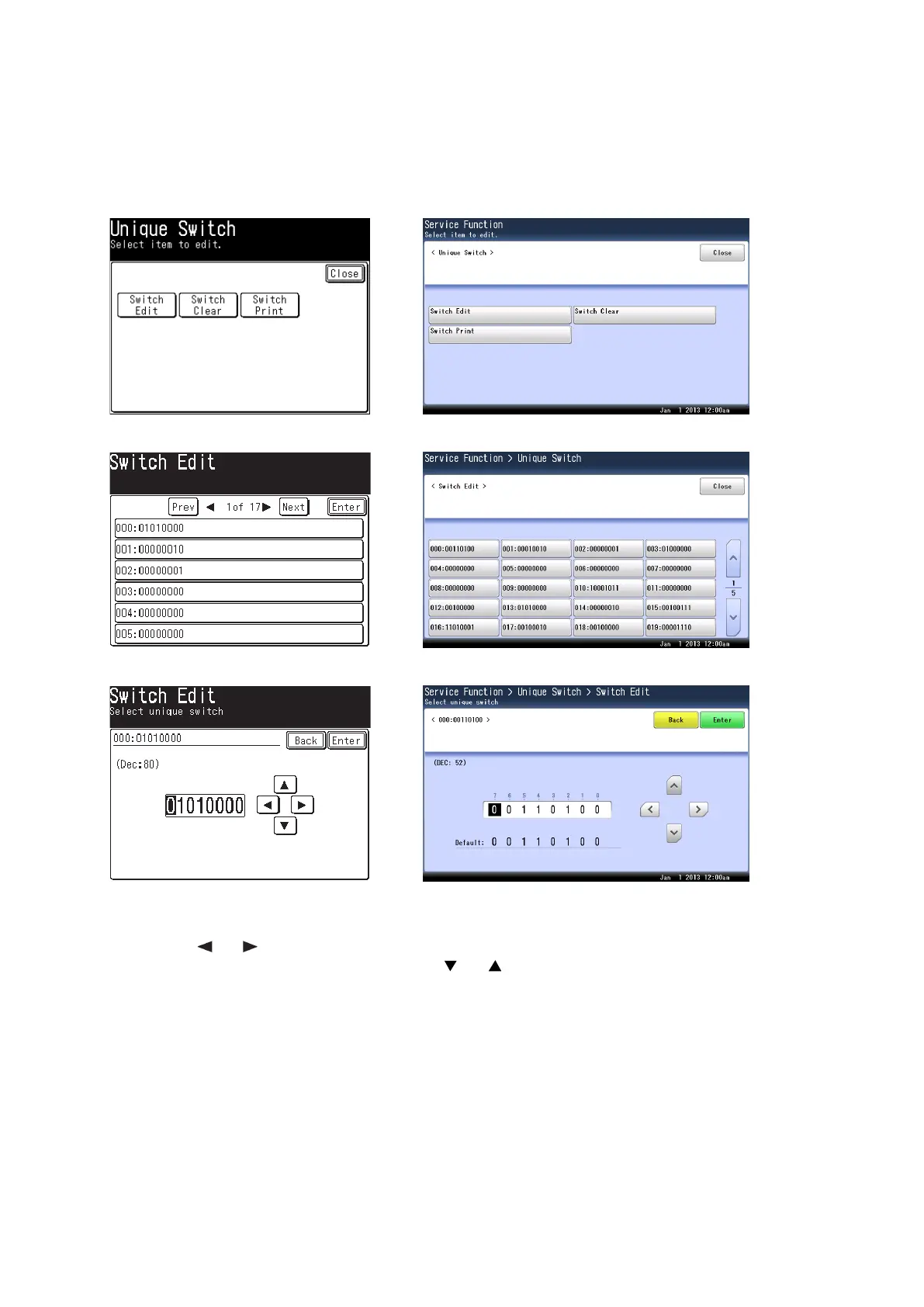
3.5.1 Setting the Unique Switches
These switches are used to program internal machine parameters.
1. From standby, press <Mode>, <*>, <0>, <4>.
2. Press [Switch Edit].
3. Call up the desired switch by pressing [
Prev]
or [
Next]
, or by pressing the numeric keys.
4. Select the desired switch by pressing the box.
5. To navigate through the unique switch settings:
• The bits are ranged from 7 (left) to 0 (right).
• Press [
]
or [
]
of the cursor key to move the cursor.
• Press <0> or <1> on the numeric keys, or [ ] or [ ], to change the bit value.
• Press [Enter] to save the setting of the displayed parameter and return to the machine parameter
edit screen.
• Press [Back] not to save the setting of the displayed parameter.
6. If you want to set other unique switches, repeat step 3-5. Otherwise, proceed to step 7.
7. Press <Reset> to return the machine to ready screen.
You can confirm the setting on a list. The unique switch list will be printed by pressing [Switch Print] in
step 2.










 To Next Page