5-96
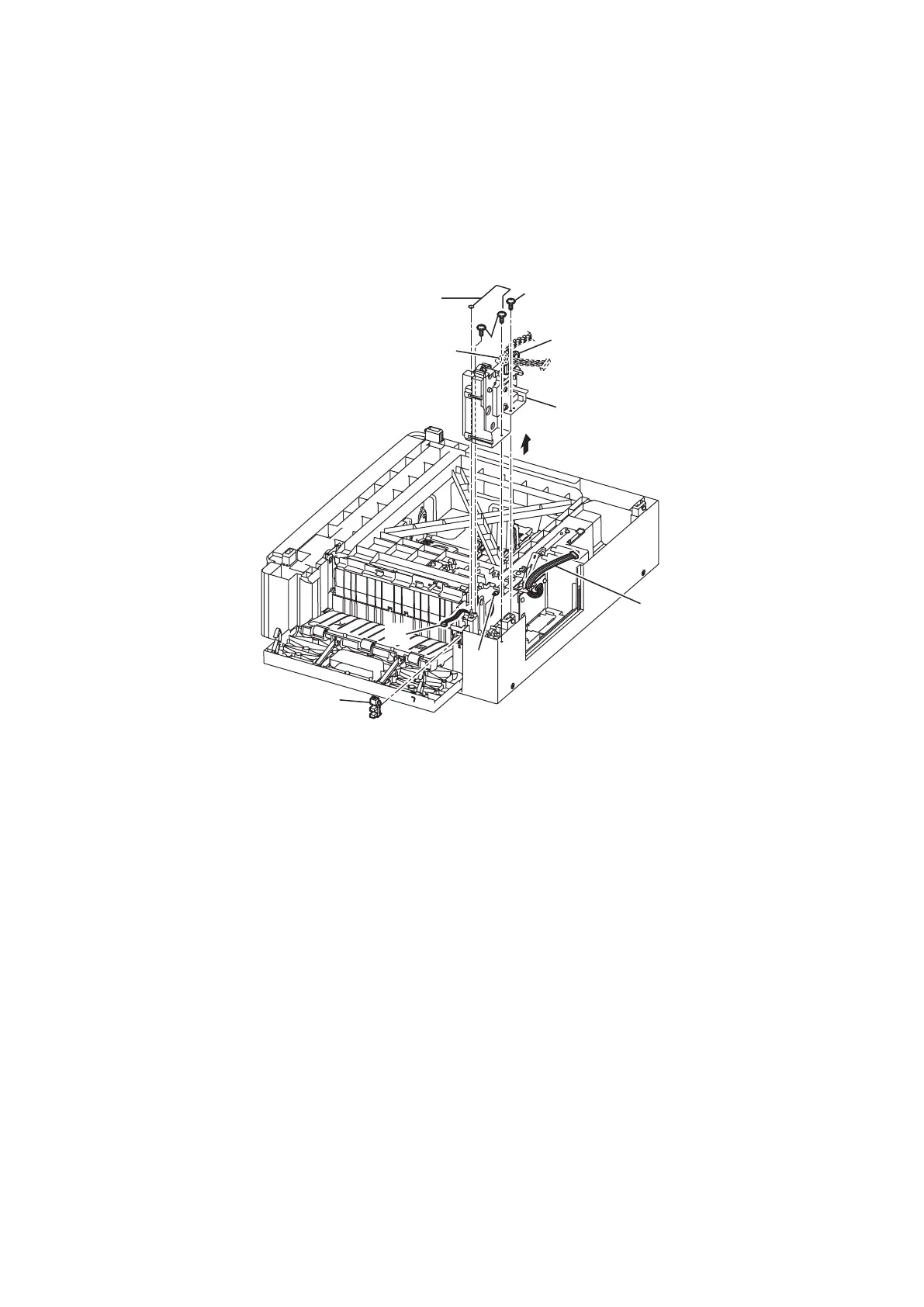
SENSOR JAMC2
1. Remove the OP Cassette. (See “OP CASSETTE” on page 5-91.)
2. Remove the Roller feed OP. (See “ROLLER FEED OP” on page 5-94.)
3. Remove the harness [1] from the Frame drive B OP hole [2].
4. Release two hooks [3] and remove the Spring T pickup OP [4].
5. Remove three screws [5], and remove the Frame drive ASSY OP [6].
6. Disconnect the connector [7].
7. Remove the SENSOR JAMC [8].
* There are hooks on the short side (1 place) and the long side (2 places) on the sensor.
After releasing the hook on the short side, slide the sensor to the short side and remove it.
[
8
]
[
2
]
[
5
]
[
5
]
[
6
]
[
4
]
[
3
]
[
1
]
[
7
]
[
3
]






 To Next Page