5-34
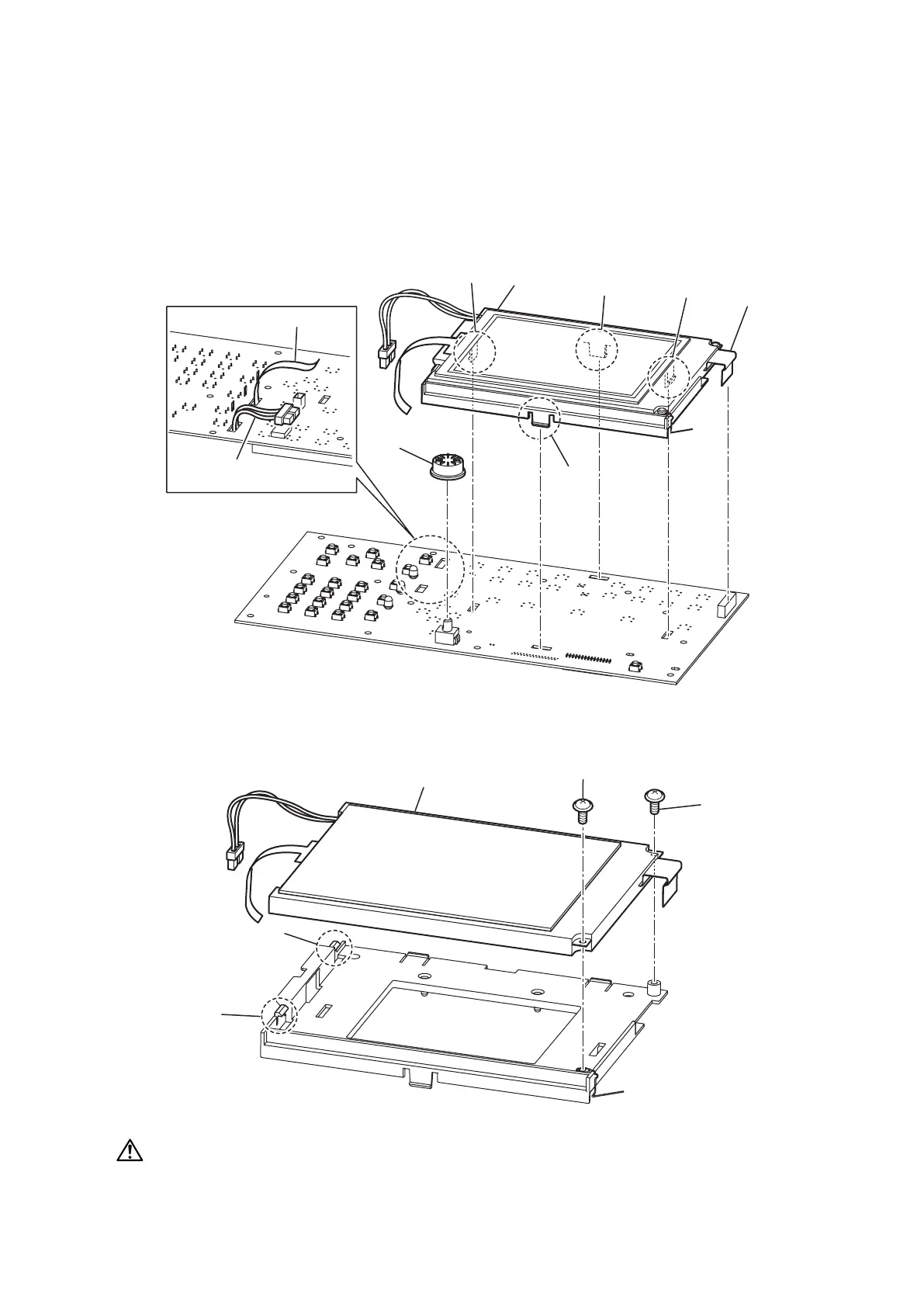
DISPLAY LCD B/W (MFX-3535)
1. Remove the Cover platen. (See “COVER PLATEN” on page 5-23.)
2. Remove the Cover top FBS. (See “CIS” on page 5-27.)
3. Remove the PCB panel assy. (See “PCB PANEL ASSY (MFX-3535)” on page 5-30.)
4. Remove the PCB PANEL. (See “PCB PANEL (MFX-3535)” on page 5-32.)
5. Remove the Knob volume [1].
6. Remove the film harness [2].
7. Disconnect the connector [3] and the film harness [4] on the back side.
8. Remove four hooks [5] then remove the Bracket LCD MID [6].
>
@
>
@
>
@
>
@
>
@
>
@
>
@
>
@
9. Remove two screws [7].
10. Remove the DISPLAY LCD B/W [9] while releasing two hooks [8].
>
@
>
@
>
@
>
@
CAUTION
• Handle the LCD gently to avoid from breaking it.
• If the LCD breaks and the liquid comes into contact with your hands, rinse with water. If you have
contact with your eyes or mouth, rinse with water and consult a physician.










 To Next Page