Description of Setup Buttons (User Settings) 6-3
6
[Printer Settings]
To display: [Utility] - [User Settings] - [Printer Settings]
Configure settings for printer operations.
[Basic Settings]
To display: [Utility] - [User Settings] - [Printer Settings] - [Basic Settings]
Specify the default print settings for this machine.
This machine operates according to these settings unless the printer driver specifies the print settings.
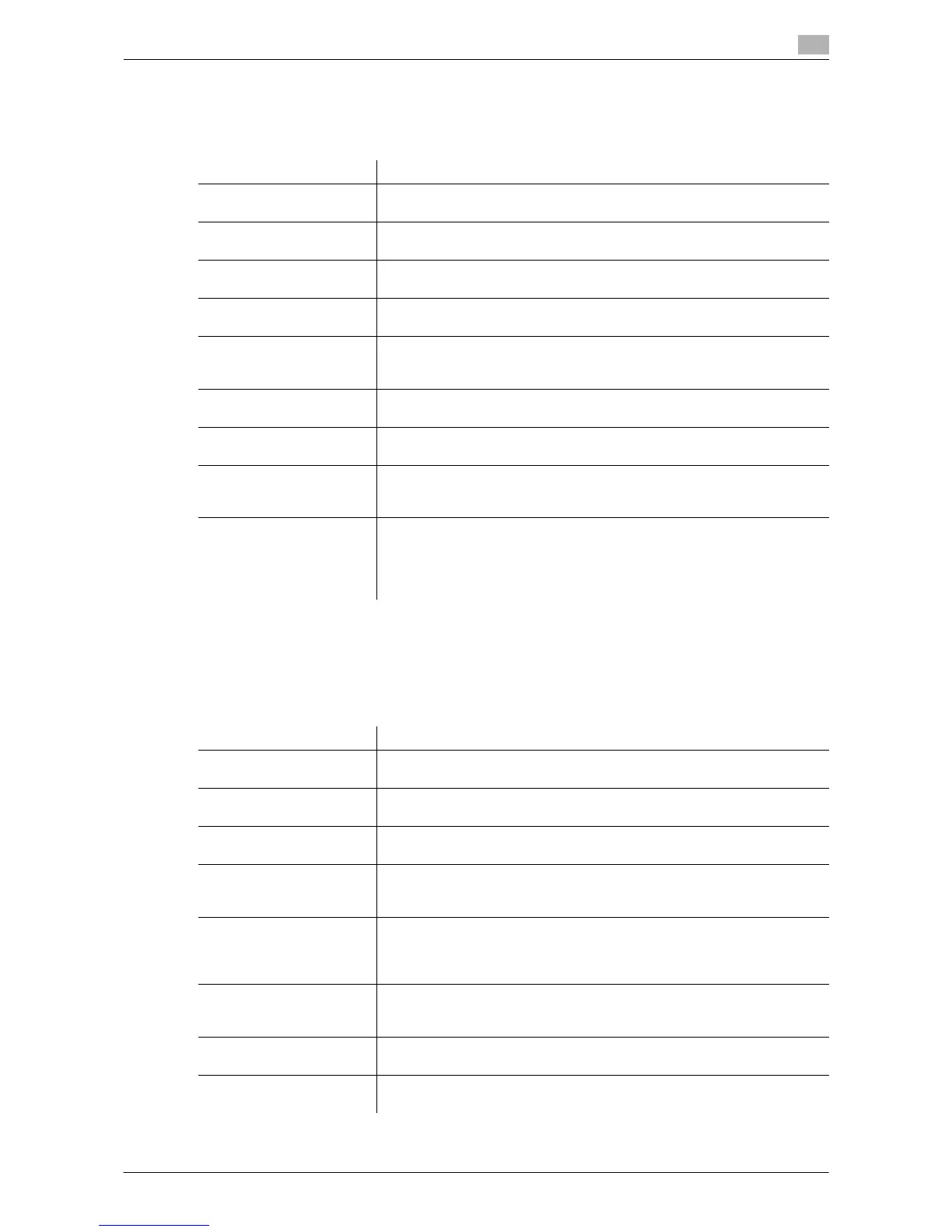
Settings Description
[Basic Settings] Specify the default print settings for this machine.
For details, refer to page 6-3.
[Paper Setting] Specify the default values for the paper trays and paper size to be used.
For details, refer to page 6-6.
[PCL Settings] Specify the default values for PCL printing.
For details, refer to page 6-6.
[PS Setting] Specify the default values for PS printing.
For details, refer to page 6-7.
[Security Settings] Select whether to verify the digital signature when printing XPS/OOXML
(docx, xlsx, pptx) files with a digital signature.
For details, refer to page 6-7.
[OOXML Print Settings] Specify the default value for OOXML print settings during direct printing.
For details, refer to page 6-8.
[Layout - Combination] Specify the default value for combination settings during direct printing.
For details, refer to page 6-8.
[Print Reports] A report on configuration information of this machine or a font list is print-
ed.
For details, refer to page 6-8.
[TIFF Image Paper Setting] Specify paper settings for directly printing of TIFF or JPEG format files.
The settings are applied when images are printed from a USB memory de-
vice or Bluetooth-compatible device or directly printed using the Direct
Print function of Web Connection.
For details, refer to page 6-9.
Settings Description
[PDL Setting] Select the Page Description Language.
For details, refer to page 6-4.
[Number of Copies] Enter the number of copies to be printed.
For details, refer to page 6-4.
[Original Direction] Select the orientation of the image to be printed.
For details, refer to page 6-4.
[Spool Print Jobs in HDD
before RIP]
Select whether to save the next print job on the hard disk if the job is re-
ceived while another print job is being executed.
For details, refer to page 6-4.
[A4/A3 <- -> LTR/LGR Auto
Switch]
If papers you have set by [User Settings] - [Printer Settings] - [Paper Set-
ting] - [Paper Size] are not loaded into the paper tray, you can specify
whether or not to print on paper of a similar size.
For details, refer to page 6-4.
[Banner Sheet Setting] Select whether to print the banner page (cover page) showing the sender
or title of the print data.
For details, refer to page 6-5.
[Binding Direction Adjust-
ment]
Select how the binding position is adjusted on two-sided printed sheets.
For details, refer to page 6-5.
[Line Width Adjustment] Select how the width of text or lines is adjusted.
For details, refer to page 6-5.



 To Next Page
 Loading...




