Printing in the Windows Environment 2-60
2.4 Useful Printing Functions
2
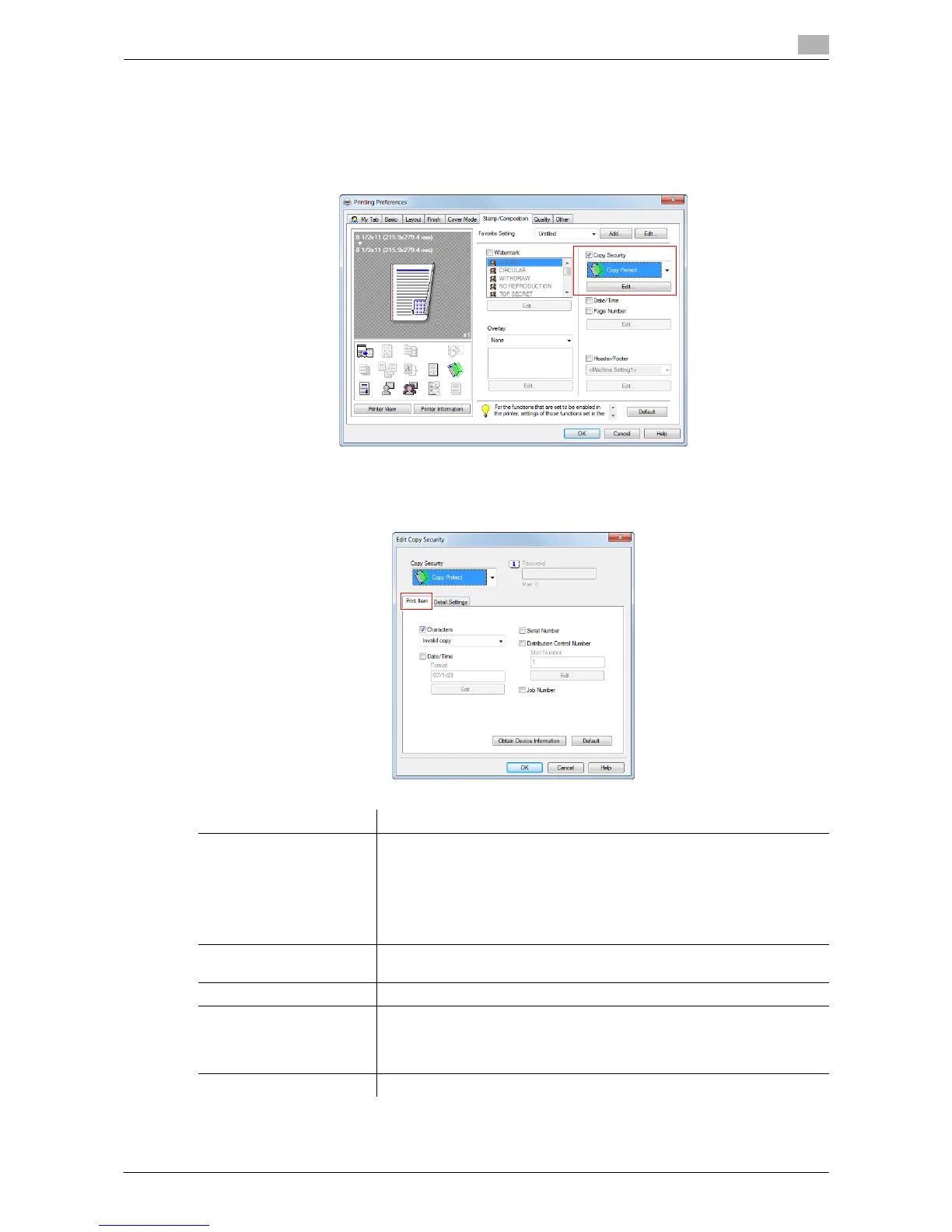
Configuring the print settings for Copy Security
When printing a copy security pattern on sheets, you can set the text to be printed and the format of the text
as necessary.
1 On the [Stamp/Composition] tab, check the [Copy Security] box, and then click [Edit...].
2 In the [Print Item] tab, select the item to be printed.
% Items that can be specified vary depending on the selected copy security function.
Settings Description
[Characters] Select this check box to print a text. In addition, select the text you want to
print.
• You can select the text to be printed from the registered preset stamps
and stamps registered by users.
• If your computer can communicate with this machine, clicking [Obtain
Device Information] obtains and displays the latest stamp information
registered in this machine.
[Date/Time] Select this check box to add the print date/time.
As necessary, click [Edit...] to specify the format.
[Serial Number] Select this check box to print the serial number of this machine.
[Distribution Control
Number]
Select this check box to print copy numbers when printing multiple sets of
copies.
As necessary, click [Edit...] to specify the start number and the number of
digits.
[Job Number] Select this check box to print the job numbers managed in this machine.



 To Next Page