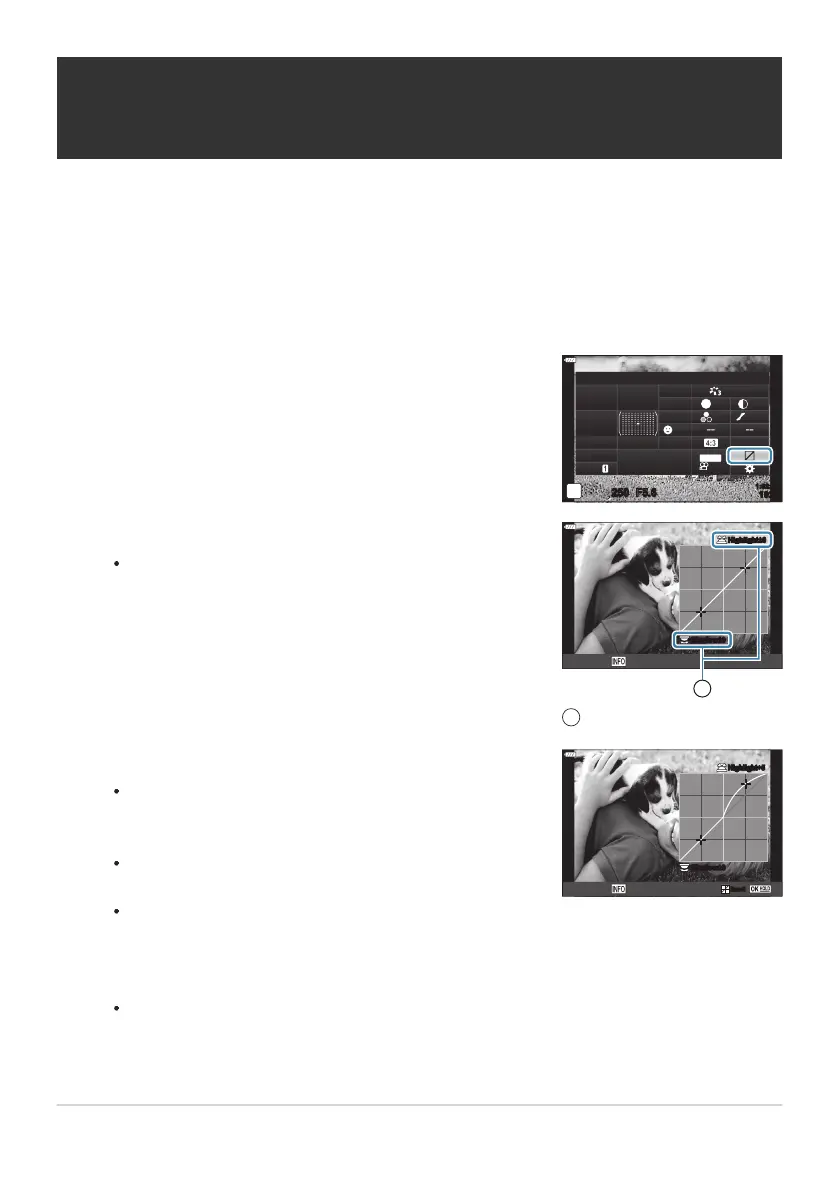
Highlight [Highlight&Shadow Control] using the
FGHI
buttons and press the OK button.
Highlight&Shadow Control
sRGB
Natural
Normal
WB
Auto
ISO
Auto
A
±
0
G
±
0
250 F5.6
p
S
±
0
±
0
±
0
o
S
-
AF
Off
30
p
30
p
4K
S-IS Auto
Y
F
#
±
0.0
#
1023
1:02:03
M-IS
Press the INFO button t
o choose the desired tone range.
The tone range changes each time the button is pressed.
Shadow±0
Highlight+5
Highlight±0
Midtone
1
Selected tone range
1
Rotate the dials to choose the desired setting.
[Hi. & Sh.] selected
Adjust highlights using the fr
ont dial and shadows using the
rear dial.
[Midtone] selected
Use the front or rear dial.
To reset highlight and shadow control, press and hold the
OK button.
Shadow±0
Highlight+5Highlight+5
ResetReset
Midtone
Changing the brightness of highlights and
shadows (Highlight&Shadow Control)
Adjust brightness sep
arately for highlights, mid-tones, and shadows. You gain greater control over
exposure than you would with exposure compensation alone. You can selectively make highlights
darker or shadows brighter.
Press the OK button to display the LV super control panel.
Press the OK button to select the highlighted option.
You can also save changes by pressing the shutter button halfway.
166
Changing the brightness of highlights and
shadows (Highlight&Shadow Control)
1.
2.
3.
4.
5.



 To Next Page