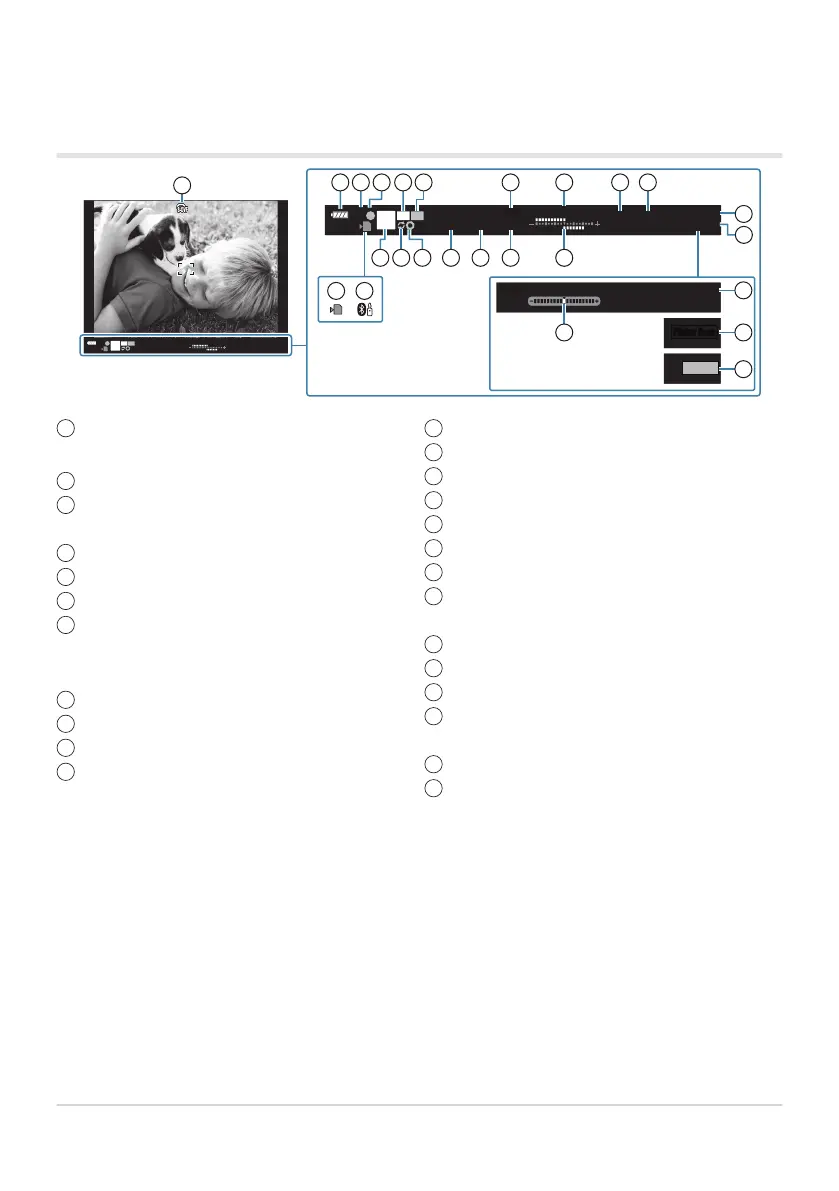
sOVF simulation
1
gCCustom Menu
I> [S-OVF] (P. 293)
Battery level (P. 32)
Flash mode (blinks while flash is charging, lights
when charging is complete) (P. 147, P. 149)
AF confirmation mark (P. 43)
Custom mode (P. 77, P. 79)
AE lock (P. 100, P. 299)
Live view boost
gCCustom Menu j> [Live View
Boost] (P. 280)
Highlight & shadow control (P. 166)
White balance (P. 129)
ISO sensitivity (P. 98, P. 117)
Card write indicator (P. 23, P. 28)
1
2
3
4
5
6
7
8
9
10
11
Active Bluetooth
®
connection (P
. 359)
Shooting mode (P. 43)
Pro Capture active (P. 107)
Preview (P. 167)
Shutter speed (P. 48, P. 51, P. 53, P. 55)
Aperture value (P. 48, P. 51, P. 53, P. 55)
Exposure compensation value (P. 89)
Top: Flash intensity control (P. 153)
Bottom: Exposure compensation (P. 89)
Available recording time (P. 424)
Number of storable still pictures (P. 422)
Level gauge
2
(P. 42)
Recording time (displayed during recording)
(P. 83)
Flicker scan (P. 240, P. 343)
Test shot (P. 169)
12
13
14
15
16
17
18
19
20
21
22
23
24
25
Viewfinder display when shooting using the
viewfinder (Style 1/S
tyle 2)
1:02:03
1023
250 F5.6 +2.0
WB
AUTO
Sh-3 Mid+2 Hi+6
ISO-A
200
P
AEL
C
#
G
1:02:03
1023
250 F5.6 +2.0
WB
AUTO
Sh-3 Mid+2 Hi+6
ISO-A
200
P
AEL
C
#
G
F5.6 +2.0
WB
AUTO
ISO-A
200
G
●
REC
0:00:12
1:02:03
1
32 4 5 6 7 8 9
10
20
21
13 14 15 16 17 18 19
22
11 12
23
24
25
Shown in viewfinder only.
Displayed when the shutt
er button is pressed halfway. gCCustom Menu I> [qHalf Way
Level] (P. 293)
350
Selecting the display style of the viewfinder (EVF
S
tyle)
1
2



 To Next Page