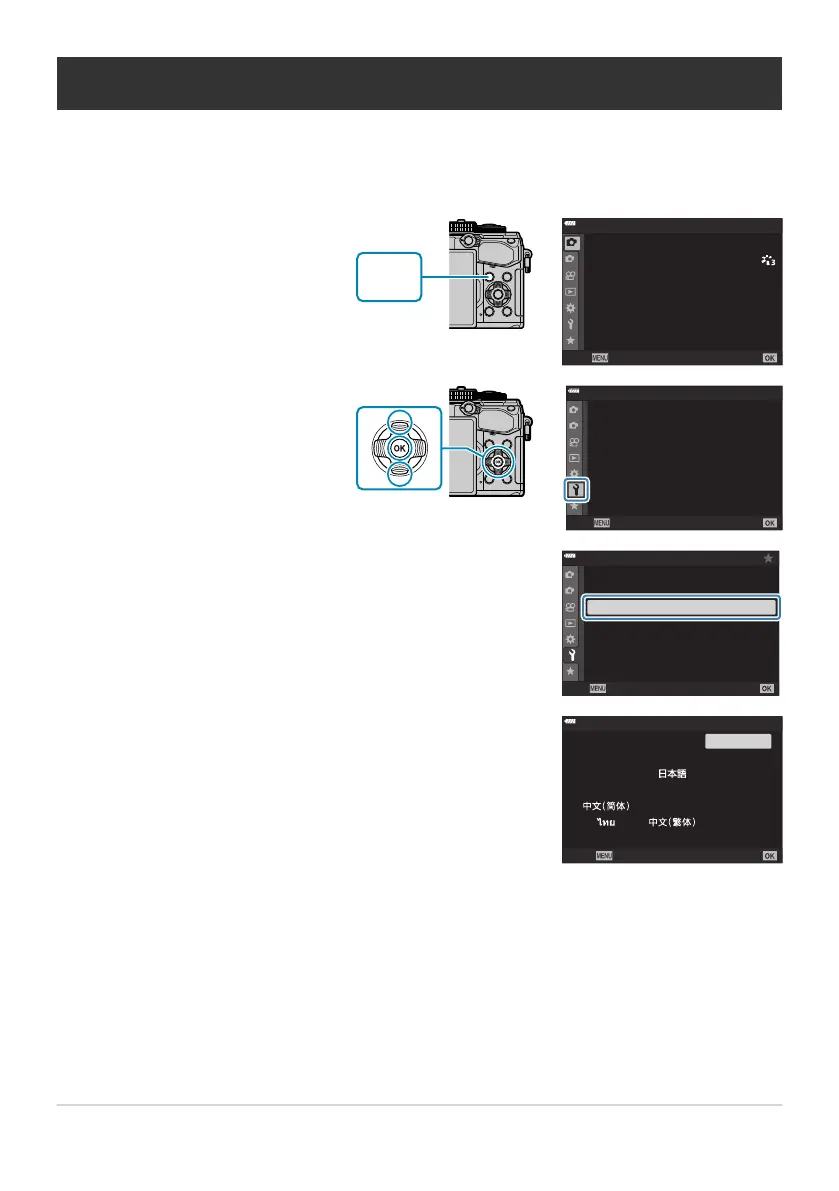
Press the MENU button t
o
view the menus.
1
2
1
เมนูถ่ายภาพ 1
4:3
ป
ิด
ส
ั
ดส
่
วนภาพ
K
K
โหมดภาพ
รีเซ
็
ต / โหมดกําหนดเอง
ดิจิทัลเทเลคอน
ระยะเวลาต่อภาพ/Time Lapse
Y
F
กลับ ตั=งค่า
o
j
/
Y
ปิ ด
Highlight the e (setup) tab
using the
FG buttons and
press the OK button.
1
2
j±
0 k±0
s
W
เมนูตังค่า
ไทย
ป
ิด
X การตังค่า
ตังค่าการ์ด
ตรวจดูภาพ
การตังค่า Wi-Fi/Bluetooth
เวอร์ช
ั
นเฟิ ร์มแวร์
กลับ
ตังค่า
Highlight [W] using the FG buttons and pr
ess the OK
button.
1
2
เมนูตังค่า
ไทย
j±
0 k±0
ปิ ด
s
W
X ก
ารตังค่า
ตังค่าการ์ด
ตรวจดูภาพ
การตังค่า Wi-Fi/Bluetooth
เวอร์ช
ั
นเฟิ ร์มแวร์
กลับ ตังค่า
Highlight the desired language using the FGHI buttons
and pr
ess the OK button.
W
SetBack
Suomi
Česky
Italiano
Polski
Français
Nederlands
Português(Pt)
Deutsch
English
Norsk
Ру
сский
SvenskaEspañol
Türkçe
What to Do If You Can’t Read the Display
If you see unfamiliar charact
ers or words in other languages, you may not have selected the language
you intended. Follow the steps below to choose another language.
36
What to Do If You Can’t Read the Display
1.
2.
3.
4.



 To Next Page