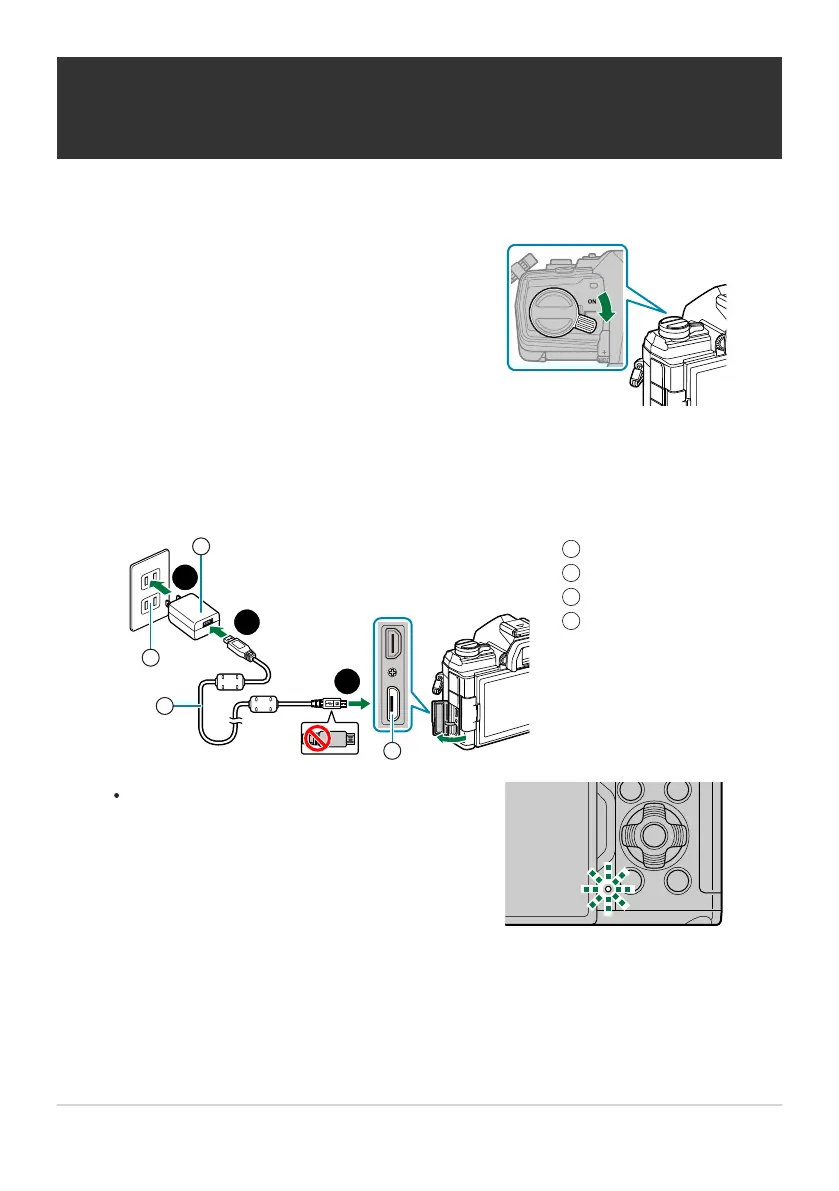
Confirm that the ON/OFF lever is in the OFF
position.
USB-AC adapter (supplied)
AC outlet
USB cable (supplied)
Micro-USB connector
1
2
3
4
The CHARGE lamp lights while charging is
in progr
ess. Charging takes about 4 hours.
The lamp goes out as the batteries reach
full charge. Remove the USB cable from the
camera.
Charging the Battery using the supplied USB-
AC adapt
er
The battery will not be fully charged at the time of purchase. Charge the battery before use.
Connect the USB cable and USB-AC adapter and plug the adapter in.
Refrain from using anything other than the USB cable (CB‑USB12) supplied with the camera
or sold separately.
If a charging error occurs, the CHARGE lamp will blink. Disconnect and reconnect the USB
cable.
24
Charging the Battery using the supplied USB-AC
adapter
C
1.
2.
B
C



 To Next Page