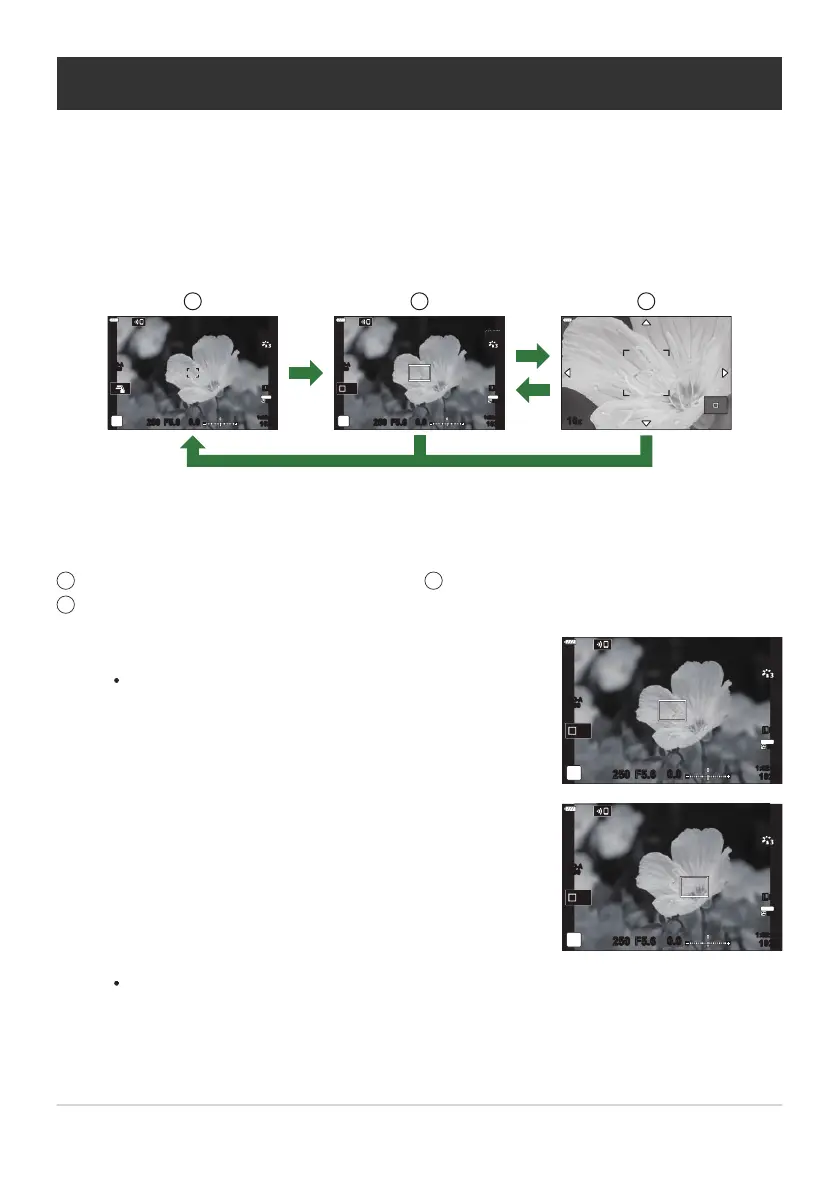
Shooting display
Zoom frame AF display
1
2
Zoom AF display
3
Press the button to which [8] (magnif
y) is assigned.
The zoom frame will be displayed.
S-IS AUTOS-IS AUTO
250 F5.6
Off
0.0
S-IS AUTOS-IS AUTO
30
p
30
p
4K
YFYF
1023
1:02:03
ISO-A
200
Position the frame using the FGHI buttons.
S-IS AUTOS-IS AUTO
250 F5.6
Off
0.0
30
p
30
p
4K
YFYF
1023
1:02:03
ISO-A
200
Zoom frame AF/Zoom AF (Super Spot AF)
You can zoom in on the display during shooting. For gr
eater precision during focusing, zoom in on the
focus area. At higher zoom ratios, you can focus on areas smaller than the standard focus target. You
can reposition the focus area as desired during zoom.
This function is only available when [8] is assigned to a camera control. g“Assigning functions
to buttons (Button Function)” (P. 167), “Available Roles” (P. 169)
S-IS AUTOS-IS AUTO
250 F5.6
0.0
30
p
30
p
4K
YFYF
ISO-A
200
10x
S-IS AUTOS-IS AUTO
250 F5.6
Off
0.0
S-IS AUTOS-IS AUTO
30
p
30
p
4K
YFYF
1023
1:02:03
ISO-A
200
8
8
8
1 2 3
OK
1
To return to the shooting display, you have the option of pressing and holding the control to
which [8] (magnify) is assigned inst
ead of pressing the OK button.
To re-center the frame, press and hold the OK button.
96
Zoom frame AF/Zoom AF (Super Spot AF)
C
1
1.
2.



 To Next Page