1
2
1
4:3
Off
Y
F
o
Off
Back
Set
Shooting
Menu 1
K
K
Picture Mode
Reset / Custom Mo
des
Intrvl. Sh./Time Lapse
j
/
Y
Image Aspect
Digital Tele-converter
Preliminary and basic
shooting options.
5
4
3
2
1
Guide
Press the
OK button to confirm the setting
Press the MENU button to go back one
screen
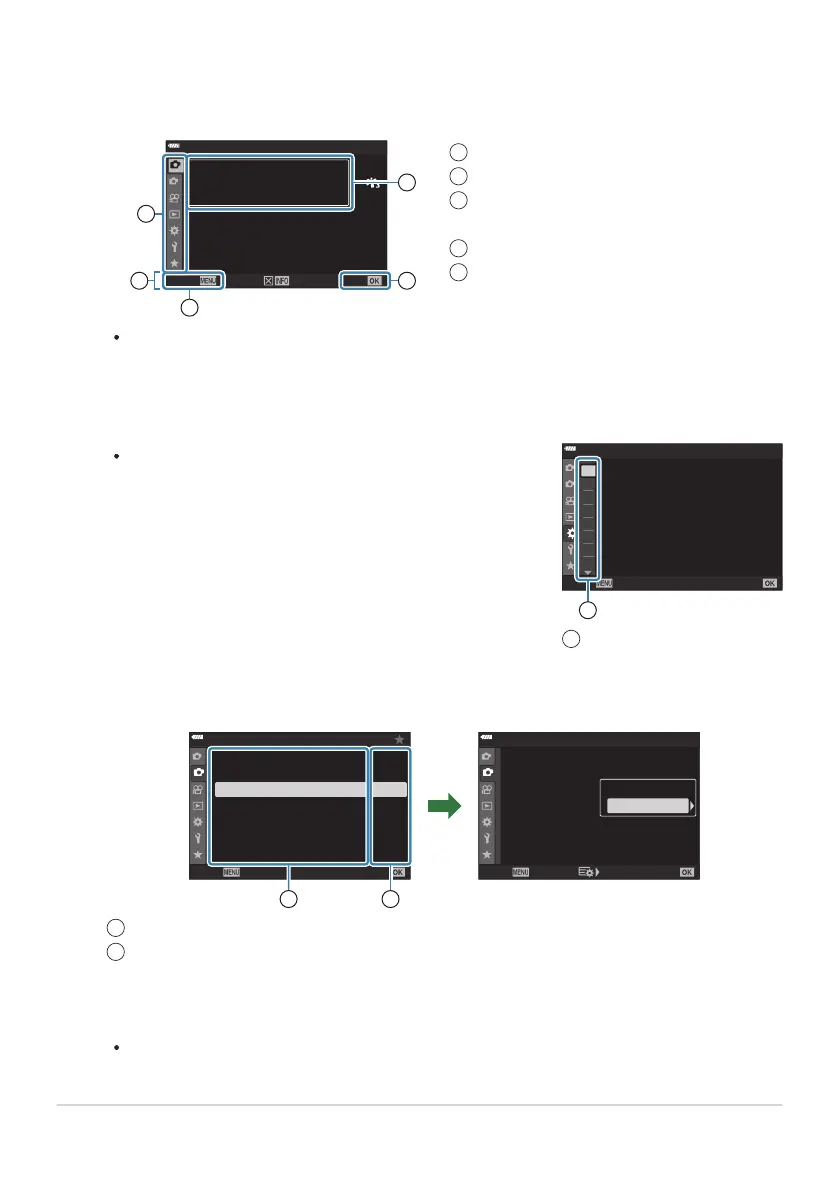
Operation guide
Tab
1
2
3
4
5
Menu group tabs appear when CCust
om Menu is
select
ed. Use FG to select the menu group and press the
OK button.
1
2
A2
A3
A4
A1
B
C1
C2
D1
A1
A1. AF/MF
mode2
±0
S3/
C4/M3/F3
Off
S-AF
AF Scanner
K
AEL/AFL
K
AF+MF
K
AF Mode
K
C-AF Sensitivity
K
C-AF Center Start
K
C-AF Center Priority
Back
Set
1
Menu groups
1
Press the MENU button t
o view the menus.
A guide is displayed about 2seconds after you select an option. Press the INFO button to
view or hide guides.
Highlight a tab using the FG buttons and press the OK button.
Select an item using FG and press the OK button to display options for the selected item.
1
2
1
2
2 2
Off
Off
Off
Off
Shooting Menu 2
Keystone Comp.
Multiple Exposur
e
HDR
Bracketing
Back
Set
Anti-Shock r/Sil
ent s
Off
High Res Shot
Live ND Shooting
Off
Off
Off
Off
Shooting Menu 2
Keystone Comp.
Multiple Exposur
e
HDR
Bracketing
Back
Set
Anti-Shock r/Sil
ent s
Off
High Res Shot
Live ND Shooting
Off
On
OK
21
Function
The current setting is display
ed
Use FG to highlight an option and press the OK button to select.
Press the MENU button repeatedly to exit the menu.
201
Basic menu operations
1.
2.
3.
1
2
4.



 To Next Page