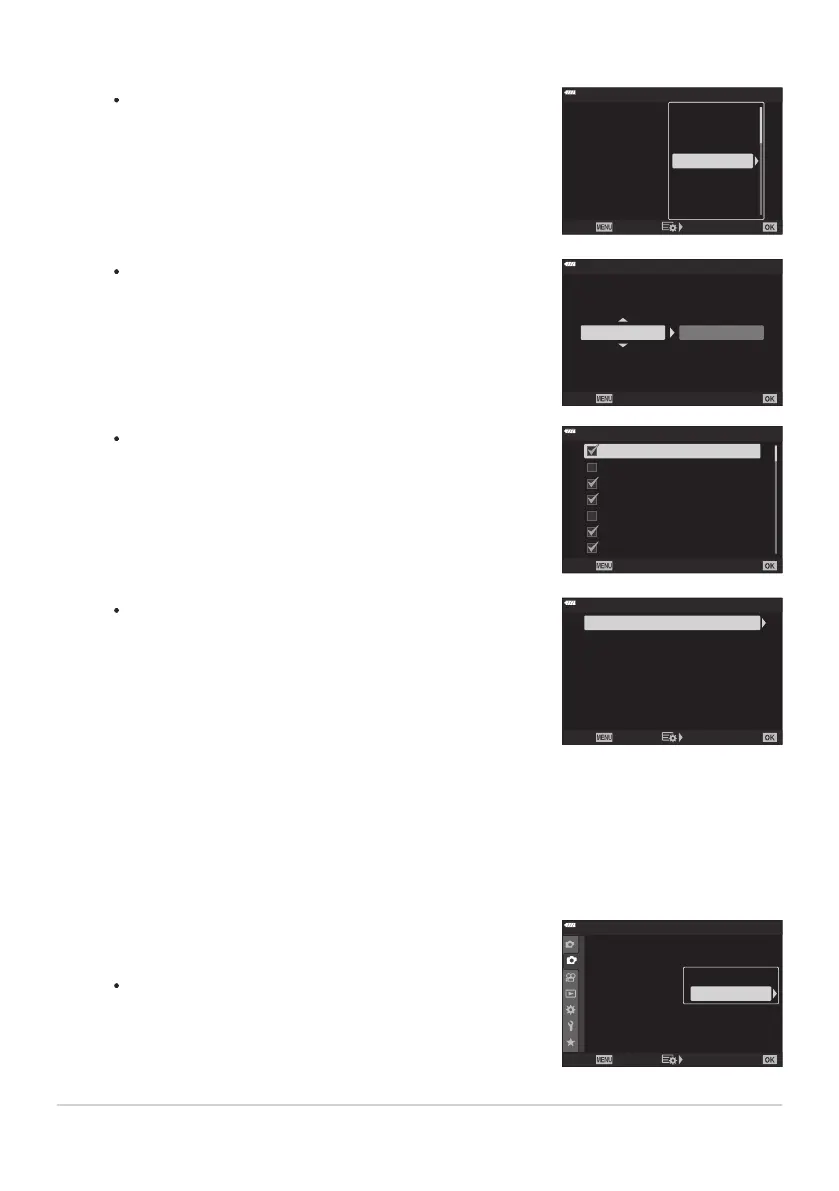
AE BKT
Highlight a two-shot (2f
) option and press the I button to
display a menu where you can choose whether exposure will
be adjusted upward or downward from the reference value.
Use the FG buttons to highlight the desired option and
press the OK button to select the highlighted option and
return to the previous display.
ART BKT
ISO BKT
Focus BKT
WB BKT
AE BKT
FL BKT --
-
-
--
--
A-- G--
3f 1.0EV
Back Set
Bracketing
Off
2f 0.3EV
2f 0.7EV
2f 1.0EV
3f 0.3EV
3f
0.7EV
3f 1.0EV
WB BKT
You will be pr
ompted to choose a color axis (A–B or G–M).
Use the HI buttons to highlight an axis and the FG
buttons to choose the bracketing amount. Press the OK
button to return to the previous display when settings are
complete.
WB BKT
A-B G-M
3f 4Step 3f 4Step
Back Set
ART BKT
Highlight [On] and press the
I button to display a menu
of picture modes and art filters. Use the FG buttons to
highlight the desired filters and press the OK button to
select (selected filters are indicated by check marks). Press
the MENU button to return to the previous display when
settings are complete.
ART BKT
H
Pop Art 2
Pop Art 1
Soft Focus
Pale&Light Col
or 1
Pale&Light Color 2
Light Tone
Grainy Film 1
Back
Focus BKT
Highlight [On] and press the
I button to view focus
bracketing settings. Use the FG buttons to highlight a
setting and press the I button to display options. Use
the FG buttons to highlight an option and press the OK
button to return to the setting menu. Press the OK button
again to return to the bracketing menu when settings are
complete. The [Focus BKT] menu is also used for [Focus
Stacking] settings.
Off
8
5
Set number of shots
Focus Stacking
Set focus differential
#Charge T
ime
0sec
Focus BKT
Back Set
Confirm that [On] is selected for
[Bracketing] and press the
OK button.
To save changes without enabling bracketing, press the
MENU button or highlight [Off] and press the OK button.
1
2
2
Off
Off
Off
Off
Shooting Menu 2
Keystone Comp.
Multiple Exposur
e
HDR
Bracketing
Back
Set
Anti-Shock r/Sil
ent s
Off
High R
es Shot
Live ND Shooting
Off
On
Using the FGHI buttons, select
[On] or a bracketing program.
With [On] selected, press the OK button to save changes and exit.
222
Varying settings over a series of photographs
(Bracketing)
4.
5.
6.



 To Next Page