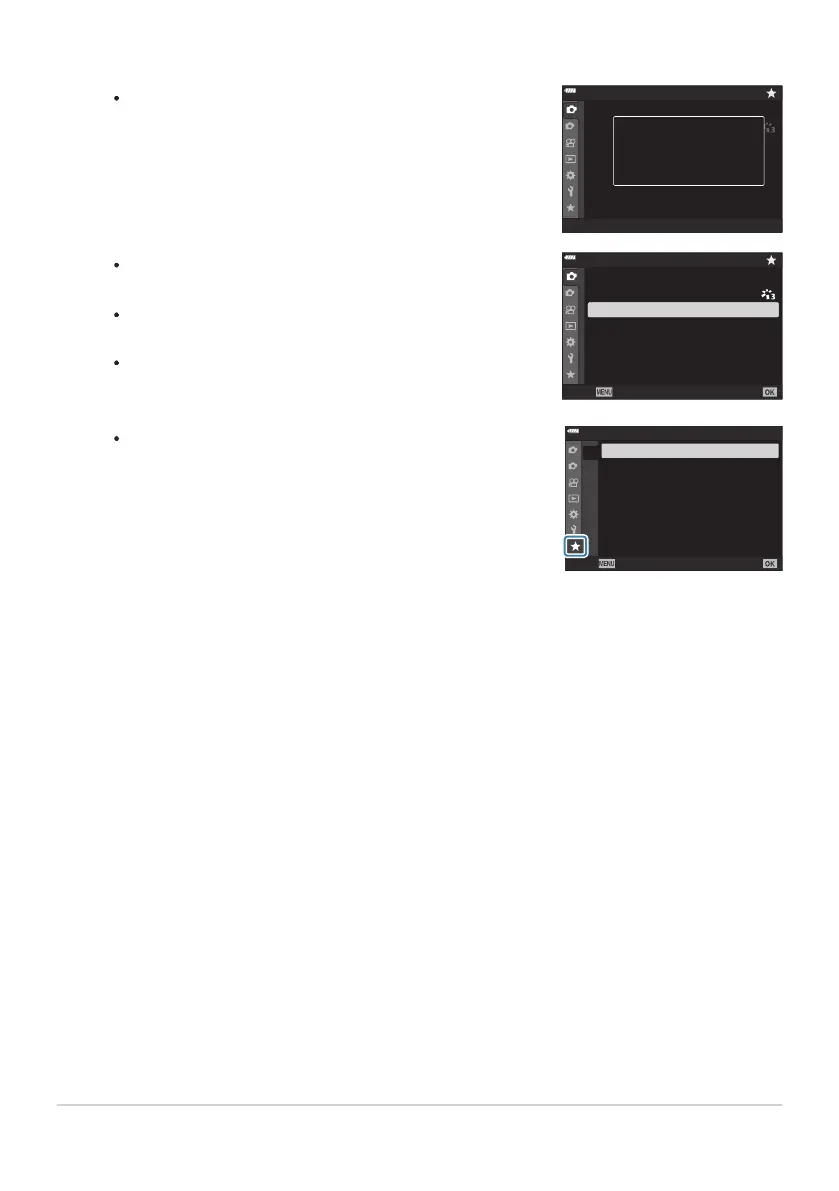
The camera will display a message stating that the item has
been added to “My Menu”
.
1
2
1
4:3
Off
Y
F
o
Off
Picture Mode
Reset / Custom Modes
K
K
Intrvl. Sh./Time Lapse
j
/
Y
Image
Aspect
Digital Tele-converter
Added to My Menu.
Items that have been added to “My Menu” are indicated by
a yellow
E.
The next available page will be displayed once the seventh
item is added to the current page.
Items marked with a E can be removed from “My Menu”
by pressing the R button. Select [Yes] and press the OK
button.
1
2
1
4:3
Off
Y
F
o
Off
Back
Set
Shooting Menu 1
K
K
Picture Mode
Reset / Custom Mo
des
Intrvl. Sh./Time Lapse
j
/
Y
Image Aspect
Digital Tele-converter
Items saved to “My Menu” are added to the E (“My
Menu”) tab.
1
2
f2
f3
f4
f5
f1f1
YF
My Menu 1
K
K
Back Set
Press the OK button t
o add the item to the selected page.
To access "My Menu", select the E (“My Menu”) tab.
267
My Menu
4.
5.



 To Next Page