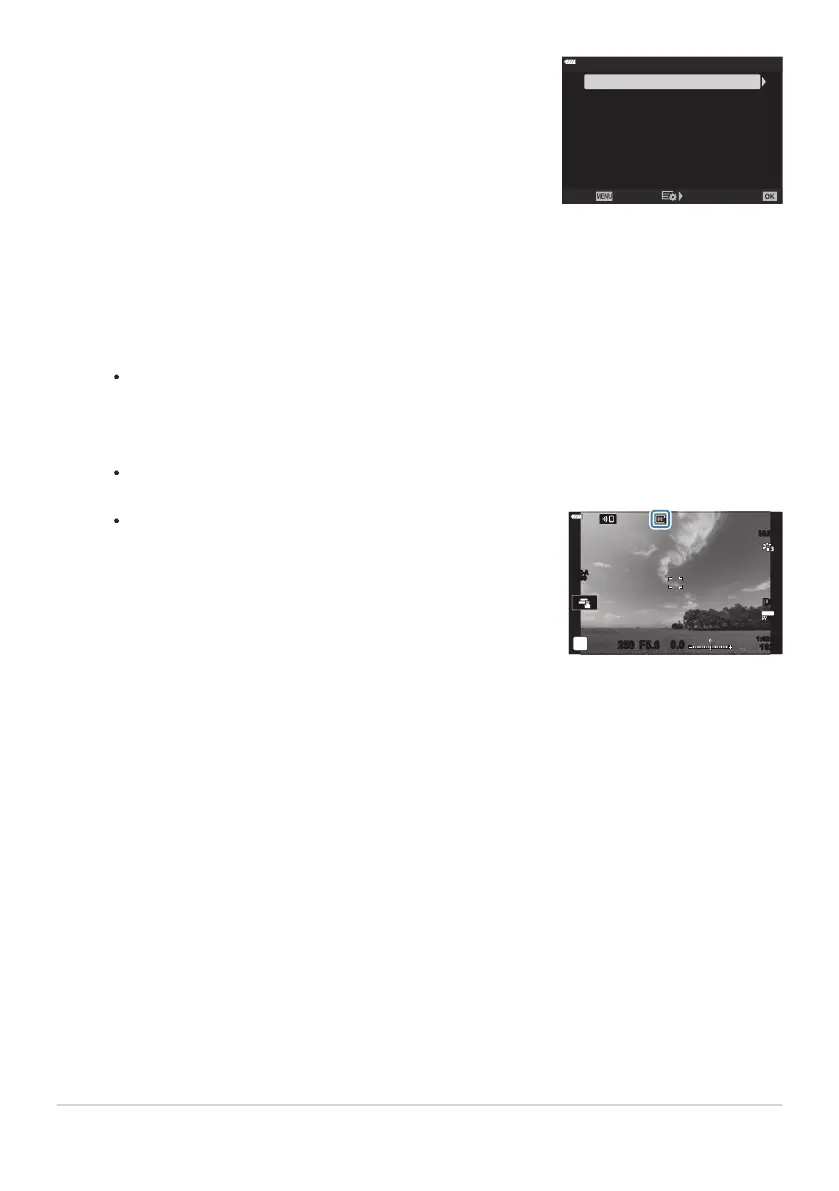
Highlight an item using the FG buttons and pr
ess the I
button.
1
Off
j/i Correction
Angle
Fisheye Compensation
Back Set
When fisheye compensation is enabled, a r icon will be
displayed t
ogether with the selected crop.
S-IS AUTOS-IS AUTO
250 F5.6
0.0
30
p
30
p
4K
1
YFYF
1023
1:02:03
ISO-A
200
Highlight an option using the FG buttons.
If y
ou are not taking photos under water, choose [Off] for [Q/PCorrection].
Press the OK button.
[Fisheye Compensation] options will be displayed.
Press the OK button repeatedly to exit to CCustom Menur.
After confirming that [On] is selected for [Fisheye Compensation], press the MENU button
to exit the menus.
Take pictures.
Pictures taken with [RAW] selected for image quality are recorded in RAW+ JPEG format. Fisheye
compensation is not applied to the RAW image.
Focus peaking is not available in the fisheye compensation display.
AF-target selection is restricted to single- and small-target modes.
The following cannot be used:
live composite photography, burst photography, bracketing, HDR, multiple exposure, the live
ND filter, keystone compensation, the digital teleconverter, movie recording, [C‑AF], [C‑AFJ],
[C‑AF+TR], and [C‑AF+TRJ] AF modes, [e-Portrait] and art filter picture modes, the custom
self-timer, and High Res Shot.
354
Correcting Fisheye Distortion (Fisheye
Compensation)
3.
4.
C
5.
6.
7.
C
C
C
C
-



 To Next Page