Chapter E: Basic repair procedures 2 Basic repair procedures
Technical manual Planmeca PlanMill 40 149
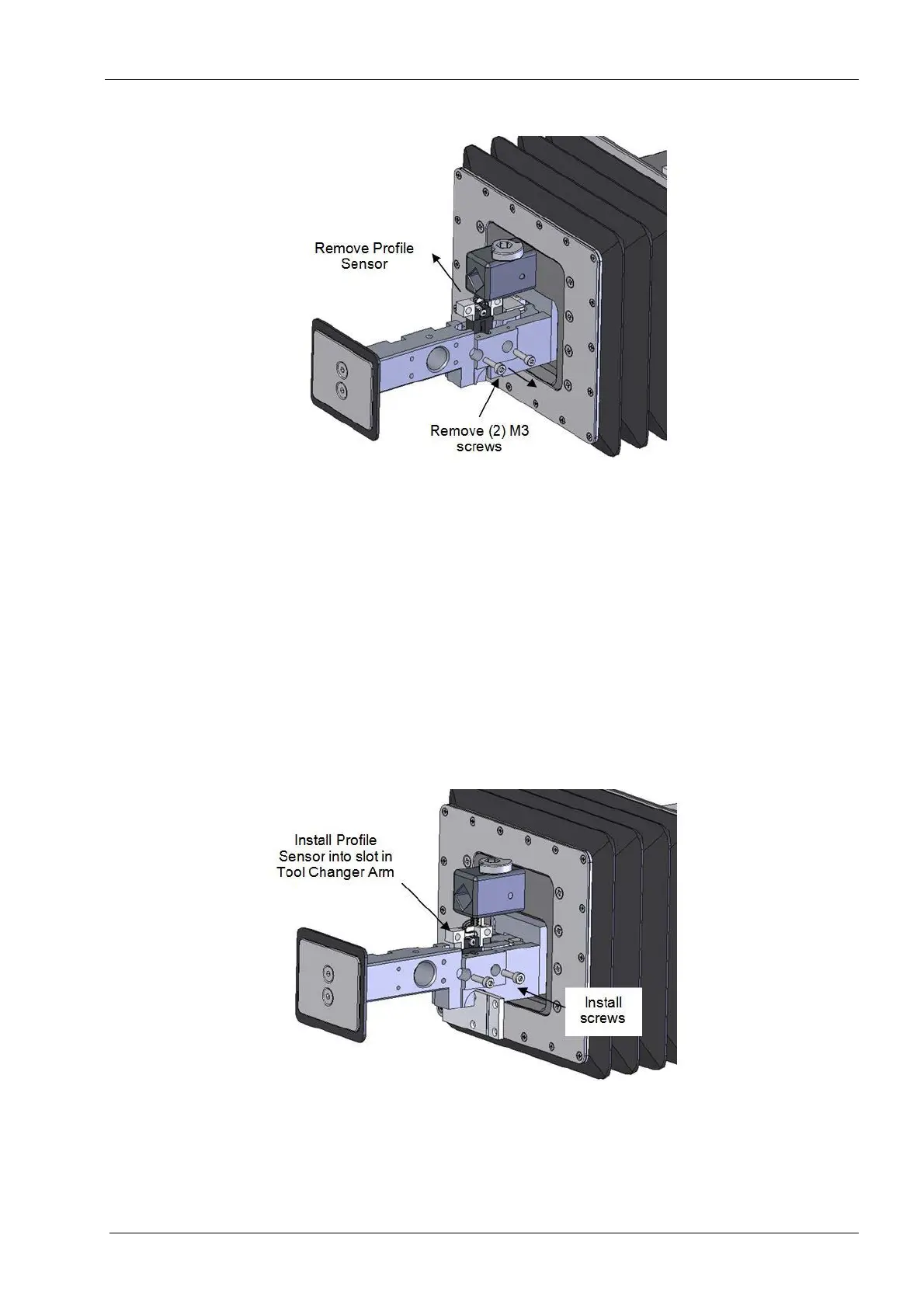
Figure 157: Profile sensor removal
5. Use the 2.5 mm Allen key and remove the screws.
6. Lift the sensor up out of the pocket, locate the inline connector and disconnect.
When disconnecting the connector be careful to pull only on the connector housing
and not the individual wires as this can damage the cable assembly.
7. Remove the sensor from the assembly.
Install
1. Use the profile sensor cap as an alignment tool for the profiles sensor by inserting it
into the profile sensor slot as shown in the illustration
2. Position the sensor into the pocket, insert the (2) screws and tighten.
Figure 158: Profile sensor installation
3. Connect the sensor to the cable, position the cable assembly so the cap can sit flush
on the tool changer arm.
4. Reinstall the cap using the (4) flat head screws
5. Reinstall the tool holder, see section 2.9 "Tool holder" on page 147.














 To Next Page