Troubleshooting
Troubleshooting
290
• Paper is not smoothly fed
from the Paper Feed Tray.
(skipped paper, or multiple-
sheet feeding)
• There is a lot of paper
powder
• Multiple sheets of paper
were fed
• Construction paper or
postcard was skipped
• The back side of the
postcard is turned up
The print paper is inappropriate. Use paper that falls within the
recommended range.
)p.14
The position of the Paper Feed
Pressure Adjustment Lever was
inappropriate.
When using thick or slippery paper, set the
Paper Feed Pressure Adjustment Lever to
“Thick Paper”.
)p.33
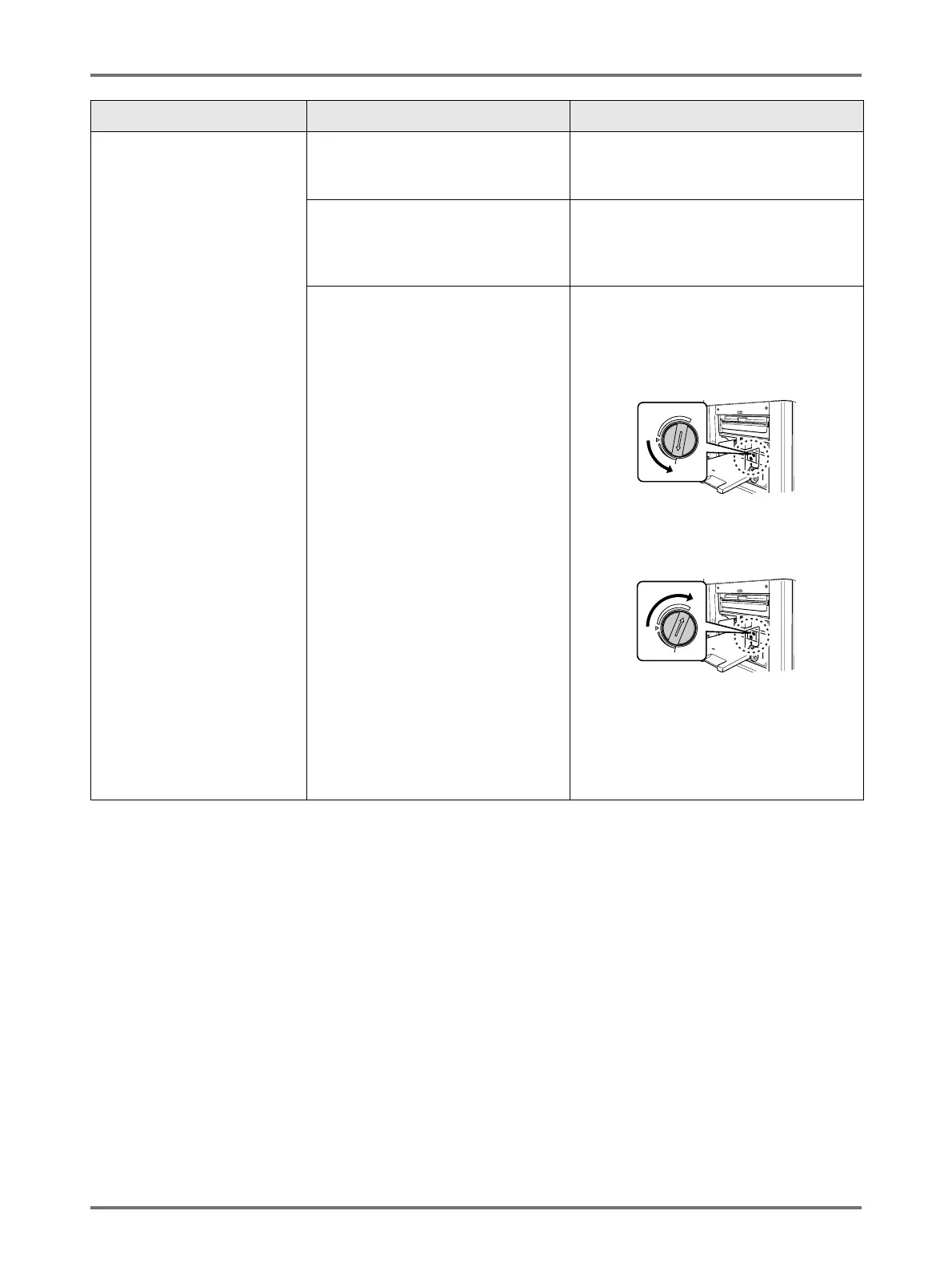
The angle of the Stripper Plate is
inappropriate.
Turn the Stripper Plate Angle Adjustment
dial as follows;
• When the feeding skips
Turn the dial to the left.
• When multiple sheets are fed
Turn the dial to the right.
Important!:
• Before making the adjustment, be sure
to remove all paper from the Paper
Feed Tray and confirm that the tray has
lowered to the bottom.
Problem Possible Cause Action



 To Next Page