Basic Operations
2-Colour Printing with 1 Original [Easy 2Colour]
52
Tip:
Using the Gauge Cover
The Gauge Cover allows you to align original
images precisely on the Platen Glass even if
they are not squared on the sheet. Shift the
original sheet along the grid lines printed on the
cover, touching it through the openings on the
cover.
When setting the Auto Document
Feeder (Option)
Match the original guides to the width of the
original, then push all the way to the back.
“How to Set the Original” ()p.41)
Important!:
• When using [Specified Area], set the
original on the platen glass.
6
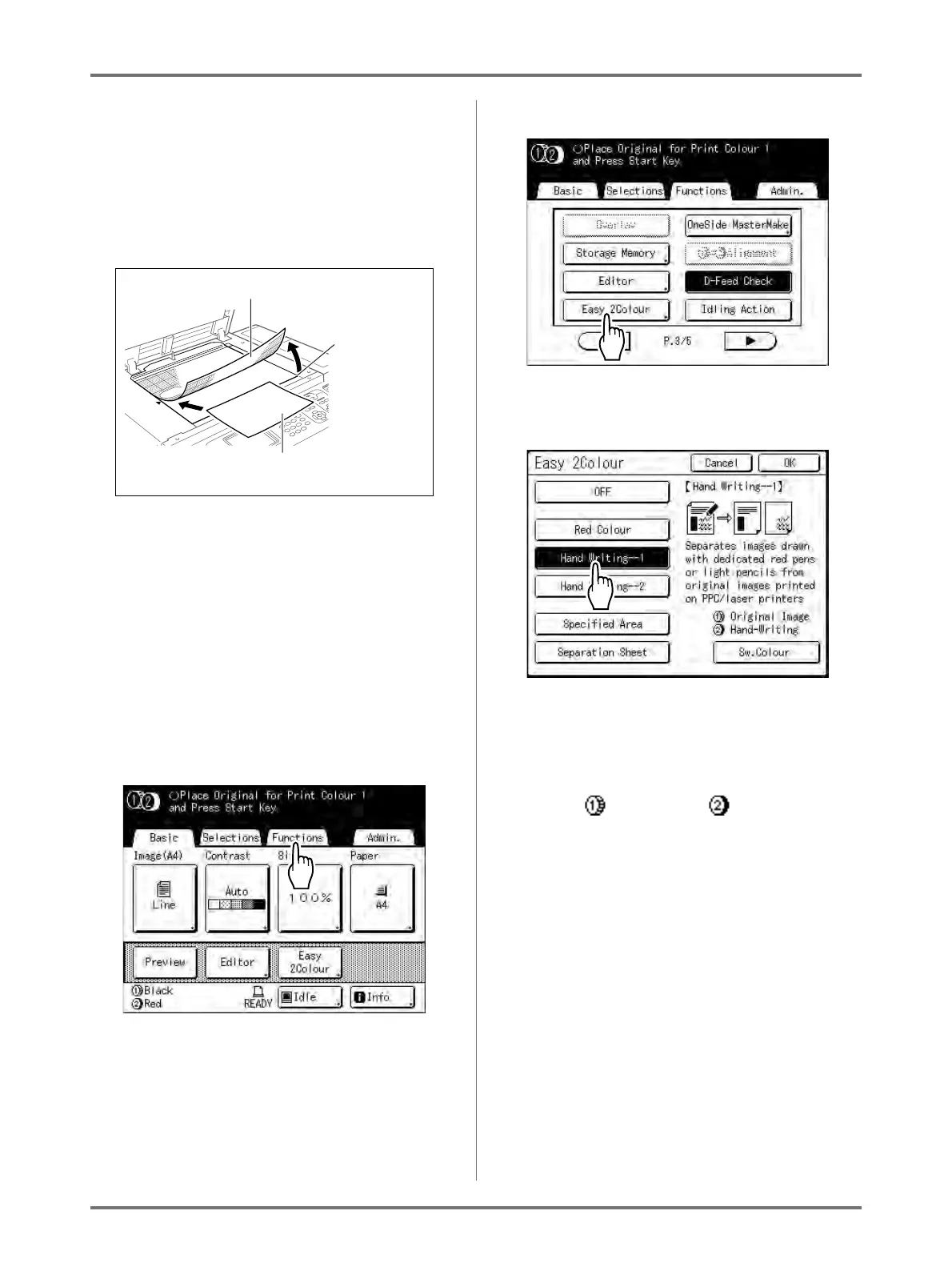
Select “Easy 2Colour”.
1) Touch [Functions].
The Functions screen appears.
2) Touch [Easy 2Colour].
The Easy 2Colour screen appears.
3) Touch the button of the separation to use.
Note:
• The part for which a master is being made
(either the “Original Image” portion or the
“Hand-Writing” portion) is displayed in the
lower right section of the screen at Drum 1
( ) and Drum 2 ( ).
Touch [Sw.Colour] to switch the colour
separations.
4) Touch [OK].
The Functions screen appears.
Gauge Cover
Grasp here
and lift up the
gauge cover
Place the original
face-down



 To Next Page