7.2
SEL-2032 Communications Processor Instruction Manual Date Code 20120126
Settings
Port Configuration (SET P) and Communication Settings
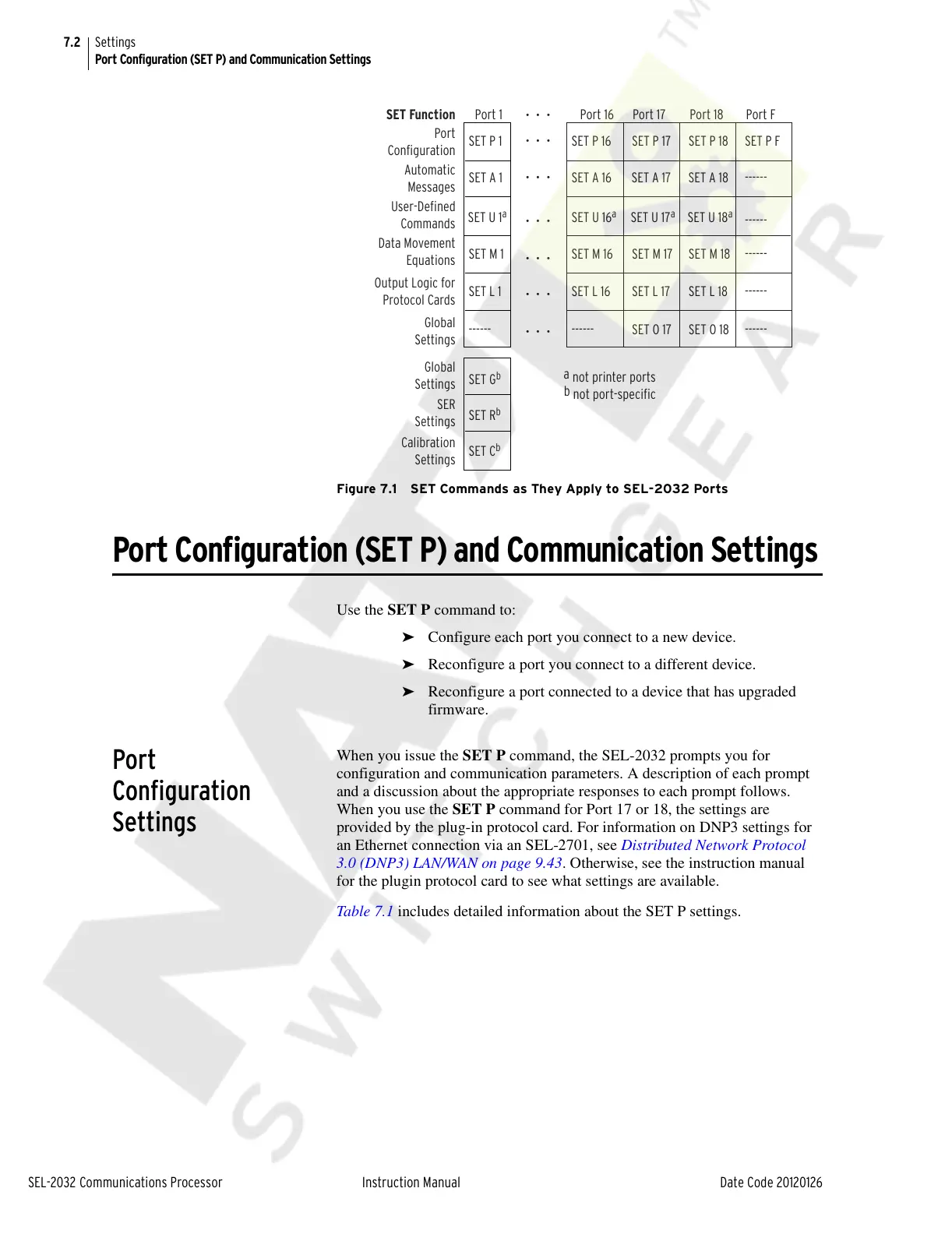
Figure 7.1 SET Commands as They Apply to SEL-2032 Ports
Port Configuration (SET P) and Communication Settings
Use the SET P command to:
➤ Configure each port you connect to a new device.
➤ Reconfigure a port you connect to a different device.
➤ Reconfigure a port connected to a device that has upgraded
firmware.
Port
Configuration
Settings
When you issue the SET P command, the SEL-2032 prompts you for
configuration and communication parameters. A description of each prompt
and a discussion about the appropriate responses to each prompt follows.
When you use the SET P command for Port 17 or 18, the settings are
provided by the plug-in protocol card. For information on DNP3 settings for
an Ethernet connection via an SEL-2701, see Distributed Network Protocol
3.0 (DNP3) LAN/WAN on page 9.43. Otherwise, see the instruction manual
for the plugin protocol card to see what settings are available.
Table 7.1 includes detailed information about the SET P settings.
SET P 16
SET A 16 SET A 17 SET A 18
SET U 16
a
SET U 17
a
SET U 18
a
SET M 16
SET L 16
------
SET P 1
Port 1 Port 16 Port 17 Port 18 Port F
SET A 1
SET U 1
a
SET G
b
SET Function
SET R
b
SET C
b
SET M 1
SET L 1
------
SET P 17
SET M 17
SET L 17
SET O 17
SET P 18
SET M 18
SET L 18
SET O 18
SET P F
------
------
------
------
------
• • •
• • •
• • •
• • •
• • •
• • •
• • •
Port
Configuration
Automatic
Messages
User-Defined
Commands
Data Movement
Equations
Output Logic for
Protocol Cards
Global
Settings
Global
Settings
SER
Settings
Calibration
Settings
a
not printer ports
b
not port-specific
Courtesy of NationalSwitchgear.com



 To Next Page